
SELECT-OPTIONS in ABAP: Complete Beginner Guide with Examples
Table of Contents
- • What is SELECT-OPTIONS?
- • Why Is It Needed?
- • Basic Syntax
- • Simple Example
- • Difference Between PARAMETERS and SELECT-OPTIONS
- • Structure Behind SELECT-OPTIONS
- ↳ 1. SIGN
- ↳ 2. OPTION
- ↳ 3. LOW
- ↳ 4. HIGH
- • Common Input Scenarios
- ↳ Single Value Selection
- ↳ Range Selection
- ↳ Excluding Values
- • Practical Database Query Example
- • Self-Assessment Checkpoint
- • Summary of Advantages
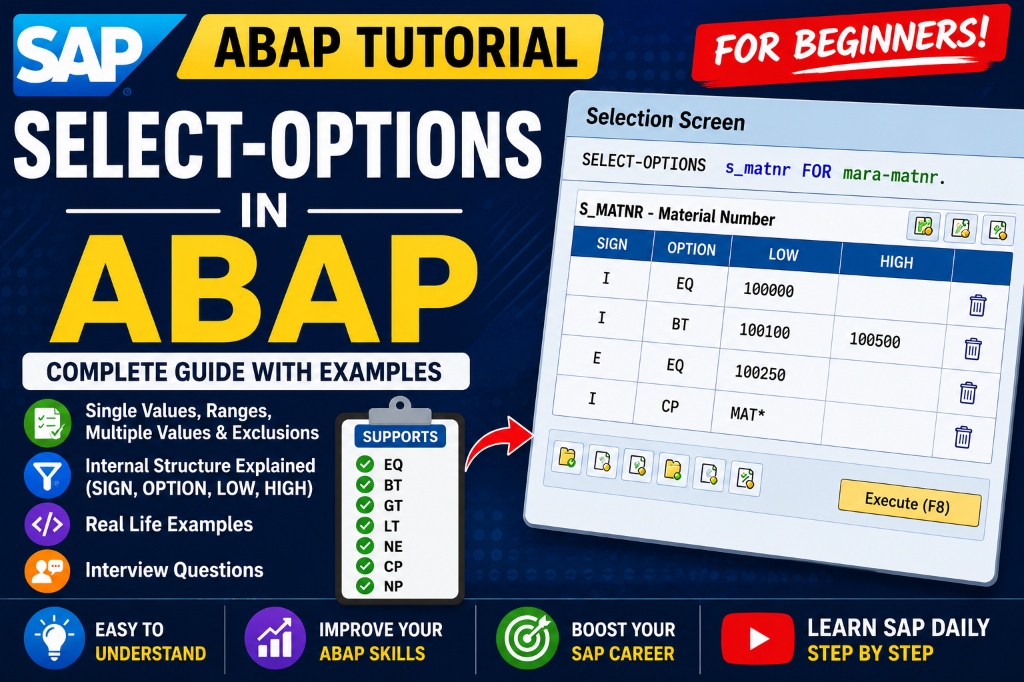
When starting your SAP development journey, you typically begin with variables, PARAMETERS statements, and basic reporting. Once you feel comfortable with those fundamentals, the logical next step is learning how to process multiple inputs or ranges of values on a selection screen. This is where SELECT-OPTIONS becomes essential.
In a real-world business system, users rarely search for just a single item. A finance analyst might need records for three different company codes, a purchasing coordinator might want inventory details for multiple material ranges, or an HR administrator could require data for a specific group of employee IDs. Entering these values one by one or running the same program repeatedly is highly inefficient.
ABAP provides SELECT-OPTIONS to resolve this challenge, letting developers create highly flexible selection fields directly inside their report programs.
What is SELECT-OPTIONS?
SELECT-OPTIONS generates a selection screen field that allows users to input multiple distinct values, intervals, exclusions, and wildcards.
Unlike the PARAMETERS statement, which restricts user input to a single value, SELECT-OPTIONS creates a complex input control that can store multiple search conditions.
This flexibility makes reports far more adaptable. Instead of requiring users to rerun a program multiple times for different input criteria, a single execution can process all conditions simultaneously.
Why Is It Needed?
Consider a purchasing manager who needs material data for the following specific IDs:
1000200030004000
If the program only used PARAMETERS, the manager would have to run the report four separate times. By implementing a range-based selection field, they can input all four numbers together and run it once. This significantly improves efficiency and delivers a cleaner user experience.
Basic Syntax
To declare a selection option, use the following syntax:
SELECT-OPTIONS: s_matnr FOR mara-matnr.Let’s break down the components:
SELECT-OPTIONS: The keyword declaring the input control.s_matnr: The name of the selection option variable (standard practice is to prefix withs_).FOR: The binding keyword connecting the input variable to a database table field.mara-matnr: The database table and field used to determine the data type and search help metadata.
ℹ️ Note: To reference database fields like
mara-matnrin your declaration, you must first declare the database table using theTABLESstatement at the top of your program:TABLES mara.
Simple Example
Here is a simple report demonstrating how to declare and execute a selection option program:
REPORT z_select_options_demo.

TABLES sscrfields. " System table for selection screen attributes

DATA: gv_num TYPE i.
SELECT-OPTIONS: s_num FOR gv_num.

START-OF-SELECTION.
  WRITE: / 'Program executed successfully.'.
When you execute this program, SAP GUI automatically generates a selection screen containing low and high value inputs, as well as a “Multiple Selection” button on the right to configure advanced filtering.
Difference Between PARAMETERS and SELECT-OPTIONS
Understanding the differences between these two input controls is a common interview topic for junior developers.
| Feature | PARAMETERS | SELECT-OPTIONS |
|---|---|---|
| Input Mode | Accepts only one value | Accepts single values, ranges, exclusions, and lists |
| Internal Type | Standard flat variable | Automatically created internal table (Selection Table) |
| SQL Operator | Queried using = or LIKE | Queried using the IN operator |
| Typical Use | Toggle options, radio buttons, single keys | Primary filter criteria (Material, Date range) |
Structure Behind SELECT-OPTIONS
When you declare a SELECT-OPTIONS field, ABAP automatically creates a special Selection Table with the same name. This selection table contains four key header fields:
SIGN | OPTION | LOW | HIGHEach row in the selection table represents a filter condition configured by the user.
1. SIGN
Determines whether the matching values should be included or excluded from the query results:
I(Include): Matches should be selected.E(Exclude): Matches should be ignored.
2. OPTION
Defines the comparison operator for the check:
EQ(Equal): Matches the exact low value.BT(Between): Matches any value in the interval fromLOWtoHIGH.GT(Greater Than): Values greater thanLOW.LT(Less Than): Values less thanLOW.NE(Not Equal): Excludes the exact low value.CP(Contains Pattern): Matches using wildcards (e.g.10*).
3. LOW
Stores the single value or the lower boundary of an interval.
4. HIGH
Stores the upper boundary of an interval (used when OPTION is BT).
Common Input Scenarios
Single Value Selection
The user enters a single value in the left-hand field:
- Selection Table Row:
SIGN = 'I',OPTION = 'EQ',LOW = '1001',HIGH = INITIAL.
Range Selection
The user enters values in both the low and high fields (e.g., 1000 to 2000):
- Selection Table Row:
SIGN = 'I',OPTION = 'BT',LOW = '1000',HIGH = '2000'.
Excluding Values
The user opens the multiple selections window and adds an exclusion for ID 1005:
- Selection Table Row:
SIGN = 'E',OPTION = 'EQ',LOW = '1005',HIGH = INITIAL.
Practical Database Query Example
To filter database queries using selection options, use the IN operator in your WHERE clause:
REPORT z_select_database_demo.

TABLES mara.

SELECT-OPTIONS: s_matnr FOR mara-matnr.

START-OF-SELECTION.
  SELECT matnr, mtart, matkl
    FROM mara
    INTO TABLE @DATA(lt_materials)
    WHERE matnr IN @s_matnr.

  IF sy-subrc = 0.
    LOOP AT lt_materials ASSIGNING FIELD-SYMBOL(<fs_material>).
      WRITE: / 'Material:', <fs_material>-matnr,
             'Type:', <fs_material>-mtart.
    ENDLOOP.
  ELSE.
    WRITE / 'No materials found matching criteria.'.
  ENDIF.
⚠️ Common Mistake: Beginners often use the
=operator (e.g.,WHERE matnr = s_matnr). This will cause a syntax error or runtime failure. You must always use theINoperator to evaluate a selection option table.
Self-Assessment Checkpoint
💡 **What fields are automatically created in the internal structure of a SELECT-OPTIONS table?**
A selection option automatically generates an internal table with four fields:
SIGN(valuesIorEfor Include/Exclude)OPTION(operators likeEQ,BT,NE,CP)LOW(lower bound or single value)HIGH(upper bound of an interval)
💡 **What database query operator must be used with SELECT-OPTIONS in the WHERE clause?**
You must use the IN operator (e.g., WHERE field IN @s_field). Using the = operator will fail because s_field is an internal table, not a single variable.
Summary of Advantages
- Flexible Filtering: Handles combinations of ranges, patterns, and exclusions without manual code logic.
- UX Standardization: Leverages the native, familiar SAP GUI selection screen controls.
- Automatic Validation: Inherits standard domain values and search help definitions from the database fields.
- Code Simplicity: The database engine automatically parses the selection table fields when queried with
IN.
Mastering the use of selection screens is a vital step toward developing production-ready reports, building custom ALV tables, and designing performant data queries.

Written by Daksh Dedha
SAP Technical ConsultantDaksh is an SAP Technical Consultant specializing in ABAP programming, SAP S/4HANA migrations, Fiori development, and BTP cloud architecture. He authors free, hands-on tutorials to make enterprise SAP education accessible to all developers.
Test Your Knowledge
Loading question...
Quiz Completed
Related Tutorials
SAP ABAP Enhancement Framework — User Exits, BADIs, and Enhancement Points
Master SAP ABAP enhancements. Learn User Exits, Customer Exits, BADIs, Enhancement Points, and Implicit/Explicit Enhancement Spots to modify standard SAP without modifying source code.
ABAP ProgrammingABAP CDS Views — Core Data Services Complete Guide for Beginners
Learn ABAP CDS Views from scratch. Understand how to create CDS views in Eclipse ADT, use annotations, associations, parameters, and build OData services with CDS.
ABAP ProgrammingMessage Handling in SAP ABAP — Complete SE91 Message Classes Guide
Master SAP ABAP message handling. Learn how to create message classes in transaction SE91, use the MESSAGE statement, handle error types A E W I S X, and pass placeholders.
Found this tutorial useful? Share it with your SAP development team.