
DO Loop in ABAP: A Beginner's Guide with Examples
Table of Contents
- • What is a DO Loop in ABAP?
- • Why Do We Need a DO Loop?
- ↳ Simple Loop Code in ABAP Editor:
- • Basic Syntax
- • Understanding the SY-INDEX System Variable
- • Generating Sequential Employee IDs
- • Performing Calculations with a DO Loop
- ↳ Sum Loop Code inside ABAP Editor:
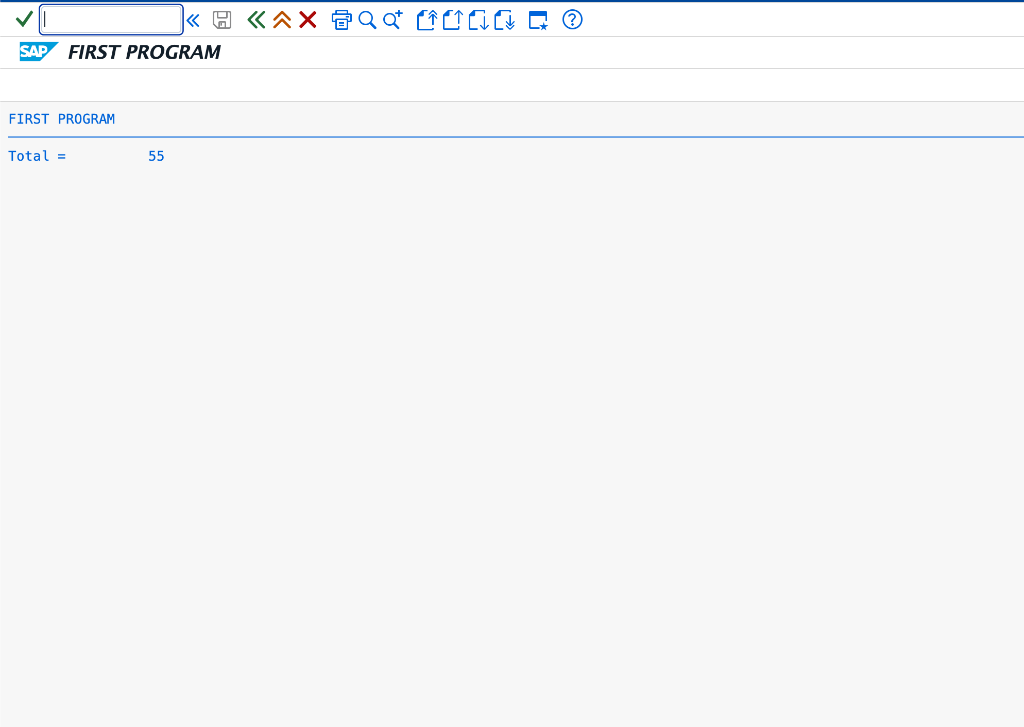
- ↳ Program Execution Output:
- • Controlling Loop Execution (EXIT, CONTINUE, CHECK)
- ↳ 1. The EXIT Statement
- ↳ 2. The CONTINUE Statement
- ↳ 3. The CHECK Statement
- • Nested DO Loops
- • Difference Between DO Loop and WHILE Loop
- • Self-Assessment Checkpoint
- • Common Mistakes to Avoid
When developing application logic in SAP ABAP, you will frequently need to execute a specific block of code multiple times. Writing the same statements repeatedly would make your program unnecessarily long, difficult to read, and complex to update.
To solve this problem, ABAP offers looping structures. The DO loop is one of the most fundamental loop controls, enabling you to repeat operations a fixed number of times.
Loops are a critical part of SAP database reporting, batch data transfers, mathematical calculations, and business validations. In this guide, we will break down the DO loop with practical examples.
What is a DO Loop in ABAP?
A DO loop is an unconditional loop structure that repeats a block of code a specified number of times.
The block of code starts with the DO statement and ends with the ENDDO keyword. The system repeats everything contained between these two boundaries until the specified iteration count is reached or a loop control statement terminates it.
Why Do We Need a DO Loop?
Imagine you need to print a developer message five times on a report list:
Without a loop, you would write:
WRITE / 'Welcome to SAP ABAP Academy'.
WRITE / 'Welcome to SAP ABAP Academy'.
WRITE / 'Welcome to SAP ABAP Academy'.
WRITE / 'Welcome to SAP ABAP Academy'.
WRITE / 'Welcome to SAP ABAP Academy'.
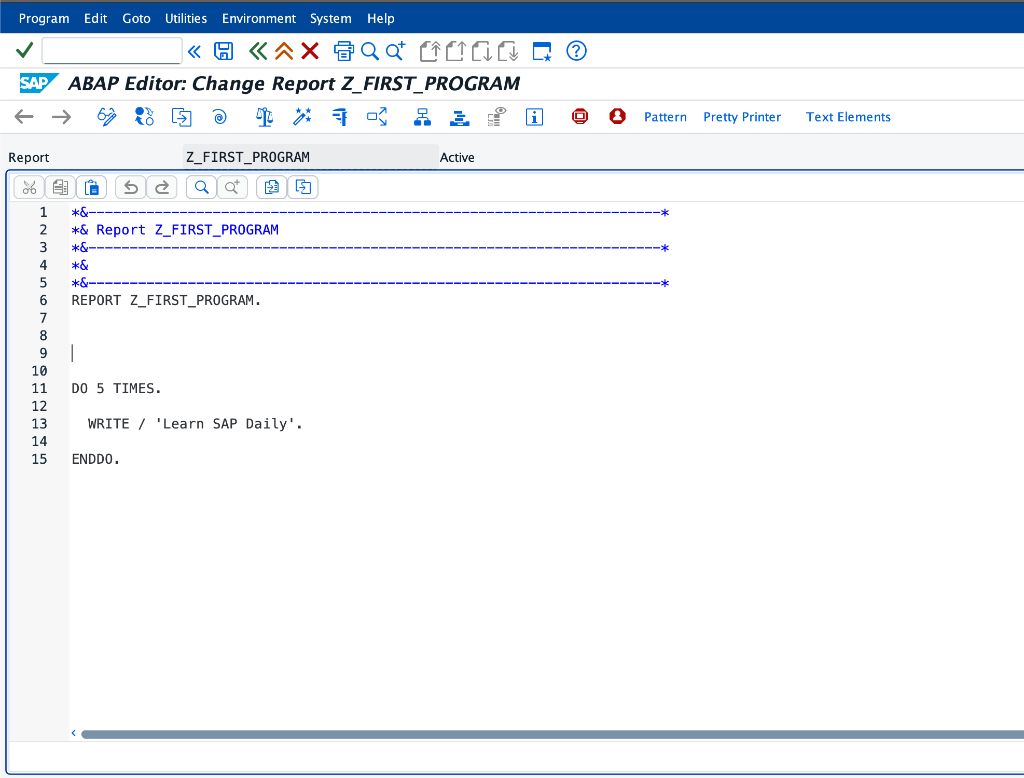
This works, but it scales poorly. If you needed to repeat this a hundred times, it would become unmanageable. By wrapping it in a DO loop, you achieve the same output with cleaner code:
DO 5 TIMES.
  WRITE / 'Welcome to SAP ABAP Academy'.
ENDDO.
Simple Loop Code in ABAP Editor:
Basic Syntax
The syntax for a standard DO loop is:
DO n TIMES.
  " Statements to be executed
ENDDO.
DO n TIMES: Initiates the loop, wherenis a number, variable, or expression indicating the iteration count.ENDDO: Closes the loop block.
Understanding the SY-INDEX System Variable
During loop execution, the SAP system maintains a special system field named SY-INDEX. This system variable stores the index of the current loop iteration. It starts at 1 for the first run and increments by 1 with each repeat.
Let’s look at an example showing SY-INDEX in action:
REPORT z_do_index_demo.

DO 5 TIMES.
  WRITE / sy-index.
ENDDO.
Output:
1
2
3
4
5
This indexing is extremely useful for generating lists of sequential ID numbers, processing internal arrays, or running mathematical calculations.
Generating Sequential Employee IDs
Here is an example demonstrating how to use SY-INDEX to generate dummy employee numbers:
REPORT z_employee_id_generator.

DATA lv_emp_id TYPE i.

DO 5 TIMES.
  lv_emp_id = 1000 + sy-index.
  WRITE: / 'Generated Employee ID:', lv_emp_id.
ENDDO.
Output:
Generated Employee ID: 1001
Generated Employee ID: 1002
Generated Employee ID: 1003
Generated Employee ID: 1004
Generated Employee ID: 1005
Performing Calculations with a DO Loop
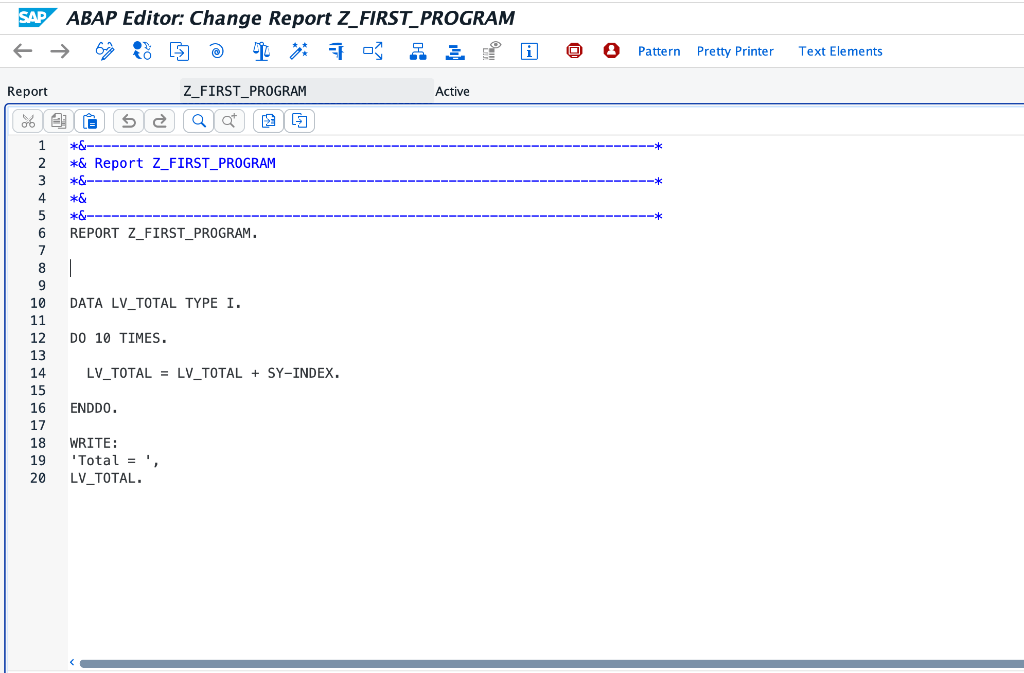
Loops are frequently used to compute running totals and process numeric arrays. Here is a practical example showing how to sum numbers from 1 to 10:
REPORT z_sum_demo.

DATA lv_total TYPE i.

DO 10 TIMES.
  lv_total = lv_total + sy-index.
ENDDO.

WRITE: 'Total = ', lv_total.
Sum Loop Code inside ABAP Editor:
Program Execution Output:
Controlling Loop Execution (EXIT, CONTINUE, CHECK)
You can alter the flow of a DO loop using three control keywords:
1. The EXIT Statement
The EXIT statement terminates the entire loop execution instantly. The program stops iterating and jumps to the code following ENDDO.
DO 10 TIMES.
  IF sy-index = 5.
    EXIT.
  ENDIF.
  WRITE / sy-index.
ENDDO.
Output:
1
2
3
4
(The loop exits as soon as index reaches 5).
2. The CONTINUE Statement
The CONTINUE statement terminates the current loop iteration immediately. It ignores any remaining lines of code in the current iteration and starts the next iteration at the top of the loop.
DO 5 TIMES.
  IF sy-index = 3.
    CONTINUE.
  ENDIF.
  WRITE / sy-index.
ENDDO.
Output:
1
2
4
5
(The value 3 is skipped).
3. The CHECK Statement
The CHECK statement evaluates a logical condition. If the condition is true, the loop continues. If the condition is false, the loop skips the remaining statements in the current iteration (equivalent to CONTINUE).
DO 6 TIMES.
  CHECK sy-index MOD 2 = 0.
  WRITE / sy-index.
ENDDO.
Output:
2
4
6
(Only even iteration indexes are printed).
Nested DO Loops
You can write loops inside other loops (nested loops) to process multi-dimensional data grids. The system maintains separate SY-INDEX values for the outer and inner loops.
REPORT z_nested_loops_demo.

DO 3 TIMES.
  WRITE: / 'Outer Loop Iteration:', sy-index.
  DO 2 TIMES.
    WRITE: / '  Inner Loop Iteration:', sy-index.
  ENDDO.
ENDDO.
Output:
Outer Loop Iteration: 1
  Inner Loop Iteration: 1
  Inner Loop Iteration: 2
Outer Loop Iteration: 2
  Inner Loop Iteration: 1
  Inner Loop Iteration: 2
Outer Loop Iteration: 3
  Inner Loop Iteration: 1
  Inner Loop Iteration: 2
Difference Between DO Loop and WHILE Loop
Understanding loop differences helps you choose the right execution syntax:
- DO Loop (Conditional on iteration count): Executes a fixed, predetermined number of times. Use this when you know exactly how many loops are required.
- WHILE Loop (Conditional on expression): Runs repeatedly as long as a logical condition remains true. Use this when the number of loops depends on external states or changing variable values.
Self-Assessment Checkpoint
💡 **What is the initial value of SY-INDEX when a DO loop starts executing?**
The system variable SY-INDEX starts at 1 on the first iteration of the loop, not 0. It increments by 1 with each consecutive pass.
💡 **What happens if you define a DO statement without specifying the TIMES parameter?**
A DO statement without TIMES creates an Infinite Loop. It will run forever unless it encounters an EXIT or REJECT statement inside the loop body to terminate execution.
Common Mistakes to Avoid
- Accidental Infinite Loops: Forgetting to include an
EXITcondition inside an unconditionalDOloop will lock program execution and lead to runtime timeouts. - Forgetting ENDDO: Omitting the closing
ENDDOstatement will prevent your program from compiling. - Over-Nesting: Writing deep hierarchies of nested loops (three or more levels) can degrade system performance and make your code difficult to follow.

Written by Daksh Dedha
SAP Technical ConsultantDaksh is an SAP Technical Consultant specializing in ABAP programming, SAP S/4HANA migrations, Fiori development, and BTP cloud architecture. He authors free, hands-on tutorials to make enterprise SAP education accessible to all developers.
Test Your Knowledge
Loading question...
Quiz Completed
Related Tutorials
SAP ABAP Enhancement Framework — User Exits, BADIs, and Enhancement Points
Master SAP ABAP enhancements. Learn User Exits, Customer Exits, BADIs, Enhancement Points, and Implicit/Explicit Enhancement Spots to modify standard SAP without modifying source code.
ABAP ProgrammingABAP CDS Views — Core Data Services Complete Guide for Beginners
Learn ABAP CDS Views from scratch. Understand how to create CDS views in Eclipse ADT, use annotations, associations, parameters, and build OData services with CDS.
ABAP ProgrammingMessage Handling in SAP ABAP — Complete SE91 Message Classes Guide
Master SAP ABAP message handling. Learn how to create message classes in transaction SE91, use the MESSAGE statement, handle error types A E W I S X, and pass placeholders.
Found this tutorial useful? Share it with your SAP development team.