
LOOP AT Internal Table in ABAP: A Complete Beginner Guide with Examples
Table of Contents
- • What is an Internal Table?
- • What is LOOP AT Internal Table?
- • Why Do We Need LOOP AT?
- • Basic Syntax
- • Creating and Populating an Internal Table
- ↳ 1. Declaring the Structure and Table
- ↳ 2. Adding Data to the Table
- • First LOOP AT Example
- ↳ Complete Standalone Program:
- • Real-Time SAP GUI Program Example
- ↳ 1. Data Declarations inside the ABAP Editor
- ↳ 2. SAP GUI Selection Screen Input
- ↳ 3. LOOP AT and WRITE Implementation
- ↳ 4. Program Execution Output
- • Understanding SY-TABIX
- • LOOP AT with WHERE Condition
- • LOOP AT ASSIGNING FIELD-SYMBOL
- • Modifying Records Inside a LOOP
- ↳ Method 1: Using Work Area (Requires MODIFY)
- ↳ Method 2: Using Field Symbol (Automatic)
- • Controlling Loop Iterations (CHECK, CONTINUE, EXIT)
- ↳ 1. The CHECK Statement
- ↳ 2. The CONTINUE Statement
- ↳ 3. The EXIT Statement
- • Nested LOOP AT
- • LOOP AT vs. DO and WHILE Loops
- ↳ DO Loop
- ↳ WHILE Loop
- ↳ LOOP AT
- • Self-Assessment Checkpoints
- • Common Beginner Mistakes
- • Interview Practice Questions
- • Career Perspective
- • Summary
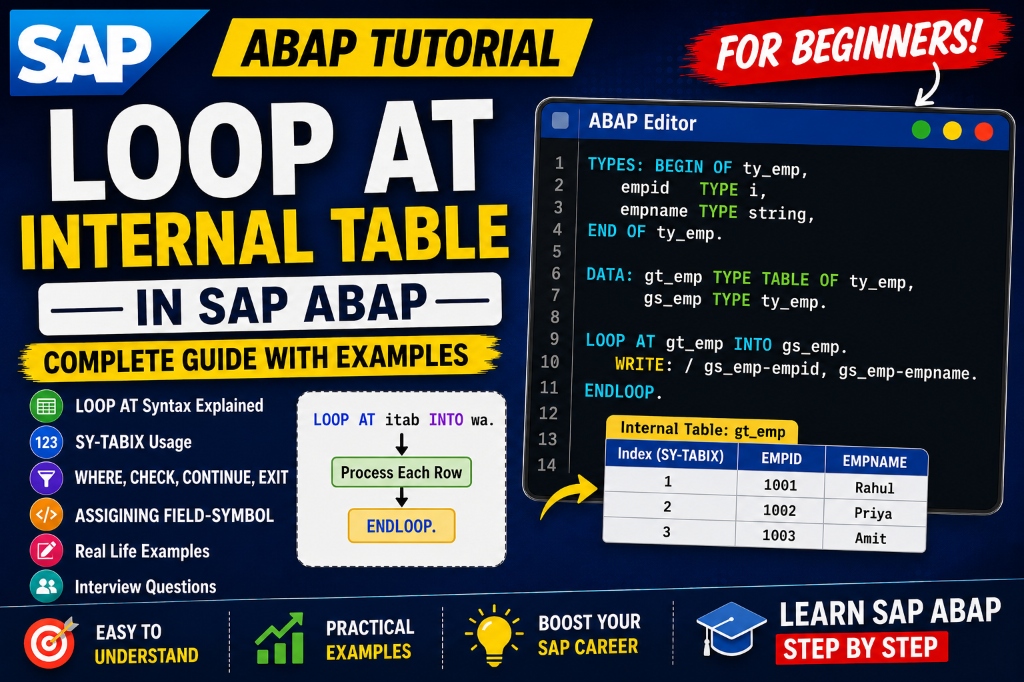
When you work with SAP ABAP, you need to learn about Internal Tables. Internal Tables help store records in memory and process lots of data quickly. Storing data is only part of the job. The real power comes when you start reading, displaying, changing, and processing those records.
This is where the LOOP AT Internal Table statement becomes really useful.
The LOOP AT statement helps you access records in an Internal Table one by one. It is one of the most frequently used statements in SAP ABAP development and is found in almost every real-world program.
Whether you are learning SAP ABAP, preparing for SAP ABAP certification, practicing SAP ABAP interview questions, or taking an ABAP programming course, understanding LOOP AT is key.
In this guide, we will cover everything about LOOP AT in simple terms with practical examples.
What is an Internal Table?
An Internal Table is a temporary table that exists in the application server’s memory only while an ABAP program is running. It stores rows of data structured by columns, similar to a database table.
Think of it like a spreadsheet:
| Employee ID | Employee Name |
|---|---|
| 1001 | Rahul |
| 1002 | Priya |
| 1003 | Amit |
What is LOOP AT Internal Table?
LOOP AT is a control statement that reads records from an Internal Table one by one, copying each row into a workspace variable (Work Area) or pointing to it with a Field Symbol.
Instead of accessing every row manually, the system automatically loops through all records sequentially.
The loop starts with:
LOOP AT it_table INTO wa_table.And ends with:
ENDLOOP.Why Do We Need LOOP AT?
Imagine an Internal Table containing 500 employee records. Without LOOP AT, reading or updating every record manually would require writing 500 lines of indexing code, which is impossible.
LOOP AT helps you:
- Display data systematically
- Process and validate records
- Calculate aggregate values
- Modify table entries on the fly
- Generate business reports
Basic Syntax
The syntax for a basic loop is straightforward:
LOOP AT it_table INTO wa_table.
  " Statements to process the work area
ENDLOOP.it_table: The internal table containing your dataset.wa_table: The work area structure matching the table line type.Statements: The block of code executed on each row.
Creating and Populating an Internal Table
Before we run a loop, we need to create a table and add some sample records.
1. Declaring the Structure and Table
TYPES: BEGIN OF ty_employee,
         emp_id   TYPE i,
         emp_name TYPE string,
       END OF ty_employee.

DATA: gt_employee TYPE TABLE OF ty_employee,
      gs_employee TYPE ty_employee.
2. Adding Data to the Table
gs_employee-emp_id = 1001.
gs_employee-emp_name = 'Rahul'.
APPEND gs_employee TO gt_employee.

gs_employee-emp_id = 1002.
gs_employee-emp_name = 'Priya'.
APPEND gs_employee TO gt_employee.

gs_employee-emp_id = 1003.
gs_employee-emp_name = 'Amit'.
APPEND gs_employee TO gt_employee.
First LOOP AT Example
Now, let’s write a simple loop to output the names of our employees:
LOOP AT gt_employee INTO gs_employee.
  WRITE: / gs_employee-emp_id, gs_employee-emp_name.
ENDLOOP.
Complete Standalone Program:
REPORT z_loop_at.

TYPES: BEGIN OF ty_employee,
         emp_id   TYPE i,
         emp_name TYPE string,
       END OF ty_employee.

DATA: gt_employee TYPE TABLE OF ty_employee,
      gs_employee TYPE ty_employee.

" Populate Table
gs_employee-emp_id = 1001.
gs_employee-emp_name = 'Rahul'.
APPEND gs_employee TO gt_employee.

gs_employee-emp_id = 1002.
gs_employee-emp_name = 'Priya'.
APPEND gs_employee TO gt_employee.

gs_employee-emp_id = 1003.
gs_employee-emp_name = 'Amit'.
APPEND gs_employee TO gt_employee.

" Execute Loop
LOOP AT gt_employee INTO gs_employee.
  WRITE: / gs_employee-emp_id, gs_employee-emp_name.
ENDLOOP.
Output:
1001 Rahul
1002 Priya
1003 Amit
Real-Time SAP GUI Program Example
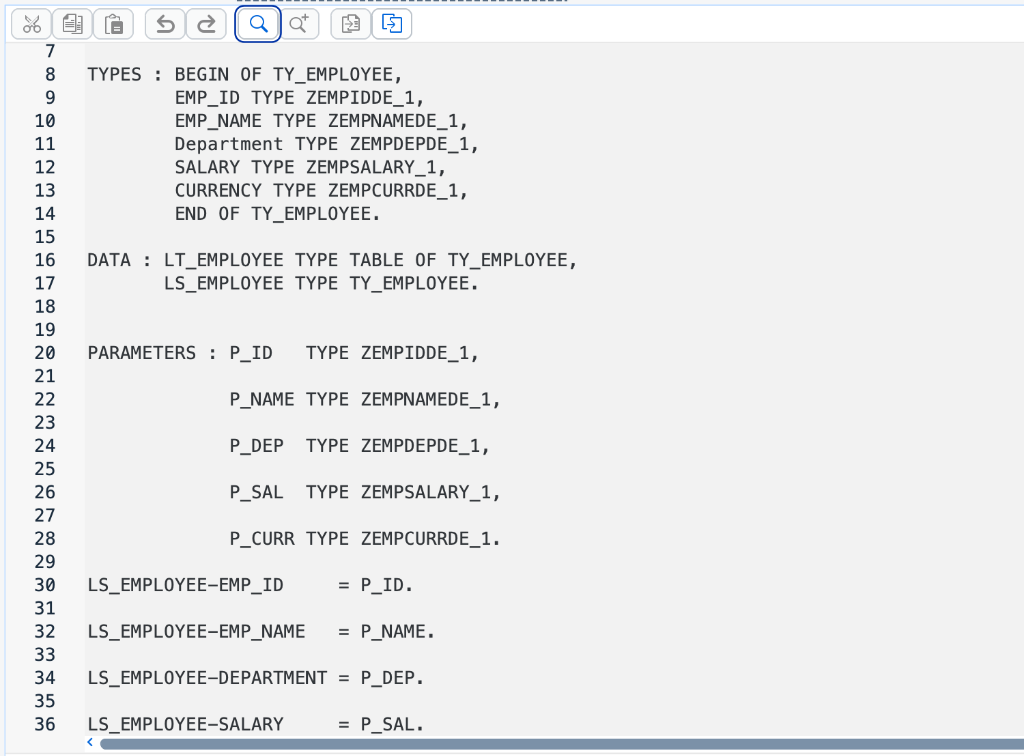
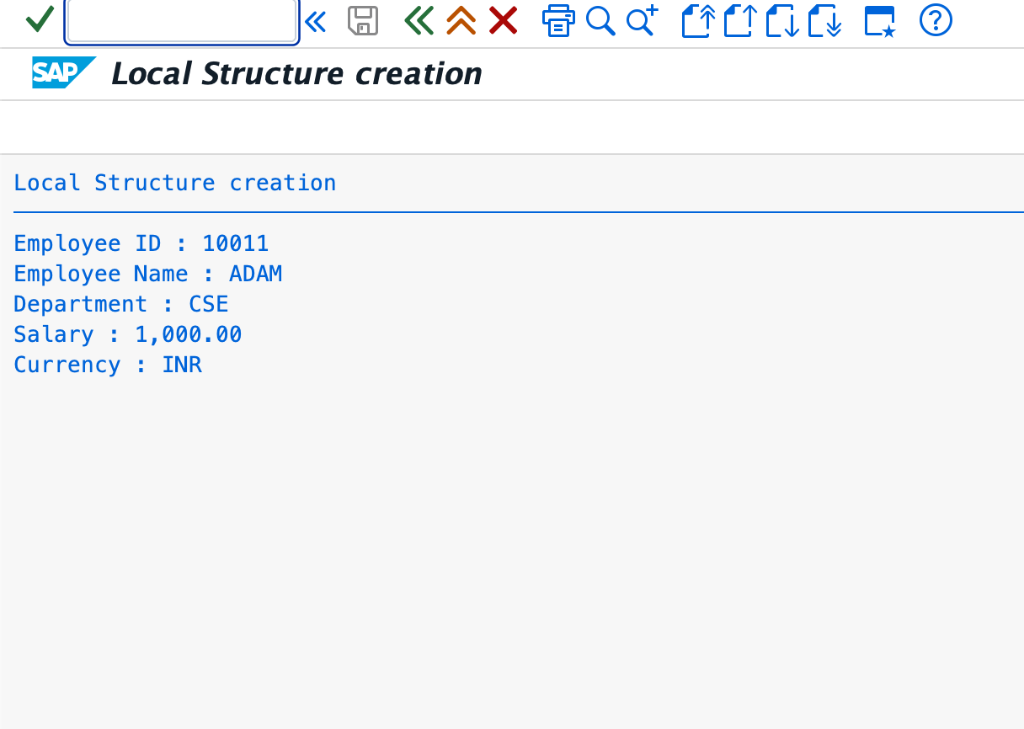
Let’s look at a real-world SAP GUI program that declares employee components (ID, Name, Department, Salary, and Currency) using custom dictionary data elements, binds inputs to PARAMETERS, and loops through the internal table to display values.
1. Data Declarations inside the ABAP Editor
Here, we define our structure TY_EMPLOYEE, internal table LT_EMPLOYEE, and work area LS_EMPLOYEE. We also create the selection screen parameters:
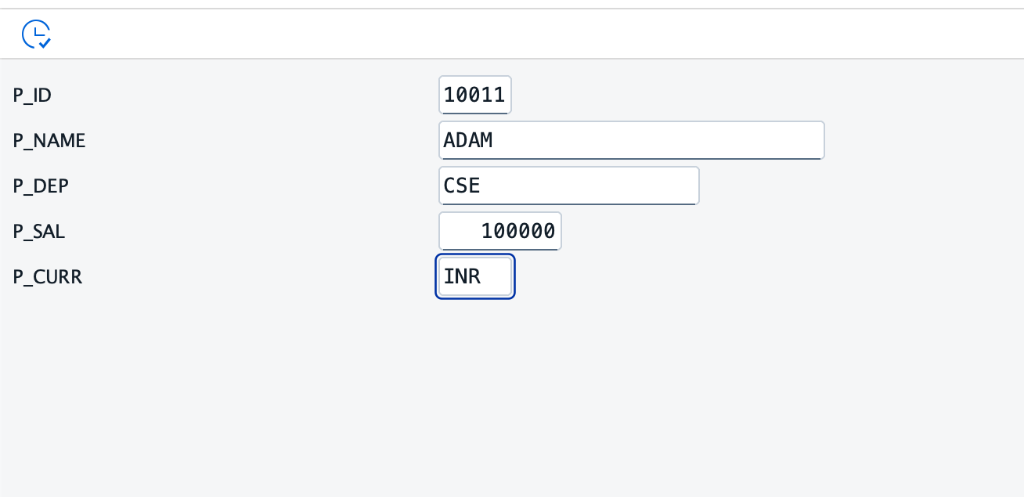
2. SAP GUI Selection Screen Input
When the program is executed, the user enters the employee details on this selection screen:
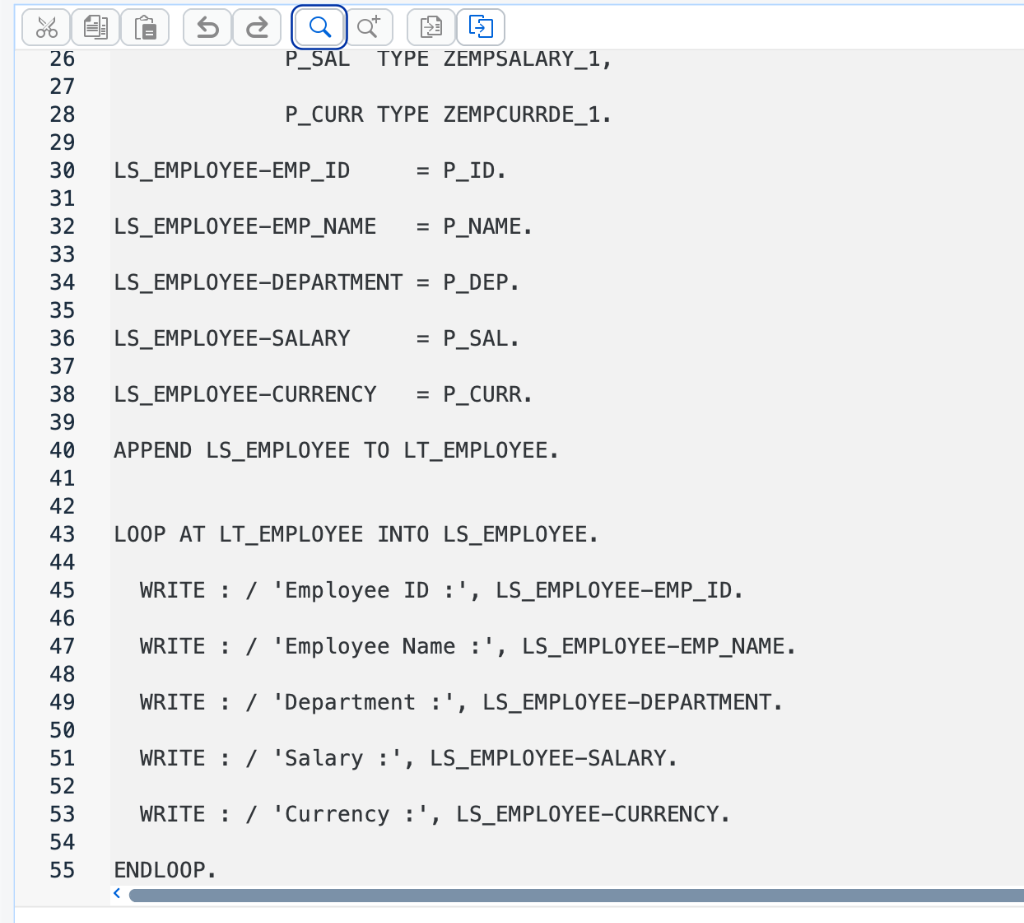
3. LOOP AT and WRITE Implementation
Once the input is appended to the internal table, we loop over LT_EMPLOYEE to output each field:
4. Program Execution Output
The final report displays the formatted employee card from memory:
Understanding SY-TABIX
During loop execution, the system variable SY-TABIX acts as an automatic counter. It stores the index (row number) of the row currently being processed.
LOOP AT gt_employee INTO gs_employee.
  WRITE: / 'Row Number:', sy-tabix, ' - Name:', gs_employee-emp_name.
ENDLOOP.
Output:
Row Number: 1  - Name: Rahul
Row Number: 2  - Name: Priya
Row Number: 3  - Name: Amit
LOOP AT with WHERE Condition
You can filter internal table records using a WHERE condition. This restricts loop iterations to only the rows that match your criteria, which increases performance.
" Loop only for Priya's record
LOOP AT gt_employee INTO gs_employee WHERE emp_name = 'Priya'.
  WRITE: / gs_employee-emp_id, gs_employee-emp_name.
ENDLOOP.
LOOP AT ASSIGNING FIELD-SYMBOL
When you loop INTO a Work Area, ABAP copies data from the table line to the structure memory block. For large tables with many columns, this copying overhead degrades performance.
To prevent copying overhead, you can loop using Field Symbols. Think of a Field Symbol as a pointer that points directly to the row in table memory:
FIELD-SYMBOLS <fs_employee> TYPE ty_employee.

LOOP AT gt_employee ASSIGNING <fs_employee>.
  WRITE: / <fs_employee>-emp_id, <fs_employee>-emp_name.
ENDLOOP.
[!TIP] Always use
ASSIGNING <field-symbol>instead ofINTO work_areafor performance-sensitive loops or when handling large internal tables.
Modifying Records Inside a LOOP
If you want to update fields of internal table records, you can do so inside the loop. The method depends on whether you are using a Work Area or a Field Symbol:
Method 1: Using Work Area (Requires MODIFY)
Modifying the fields of gs_employee does not automatically update the internal table. You must call the MODIFY statement:
LOOP AT gt_employee INTO gs_employee.
  IF gs_employee-emp_id = 1001.
    gs_employee-emp_name = 'Rahul Kumar'.
    " Write the work area changes back to the current table index
    MODIFY gt_employee FROM gs_employee INDEX sy-tabix.
  ENDIF.
ENDLOOP.
Method 2: Using Field Symbol (Automatic)
Since a Field Symbol points directly to the table row memory, any change to its fields updates the internal table instantly without needing a MODIFY statement:
LOOP AT gt_employee ASSIGNING <fs_employee>.
  IF <fs_employee>-emp_id = 1001.
    <fs_employee>-emp_name = 'Rahul Kumar'. " Table is updated immediately!
  ENDIF.
ENDLOOP.
Controlling Loop Iterations (CHECK, CONTINUE, EXIT)
ABAP provides three control keywords to alter the execution path of loops:
1. The CHECK Statement
The CHECK statement evaluates a logical condition. If true, the loop continues. If false, it skips the rest of the statements in the current iteration and proceeds to the next row (acting like a conditional jump).
LOOP AT gt_employee INTO gs_employee.
  CHECK gs_employee-emp_id >= 1002.
  WRITE: / gs_employee-emp_name.
ENDLOOP.
(Only prints ‘Priya’ and ‘Amit’ since ID 1001 fails the check)
2. The CONTINUE Statement
The CONTINUE statement terminates the current loop pass immediately and jumps back to the top of the loop to process the next row.
LOOP AT gt_employee INTO gs_employee.
  IF gs_employee-emp_name = 'Priya'.
    CONTINUE.
  ENDIF.
  WRITE: / gs_employee-emp_name.
ENDLOOP.
(Prints ‘Rahul’ and ‘Amit’, skipping ‘Priya’)
3. The EXIT Statement
The EXIT statement terminates the entire loop execution instantly. The program stops iterating and jumps to the code block below ENDLOOP.
LOOP AT gt_employee INTO gs_employee.
  IF gs_employee-emp_id = 1002.
    EXIT.
  ENDIF.
  WRITE: / gs_employee-emp_name.
ENDLOOP.
(Prints only ‘Rahul’ and exits as soon as ID 1002 is reached)
Nested LOOP AT
A loop written inside another loop is called a Nested Loop. It is commonly used to process header-item data structures (like Sales Order headers and Sales Order items).
LOOP AT gt_header INTO gs_header.
  WRITE: / 'Sales Order:', gs_header-order_id.

  LOOP AT gt_items INTO gs_items WHERE order_id = gs_header-order_id.
    WRITE: / '  Item:', gs_items-item_id, 'Material:', gs_items-matnr.
  ENDLOOP.
ENDLOOP.
[!WARNING] Nested loops over large tables can severely degrade application performance. In standard reports, prefer using
SORTandREAD TABLE with BINARY SEARCHor Parallel Cursor methods instead of plain nested loops.
LOOP AT vs. DO and WHILE Loops
Choosing the correct loop structure ensures cleaner, faster code:
DO Loop
A DO loop repeats a code block a fixed number of times using the TIMES addition, or runs infinitely if unconditional.
DO 5 TIMES.
  WRITE: / sy-index.
ENDDO.
WHILE Loop
A WHILE loop repeats code dynamically as long as a specified logical condition remains true.
WHILE lv_num <= 10.
  WRITE: / lv_num.
  lv_num = lv_num + 1.
ENDWHILE.
LOOP AT
A LOOP AT loop is dedicated exclusively to processing the structured rows of an internal table sequentially.
LOOP AT gt_employee INTO gs_employee.
  WRITE: / gs_employee-emp_name.
ENDLOOP.
Self-Assessment Checkpoints
💡 **What is the initial value of SY-TABIX inside a LOOP AT statement?**
Inside the loop, SY-TABIX contains the index number of the row currently being processed (starting at 1 for the first record, 2 for the second, and so on). Once the loop finishes and control exits the ENDLOOP block, SY-TABIX is reset to its pre-loop state (usually 0).
💡 **Why did my table modify fail inside a LOOP AT...INTO loop?**
Updating structure fields of your Work Area variable (e.g., gs_employee-emp_name = 'New') only changes the variable in memory. You must call MODIFY gt_employee FROM gs_employee INDEX sy-tabix. to save the modifications back into the actual internal table.
Common Beginner Mistakes
- Forgetting ENDLOOP: Omitting the closing
ENDLOOPstatement causes a syntax error. - Using the Wrong Work Area: Modifying variables in the wrong work area causes logic errors or compilation failures.
- Modifying Table Rows Without
INDEX: UsingMODIFYinside a loop without specifying the row index (INDEX sy-tabix) can result in updating the wrong rows or compiler warnings. - Modifying the Loop Table Key: Be careful when modifying table key fields inside a loop. If you are looping over a sorted table and modify its key, it can corrupt the table order.
Interview Practice Questions
- What is the purpose of LOOP AT in ABAP?
- Answer: It reads and processes rows of an internal table sequentially, one by one.
- What does the system variable SY-TABIX store during a LOOP AT execution?
- Answer: It stores the numeric index (row number) of the table line currently being processed.
- Why is using FIELD-SYMBOLS in a loop faster than using a Work Area?
- Answer: Field Symbols point directly to the table row memory (by reference), avoiding the overhead of copying row contents into a work area structure (by value).
- How do you modify a table row inside a LOOP AT…INTO loop?
- Answer: By modifying the work area field values and then executing
MODIFY tablename FROM work_area INDEX sy-tabix.
- Answer: By modifying the work area field values and then executing
Career Perspective
Understanding internal tables and the LOOP AT statement is key for securing SAP ABAP developer jobs. These concepts are used in:
- Standard and ALV Report development
- SAP ABAP on HANA optimizations (reducing loop overheads)
- SAP ABAP RAP and CAP application processing
- Data migration scripts and business APIs (BAPIs/RFCs)
Developing clean, performant loops is a key skill that distinguishes beginner programmers from experienced SAP consultants.
Summary
The LOOP AT statement is a fundamental block of SAP ABAP programming. It allows you to process internal table records sequentially and efficiently. By combining LOOP AT with WHERE clauses, Field Symbols, and control statements (EXIT, CONTINUE, CHECK), you can develop robust business applications capable of handling large volumes of transaction data.

Written by Daksh Dedha
SAP Technical ConsultantDaksh is an SAP Technical Consultant specializing in ABAP programming, SAP S/4HANA migrations, Fiori development, and BTP cloud architecture. He authors free, hands-on tutorials to make enterprise SAP education accessible to all developers.
Test Your Knowledge
Loading question...
Quiz Completed
Related Tutorials
SAP ABAP Enhancement Framework — User Exits, BADIs, and Enhancement Points
Master SAP ABAP enhancements. Learn User Exits, Customer Exits, BADIs, Enhancement Points, and Implicit/Explicit Enhancement Spots to modify standard SAP without modifying source code.
ABAP ProgrammingABAP CDS Views — Core Data Services Complete Guide for Beginners
Learn ABAP CDS Views from scratch. Understand how to create CDS views in Eclipse ADT, use annotations, associations, parameters, and build OData services with CDS.
ABAP ProgrammingMessage Handling in SAP ABAP — Complete SE91 Message Classes Guide
Master SAP ABAP message handling. Learn how to create message classes in transaction SE91, use the MESSAGE statement, handle error types A E W I S X, and pass placeholders.
Found this tutorial useful? Share it with your SAP development team.