
SAP BTP (Business Technology Platform) Explained — What It Is and Why It Matters
Table of Contents
- • SAP BTP Full Form and the One-Line Explanation
- • Why Did SAP Build BTP? — The Real Reason
- • What’s Actually Inside SAP BTP — The Four Pillars
- ↳ Interactive Pillars Explorer
- ↳ Pillar 1 — Database and Data Management
- ↳ Pillar 2 — Analytics and Planning
- ↳ Pillar 3 — Application Development and Automation
- ↳ Pillar 4 — Integration
- • SAP BTP Architecture — How It All Fits Together
- ↳ Global Account → Subaccounts → Spaces
- ↳ Environments in BTP
- ↳ Service Marketplace
- • SAP BTP Free Tier — What You Actually Get for Free
- ↳ Free tier includes:
- ↳ How to get it:
- • Real World Use Cases — What Companies Actually Build on BTP
- • SAP BTP Career Scope in 2026 — Who Should Learn What
- • How to Start Learning SAP BTP — Free Path
- • Final Thoughts — Why BTP Is the Skill That Separates Good SAP Professionals from Great Ones
- • Self-Assessment Checkpoint
 Figure 1: SAP BTP acts as the unified cloud extension, integration, and innovation platform for modern enterprise architectures.
Okay let me tell you something funny.
Six months ago I was in a conversation with a senior SAP architect and he casually dropped “BTP” about fifteen times in twenty minutes. Every second sentence — “deploy it on BTP”, “connect via BTP Integration Suite”, “build that extension on BTP.”
I nodded along confidently like I completely understood. I did not.
Later that evening I Googled “SAP BTP” and fell into a rabbit hole that honestly took me three days to fully climb out of. Not because BTP is impossibly complex — but because most explanations either go straight into services and features without explaining the big picture, or they stay so abstract that nothing actually lands.
So this post is what I wish existed when I first started understanding BTP. Written the way a human would explain it to another human — not a sales brochure, not official documentation, just honest plain English with real context.
By the time you finish reading this, SAP BTP will make complete sense. Not just the full form — but why it exists, what problems it solves, what’s actually inside it, and why knowing BTP in 2026 is genuinely one of the most valuable things an SAP professional can do.
Let’s go.
SAP BTP Full Form and the One-Line Explanation
SAP BTP stands for SAP Business Technology Platform.
One-line explanation: BTP is SAP’s cloud platform where you build extensions, integrations, analytics, and automation on top of SAP systems — without touching the core SAP system itself.
That last part is important. Without touching the core.
Traditional SAP customization meant modifying SAP standard code directly — risky, upgrade-sensitive, expensive to maintain. BTP changes that model completely. Instead of going inside SAP and changing things, you build around it — on a separate cloud platform that connects to SAP cleanly, extends its functionality, and adds capabilities SAP doesn’t have natively.
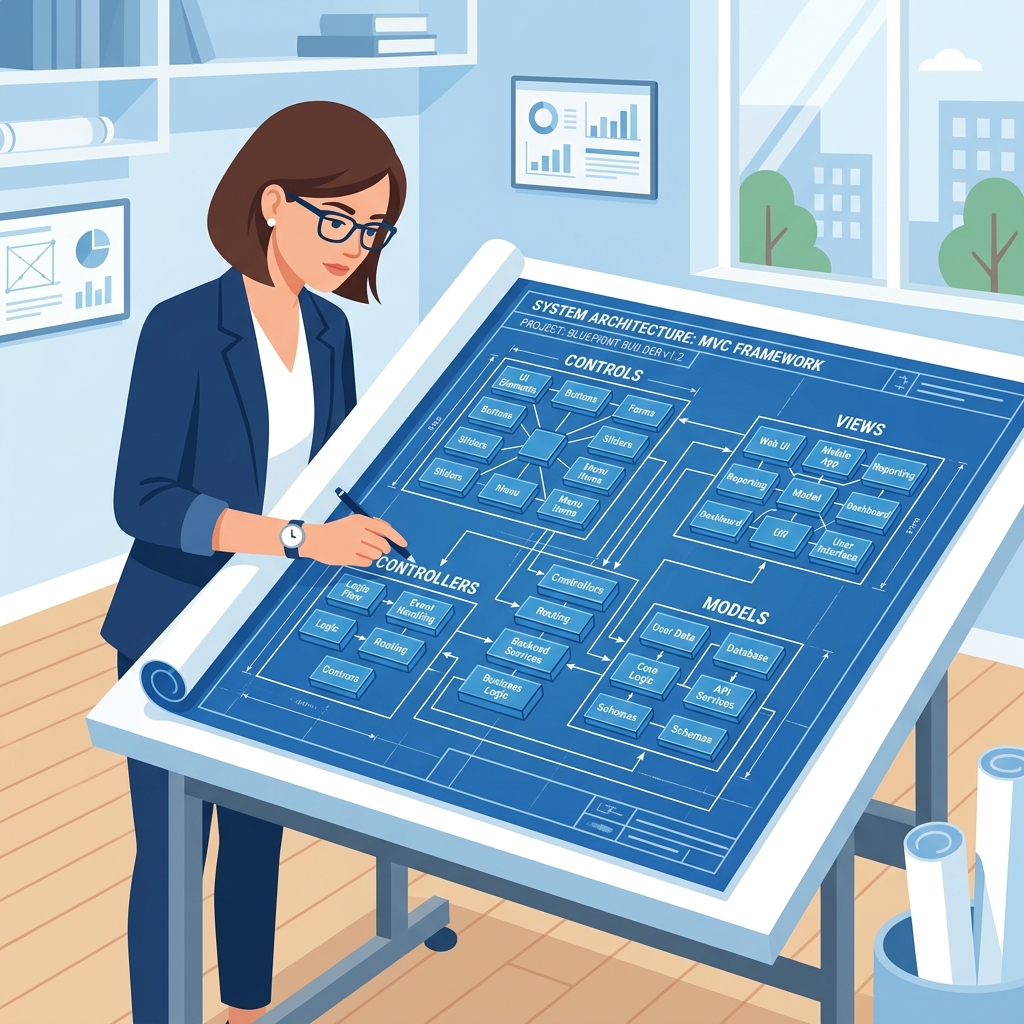 Figure 2: Customizing around the core S/4HANA ERP using side-by-side cloud environments.
Think of SAP S/4HANA as your main factory. BTP is the innovation lab, integration hub, and analytics center built right next to it — connected, coordinated, but separate.
Why Did SAP Build BTP? — The Real Reason
To understand BTP properly you need to understand the problem SAP was facing around 2015-2018.
Companies using SAP needed more than ERP. They needed:
- Integration with non-SAP systems like Salesforce, ServiceNow, Workday.
- Custom apps that extended SAP without breaking upgrade paths.
- Advanced analytics beyond what SAP standard reporting offered.
- Automation of repetitive processes across SAP and non-SAP systems.
- Mobile and web applications connected to SAP backend data.
- AI and machine learning applied to business processes.
SAP had separate products for some of this — SAP Cloud Platform, SAP HANA Cloud, SAP Analytics Cloud, SAP Integration Suite — but they were scattered, inconsistently positioned, and confusing to navigate as a customer.
BTP was SAP’s answer to that fragmentation. One unified platform bringing together all these capabilities under a single commercial framework, single technical foundation, and single identity — SAP Business Technology Platform.
Announced as BTP in 2021, it consolidated SAP’s cloud platform story and gave customers and partners one place to go for everything beyond core ERP.
What’s Actually Inside SAP BTP — The Four Pillars
BTP isn’t one thing. It’s a collection of services organized around four main capability areas. Understanding these four pillars gives you the complete picture.
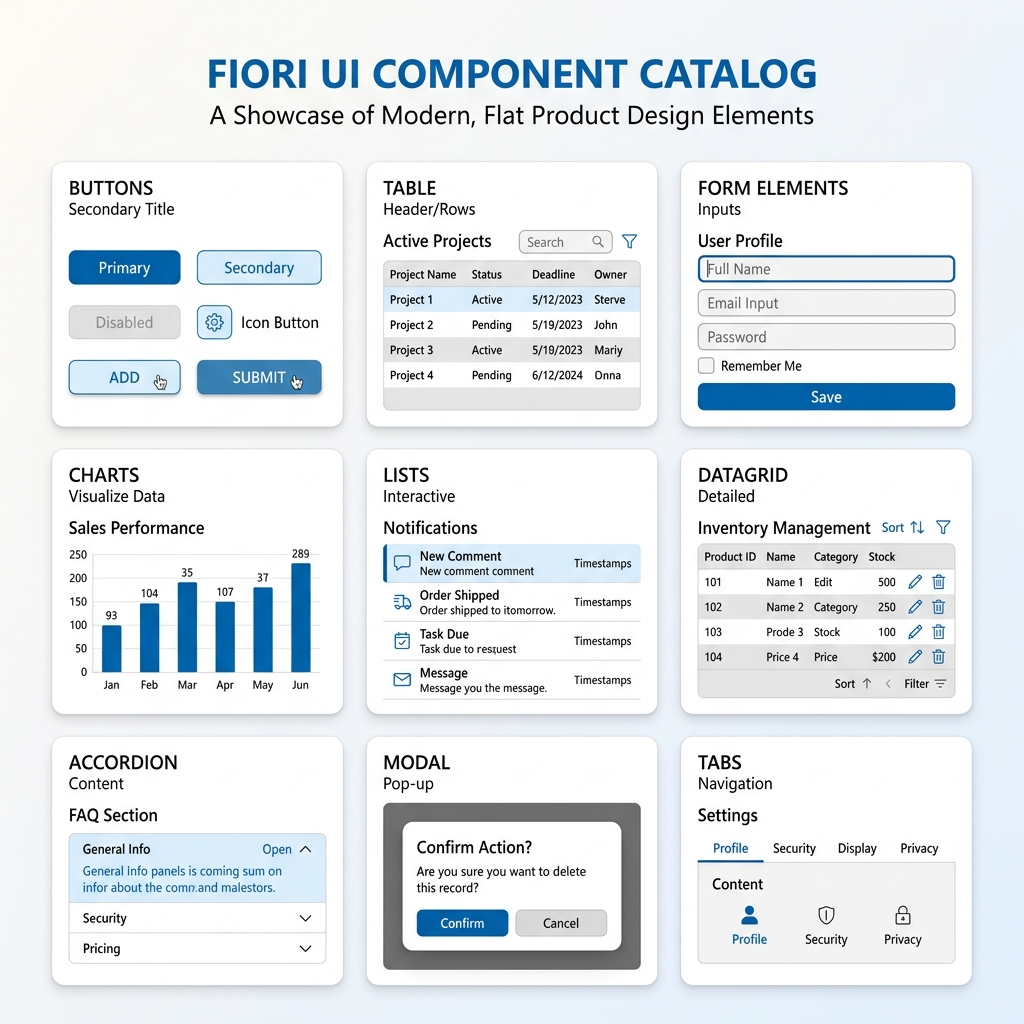 Figure 3: The four primary service pillars comprising the SAP BTP service landscape.
Interactive Pillars Explorer
Explore the BTP pillars interactively below. Click on any tab to review the core services, details, and details maps:
1. Database and Data Management
This is the database foundation of BTP. Core services include SAP HANA Cloud (fully managed in-memory cloud database) and SAP Datasphere (reusable business data fabric linking databases cleanly).
- SAP HANA Cloud: Extremely high performance, multi-model storage (relational, graph, spatial).
- SAP Datasphere: Harmonizes data models across different SAP and non-SAP silos without copying data.
Pillar 1 — Database and Data Management
This is the data foundation of BTP. The core service here is SAP HANA Cloud — the fully managed cloud version of SAP’s in-memory database.
What HANA Cloud gives you:
- Store and process massive amounts of business data in memory — dramatically faster than traditional databases.
- Multi-model data processing — relational data, graph data, spatial data, document store — all in one engine.
- Connect to SAP S/4HANA, BW/4HANA, and other SAP data sources natively.
- Build data warehouses, data lakes, and real-time analytical applications.
Also in this pillar — SAP Datasphere (previously SAP Data Warehouse Cloud). Datasphere is a business data fabric — a platform for connecting, modeling, and governing data from across your entire enterprise landscape, SAP and non-SAP, in one place.
For anyone interested in data engineering, data architecture, or business intelligence in the SAP world — HANA Cloud and Datasphere are where that work happens.
Pillar 2 — Analytics and Planning
SAP Analytics Cloud (SAC) lives here — SAP’s cloud-based platform for business intelligence, augmented analytics, and enterprise planning.
What SAC does:
- Creates beautiful interactive dashboards and reports from SAP and non-SAP data sources.
- Embedded analytics that appear directly inside S/4HANA Fiori apps — real-time KPIs visible while doing operational work.
- Predictive analytics — using machine learning to forecast trends, identify anomalies, and surface insights automatically.
- Planning and budgeting — collaborative financial planning, workforce planning, and supply chain planning with built-in version management.
SAC is increasingly replacing traditional SAP BW-based reporting in new implementations. Organizations moving to S/4HANA often pair it with SAC for analytics — and that combination is creating strong demand for SAC-skilled consultants.
Pillar 3 — Application Development and Automation
This is the pillar most developers care about — and it’s genuinely packed.
- SAP Build Apps (previously SAP AppGyver): Low-code application development platform. Build mobile and web apps without writing code — drag and drop components, configure logic visually, connect to SAP and non-SAP backends.
- SAP Build Process Automation (previously SAP Workflow Management + SAP iRPA): Automate business processes — approval workflows, document processing, repetitive task automation using RPA (Robotic Process Automation) bots.
- ABAP Cloud Environment: This is huge for ABAP developers specifically. BTP hosts a full cloud-based ABAP environment — write modern ABAP using Eclipse-based ADT (ABAP Development Tools), build RAP applications, and create OData services.
 Figure 4: Eclipse ADT editor connected to the BTP ABAP Cloud runtime.
- SAP Business Application Studio (BAS): Browser-based IDE for building Fiori applications, full-stack cloud applications, and mobile apps. Think VS Code but running in your browser and pre-configured for SAP development.
- SAP Build Work Zone: Create unified launchpads that bring together Fiori apps, third-party web apps, and BTP applications in one coherent user interface.
Pillar 4 — Integration
This pillar solves one of enterprise IT’s most persistent headaches — making different systems talk to each other reliably.
SAP Integration Suite SAP’s cloud integration platform. Connect SAP systems with each other and with third-party platforms — Salesforce, Microsoft, Workday, ServiceNow, banking systems, logistics providers, government portals, literally anything with an API.
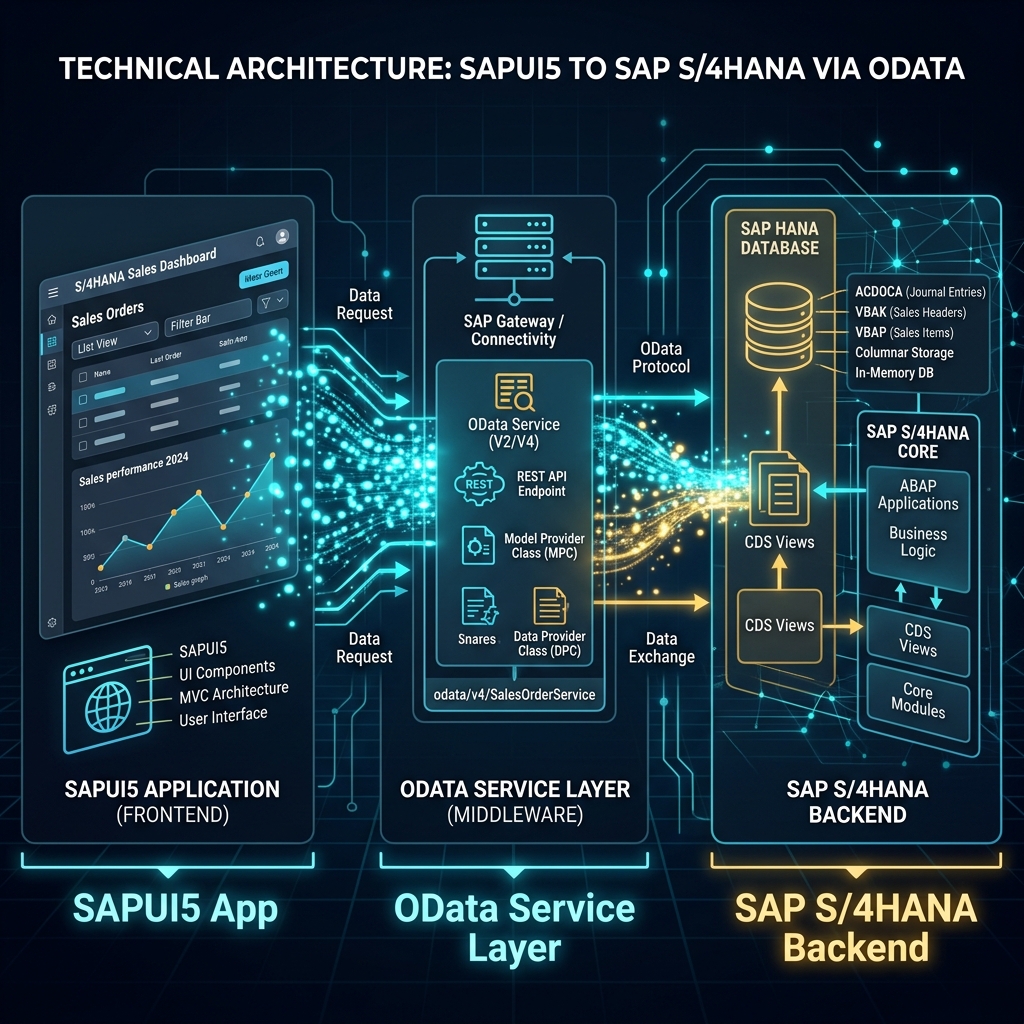 Figure 5: SAP Integration Suite acts as the messaging broker connecting ERP to external ecosystems.
Integration Suite includes:
- Cloud Integration (CPI): build integration flows visually. Map data between systems, transform formats, handle errors, schedule runs.
- API Management: publish, secure, monitor, and monetize APIs.
- Event Mesh: event-driven architecture, publishing and subscribing to business events across systems.
- Integration Advisor: AI-assisted B2B integration mapping, automatically suggesting field mappings based on industry standards.
For anyone working in SAP landscapes where multiple systems need to exchange data — Integration Suite knowledge is extremely valuable. Every large SAP implementation has integration requirements and Integration Suite is increasingly the go-to solution.
SAP BTP Architecture — How It All Fits Together
Understanding BTP architecture helps you see how all these services connect.
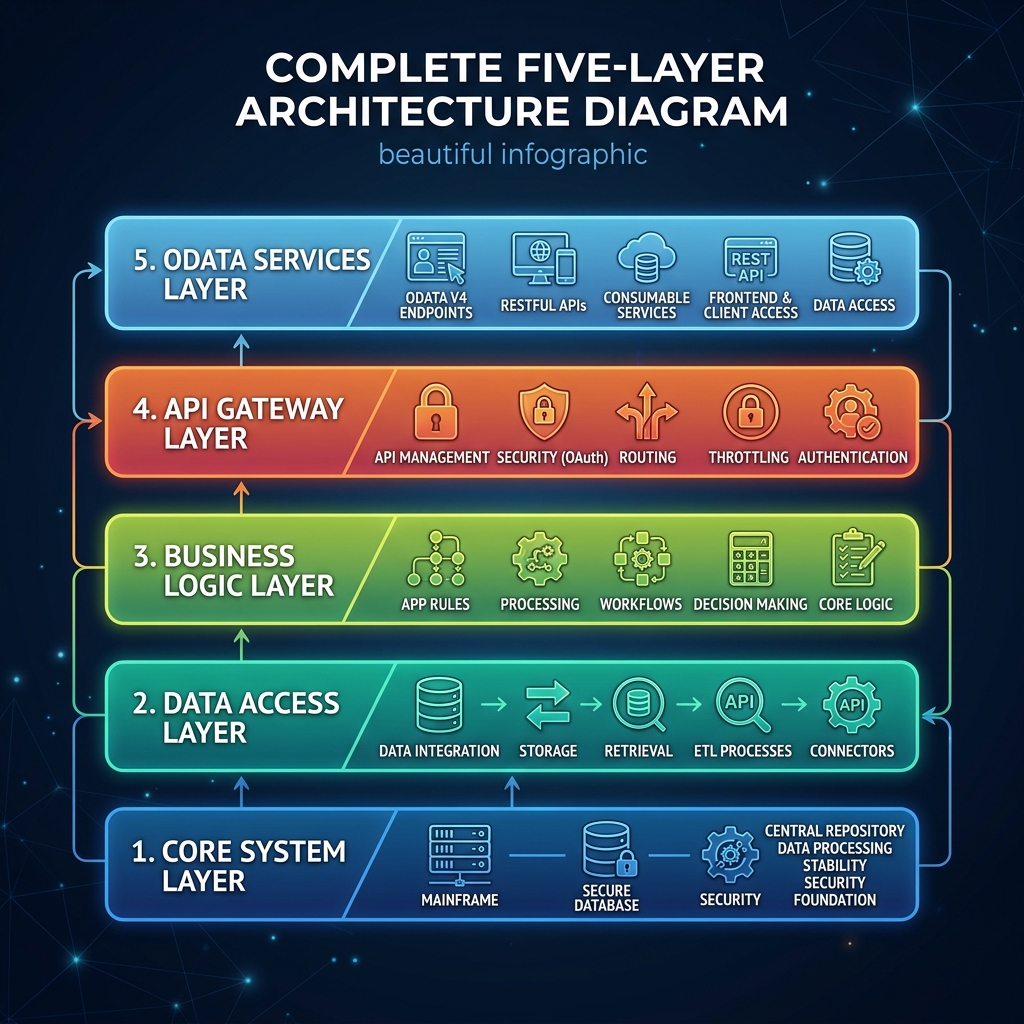 Figure 6: BTP Account topology linking Global accounts to Subaccounts and spaces.
BTP runs on multiple cloud infrastructure providers — AWS, Azure, Google Cloud, and SAP’s own data centers. When a customer subscribes to BTP, they choose their preferred hyperscaler and region. This gives flexibility — a company already invested in Azure can run BTP workloads on Azure infrastructure.
Global Account → Subaccounts → Spaces
BTP uses a hierarchical structure:
- Global Account: your company’s top-level BTP account. Think of it as the parent container.
- Subaccounts: separate environments within your Global Account. Typically one per system landscape — development, testing, and production.
- Spaces (in Cloud Foundry environment): isolated runtime environments within a subaccount where applications actually run.
Environments in BTP
BTP supports multiple runtime environments depending on what you’re building:
- Cloud Foundry: for running custom applications, microservices, and multi-language development.
- ABAP Environment: for writing cloud ABAP code and RAP applications.
- Kyma: Kubernetes-based environment for container-native development, microservices architecture.
- SAP Build environments: for low-code application and process development.
Different types of applications run in different environments. An ABAP developer building RAP services uses the ABAP Environment. A developer building a Node.js microservice uses Cloud Foundry. A DevOps engineer deploying containers uses Kyma.
Service Marketplace
BTP has a service marketplace — a catalog of hundreds of services available to add to your subaccount. Database services, integration services, AI services, security services, connectivity services — you activate what you need, pay for what you use.
This consumption model is very different from traditional SAP licensing. Instead of buying a big license upfront, you consume services and pay based on actual usage.
SAP BTP Free Tier — What You Actually Get for Free
This is probably the most practically useful section for students and freshers.
SAP offers a genuinely free tier of BTP — not a time-limited trial, but ongoing free access to a meaningful set of services.
 Figure 7: Starting with BTP Free Tier for sandboxed training projects.
Free tier includes:
- SAP HANA Cloud free tier: one HANA Cloud instance with limited capacity. Enough to learn and build real projects.
- SAP Business Application Studio: full access to browser-based IDE for Fiori and BTP development.
- ABAP Environment trial: 30-day rolling trial for cloud ABAP development (renews with activity).
- SAP Build Apps free tier: build low-code applications.
- SAP Integration Suite free tier: limited but functional access to integration capabilities.
- SAP Analytics Cloud trial: explore analytics and dashboard creation.
How to get it:
Go to account.hanatrial.ondemand.com → Register with your email → Get a trial global account → Activate free tier services from the service marketplace.
For freshers building their SAP portfolio — BTP free tier gives you a real cloud environment to build real applications that you can show in interviews. That’s genuinely valuable.
Real World Use Cases — What Companies Actually Build on BTP
Theory makes more sense with concrete examples. Here’s what real companies build on BTP:
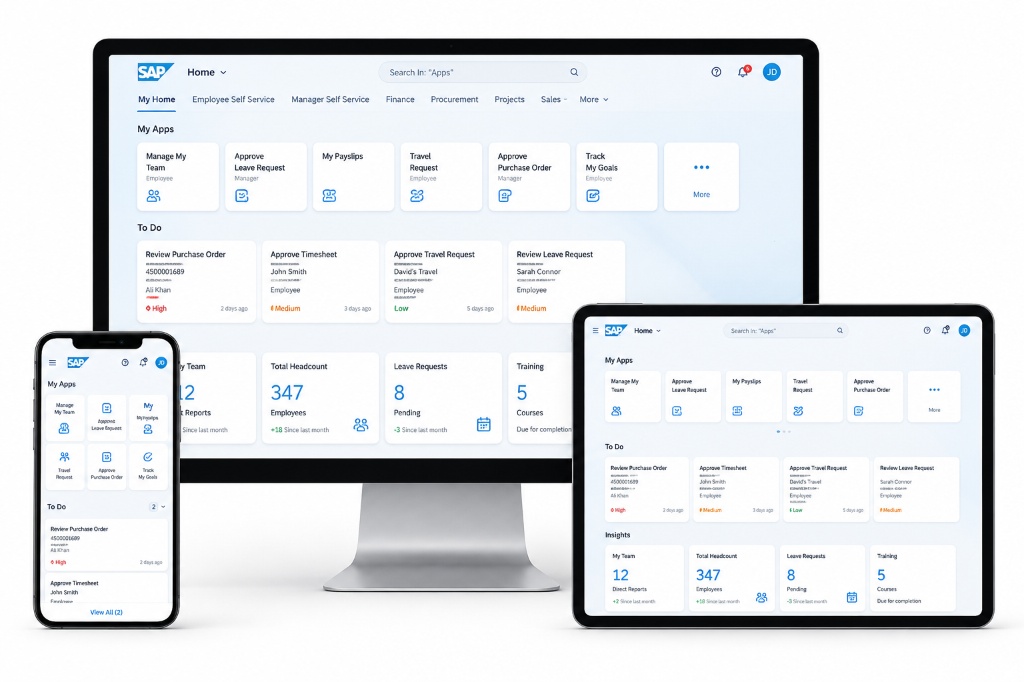 Figure 8: Common application scenarios of BTP extensions and automated bots.
- Use Case 1 — Side-by-Side Extension: A manufacturing company needs a custom mobile app for shop floor workers — scanning barcodes, confirming production operations, reporting quality issues. Building this inside S/4HANA directly would be complex and upgrade-risky. Instead they build it on BTP using SAP Build Apps or SAPUI5, connecting to S/4HANA through APIs. Clean separation, zero core modification.
- Use Case 2 — Cross-System Integration: A retail company runs SAP S/4HANA for finance and operations but uses Salesforce for CRM. When a sales order closes in Salesforce, it needs to automatically create a delivery order in S/4HANA. SAP Integration Suite handles this — a configured integration flow listens for Salesforce events and creates S/4HANA documents automatically, with error handling, retry logic, and monitoring built in.
- Use Case 3 — Intelligent Automation: An accounts payable team manually processes hundreds of vendor invoices daily — checking amounts, matching purchase orders, routing for approval. BTP’s Process Automation with document extraction AI reads incoming invoice PDFs, extracts relevant fields automatically, matches against SAP purchase orders, and routes exceptions to humans. Routine invoices process without any human touch.
- Use Case 4 — Embedded Analytics: A logistics company wants their warehouse managers to see real-time stock levels, pending delivery counts, and exception alerts directly on their Fiori home screen — not in a separate reporting tool. SAP Analytics Cloud embedded in Fiori Launchpad pulls live HANA Cloud data and displays KPI tiles that update automatically. Managers see operational intelligence without switching tools.
SAP BTP Career Scope in 2026 — Who Should Learn What
BTP is broad enough that different profiles can specialize in different areas:
- For ABAP Developers: ABAP Cloud environment and RAP development on BTP is the natural evolution path. Learning how classical ABAP skills apply in cloud context, building OData services that power Fiori apps, and understanding how BTP ABAP connects to S/4HANA is where ABAP careers are heading.
- For Fiori / SAPUI5 Developers: Business Application Studio is your primary tool. BTP hosts Fiori apps, manages their deployment, and provides the connectivity layer to backend systems. Understanding BTP subaccount setup, destinations, and app deployment is essential for any serious Fiori developer.
- For Integration Specialists: SAP Integration Suite is one of the hottest skill sets in SAP right now. Every large SAP landscape needs integration — and Integration Suite expertise is scarce relative to demand. Dedicated Integration Suite consultants command excellent compensation.
- For Functional Consultants: SAP Build Apps and Build Process Automation are increasingly in functional consultant territory — building simple extensions and automating approval workflows without deep coding. Understanding what BTP can do helps functional consultants scope projects better.
- For Analytics Professionals: SAP Analytics Cloud combined with HANA Cloud and Datasphere is a complete modern analytics stack. SAC dashboard developers, data modelers, and planning consultants are actively recruited.
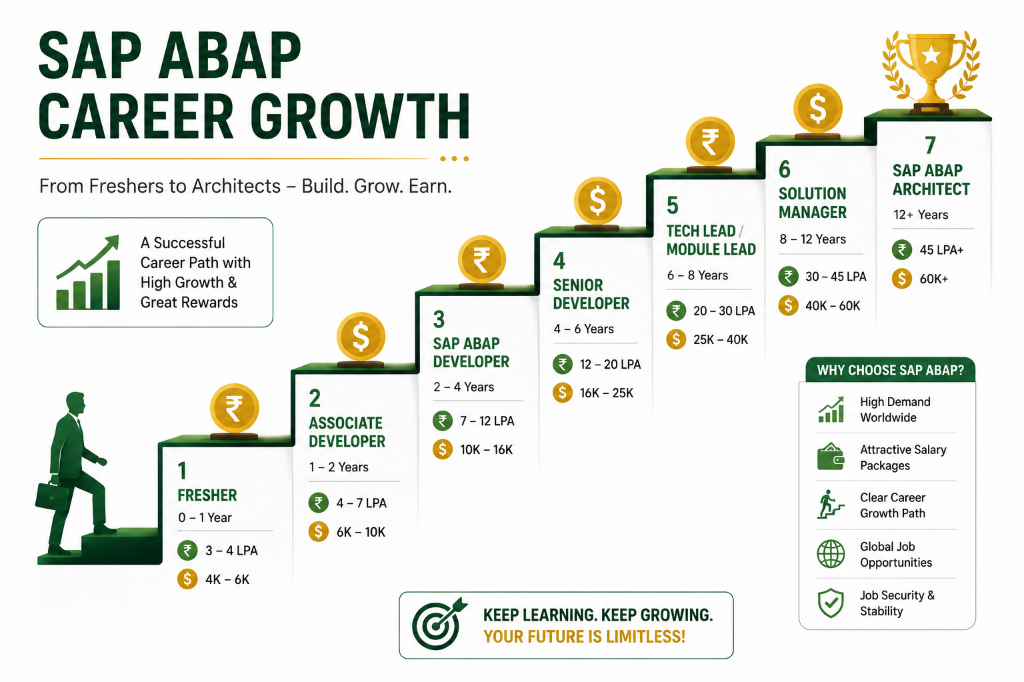 Figure 9: BTP average salary ranges and career specializations in 2026.
How to Start Learning SAP BTP — Free Path
Here’s a practical starting sequence using only free resources:
- Week 1-2: SAP Learning Journey “Discover SAP BTP” on learning.sap.com — overview of all pillars and services.
- Week 3-4: Set up BTP free tier account. Explore subaccount structure. Activate Business Application Studio. Complete one Fiori app deployment tutorial.
- Week 5-6: Pick your specialization based on background. ABAP developer → ABAP Cloud tutorials. Fiori developer → BAS and deployment tutorials. Integration interest → Integration Suite beginner content on openSAP.
- Week 7-8: Build something real. A simple extension app, a basic integration flow, or a HANA Cloud connected dashboard. A portfolio piece matters more than certificates alone.
- Ongoing: Follow SAP BTP tag on SAP Community. Watch SAP Developers YouTube channel BTP playlist. Read SAP blogs on BTP updates — the platform evolves fast and staying current matters.
Final Thoughts — Why BTP Is the Skill That Separates Good SAP Professionals from Great Ones
Here’s something I genuinely believe after spending time in this ecosystem:
S/4HANA knowledge gets you a job. BTP knowledge gets you a career path.
Companies aren’t just looking for people who can configure standard SAP anymore. They need professionals who understand how to extend SAP cleanly, integrate it with their broader technology landscape, build intelligent automation on top of it, and surface its data through modern analytics. All of that happens on BTP.
The professionals who understood Fiori early got ahead of the curve five years ago. The professionals who understand BTP deeply right now are positioning themselves the same way for the next five years.
Start with the free tier. Build something. Break it. Fix it. Then build something better.
BTP is not as intimidating as it looks from the outside. Once you’re inside and building — it clicks faster than you expect.
Keep learning. Keep building.
 Figure 10: Presenting BTP cloud extension solutions to enterprise teams.
— Daksh
Self-Assessment Checkpoint
💡 **What is the difference between S/4HANA Extensibility and SAP BTP Extensibility?**
S/4HANA Extensibility (In-App) modifies the UI, logic, or fields inside S/4HANA directly (using Custom Fields and Logic key user tools). SAP BTP Extensibility (Side-by-Side) builds custom apps or services on BTP completely separate from the ERP core, communicating only via clean, public API endpoints (OData, REST, RFC) to keep the core upgrade-safe.
💡 **What BTP services are part of the 'SAP Build' brand?**
The SAP Build portfolio consists of: (1) SAP Build Apps (no-code visual web/mobile app builder), (2) SAP Build Process Automation (visual workflow designer, business rules, and RPA task automation), and (3) SAP Build Work Zone (unified company launchpads and team spaces).
💡 **Why is CPI (Cloud Integration) preferred over older middleware like SAP PI/PO?**
CPI is a modern, cloud-native integration engine that requires zero on-premise hardware infrastructure maintenance, auto-scales on hyperscalers, runs prepackaged integration content updated by SAP, and connects cloud and hybrid systems out of the box using standardized APIs.

Written by Daksh Dedha
SAP Technical ConsultantDaksh is an SAP Technical Consultant specializing in ABAP programming, SAP S/4HANA migrations, Fiori development, and BTP cloud architecture. He authors free, hands-on tutorials to make enterprise SAP education accessible to all developers.
Test Your Knowledge
Loading question...
Quiz Completed
Related Tutorials
SAP BTP Event Mesh — Asynchronous Integration and Event-Driven Architecture Guide
Understand SAP BTP Event Mesh for event-driven architecture. Learn how queues, topics, webhooks, and asynchronous integration work between S/4HANA and cloud applications.
SAP BTPSAP Build Process Automation — Workflow, RPA, and Business Rules on BTP Guide
Master SAP Build Process Automation on SAP BTP. Learn how workflows, Robotic Process Automation (RPA), Business Rules, and low-code forms automate enterprise processes.
SAP BTPSAP BTP Free Tier Account — How to Get Started Without Spending Anything
Step by step guide to creating a SAP BTP free tier account in 2026. Set up your free BTP subaccount, enable services, and start building apps without a credit card.
Found this tutorial useful? Share it with your SAP development team.