
Top 50 SAP Fiori Interview Questions (With Answers) – Complete Guide
Table of Contents
- • What is SAP Fiori? (Basic Understanding)
- • Section 1: Basic Level Questions (Q1 – Q15)
- • Section 2: Intermediate Level Questions (Q16 – Q30)
- • Section 3: Advanced and Scenario Based Questions (Q31 – Q45)
- • Section 4: HR / Behavioral Type Questions Related to Fiori Projects (Q46 – Q50)
- • Closing Notes
Top 50 SAP Fiori Interview Questions (With Answers) – Complete Guide for Freshers and Experienced

If you are preparing for an SAP Fiori interview, this blog is going to help you a lot. I have covered 50 questions here, starting from the basic level and going up to intermediate and scenario-based advanced questions. These are actual questions asked in real interviews, not just theory copied from documentation.
I am writing this blog based on my own learning journey in SAP ABAP and Fiori. When I started preparing for interviews, I found many blogs giving only definitions without proper explanation. So here I tried to explain each answer in simple words so even a fresher can understand easily.
Let’s start.
What is SAP Fiori? (Basic Understanding)
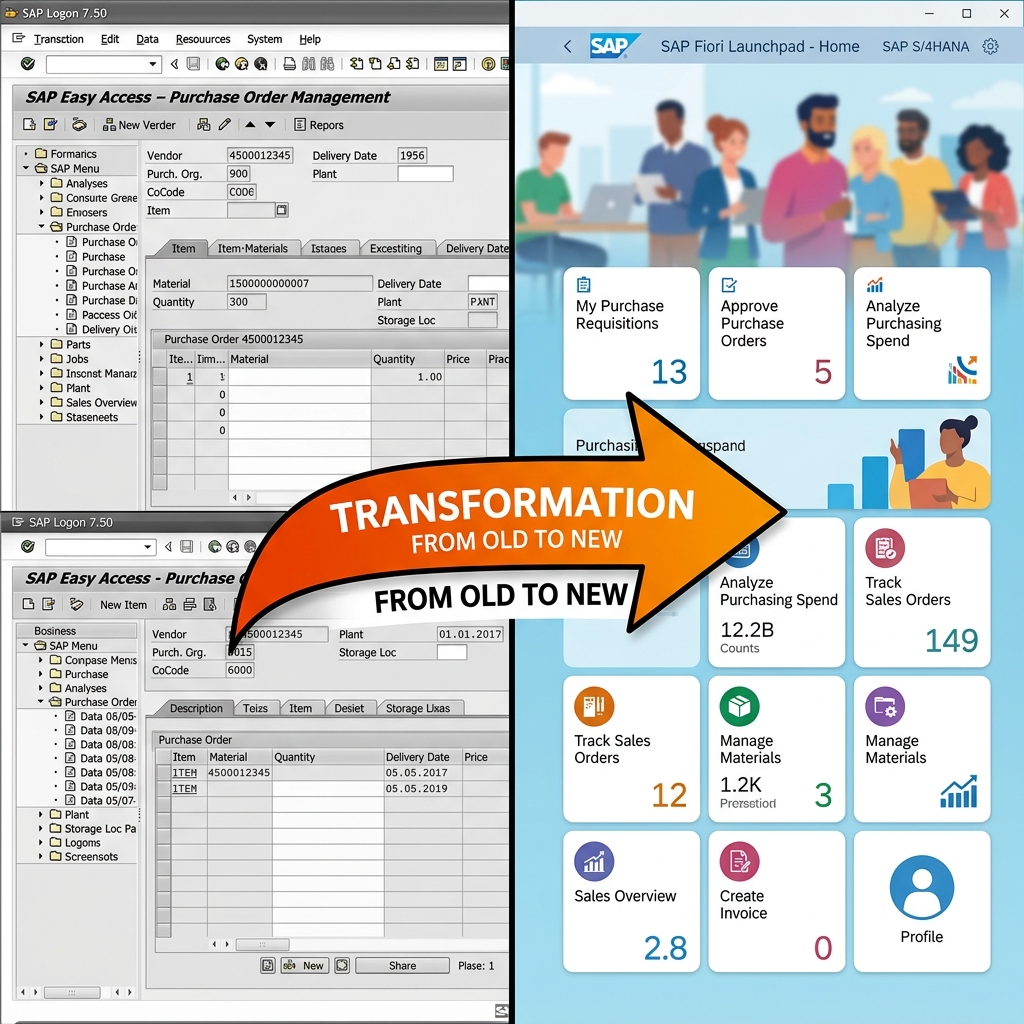
Before jumping into the questions, let’s understand what Fiori actually means. SAP Fiori is the modern user experience (UX) approach provided by SAP which provides simple, responsive, and role-based applications. It replaces old SAP GUI screens with modern web-based apps that work on desktop, tablet, and mobile devices equally well.
Now let’s go question by question.
Section 1: Basic Level Questions (Q1 – Q15)
🙋♂️ **Q1. What is SAP Fiori?**
SAP Fiori is a design system and collection of apps built with modern design principles. It provides a consistent, simple, and delightful user experience across all SAP applications, regardless of the device used (mobile, tablet, or desktop).
🙋♂️ **Q2. What are the five design principles of SAP Fiori?**
The five core design principles of SAP Fiori are:
- Role-based: Apps are designed specifically for a user’s role, showing only the information and tasks they need to perform their job.
- Responsive: Apps adapt to any screen size, device type, or orientation (mobile, tablet, desktop).
- Simple: Focuses on the 1-1-3 rule (1 user, 1 use case, 3 screens max) to keep the app clean and straightforward.
- Coherent: Provides a consistent look and feel across different business processes and apps.
- Delightful: Offers an aesthetically pleasing and satisfying experience for end users.
🙋♂️ **Q3. What are the different types of Fiori apps?**
There are three main categories of Fiori apps:
- Transactional Apps: Used to perform transactional business tasks like creating, modifying, or deleting records (e.g., Create Purchase Order). They run on any database (AnyDB or SAP HANA).
- Analytical Apps: Used for real-time data analysis, showing key performance indicators (KPIs) and visual graphs. They require the high-performance capabilities of SAP HANA.
- Fact Sheet / Object Page Apps: Used to display contextual information and key details about a business object (e.g., Vendor details), allowing navigation to related items. They also require SAP HANA.
🙋♂️ **Q4. What is the Fiori Launchpad?**
Fiori Launchpad is the central entry point for all Fiori apps. It functions like a personalized home page where users see app tiles organized into groups and catalogs based on their assigned security roles.
🙋♂️ **Q5. What is SAPUI5?**
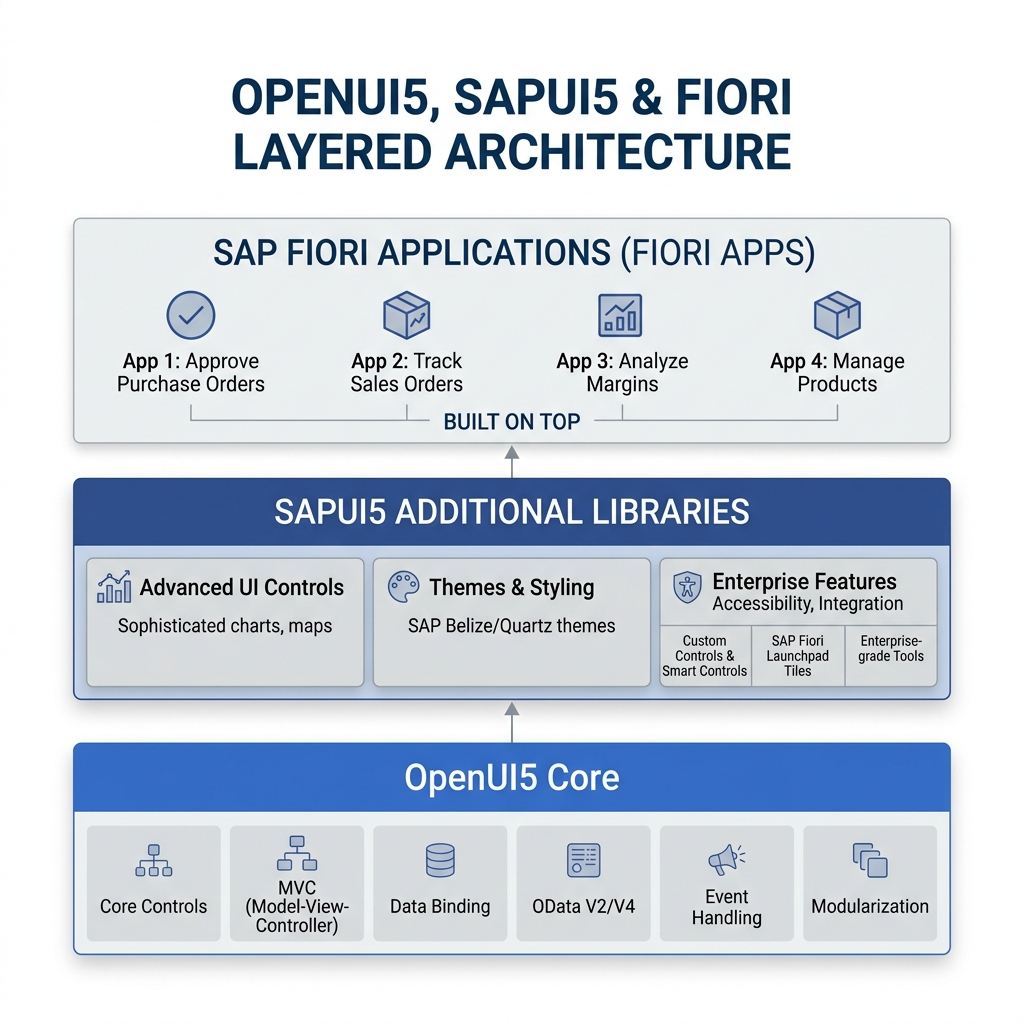
SAPUI5 is a JavaScript-based UI development toolkit provided by SAP. It is used to build Fiori applications and follows the Model-View-Controller (MVC) architecture, providing enterprise-grade UI controls, data binding, and internationalization options.
🙋♂️ **Q6. What is the difference between SAPUI5 and OpenUI5?**
OpenUI5 is the open-source version of SAPUI5, containing the core framework and essential controls. SAPUI5 is SAP’s commercial product which inherits everything from OpenUI5 but adds proprietary enterprise features, such as smart controls, advanced charts, and native SAP integration libraries.
🙋♂️ **Q7. What is MVC architecture in SAPUI5?**
MVC stands for Model, View, and Controller:
- Model: Manages the application data (e.g., JSON Model, OData Model) and handles backend communication.
- View: Defines the UI structure and layout (what the user sees on the screen).
- Controller: Contains the application logic, handles user interaction events (like clicks), and connects the Model with the View.
🙋♂️ **Q8. What are the different types of views in SAPUI5?**
There are four types of views supported by SAPUI5:
- XML View: The industry standard and SAP-recommended view type due to its readability and strict separation of UI layout from controller logic.
- JavaScript (JS) View: Built programmatically using Javascript APIs.
- JSON View: Defined using structural JSON notation.
- HTML View: Declarative markup tags.
🙋♂️ **Q9. What is OData?**
OData (Open Data Protocol) is a standardized web protocol built on REST principles. It is used to expose backend SAP business data to frontend Fiori applications via standard CRUD (Create, Read, Update, Delete) services. Without OData, a Fiori app cannot fetch or update records in the SAP database.
🙋♂️ **Q10. What is the difference between OData V2 and OData V4?**
- OData V2: The older and widely used version. It handles batch calls ($batch) less efficiently and has bulkier metadata files.
- OData V4: The newer version optimized for modern cloud deployments. It provides reduced payload sizes, cleaner metadata, built-in client-side filtering support, and much faster processing of batch requests.
🙋♂️ **Q11. What is SAP Gateway?**
SAP Gateway is a server-side technology that exposes SAP ERP backend data as OData services. It acts as the secure bridge connecting the ABAP backend system with the web-based Fiori frontend UI.
🙋♂️ **Q12. What is Fiori Elements?**
Fiori Elements is a metadata-driven UI framework that allows developers to build standard Fiori applications without writing custom JavaScript code. The UI is generated dynamically by the framework at runtime based on backend OData services and UI annotations.
🙋♂️ **Q13. What are the different floorplans available in Fiori Elements?**
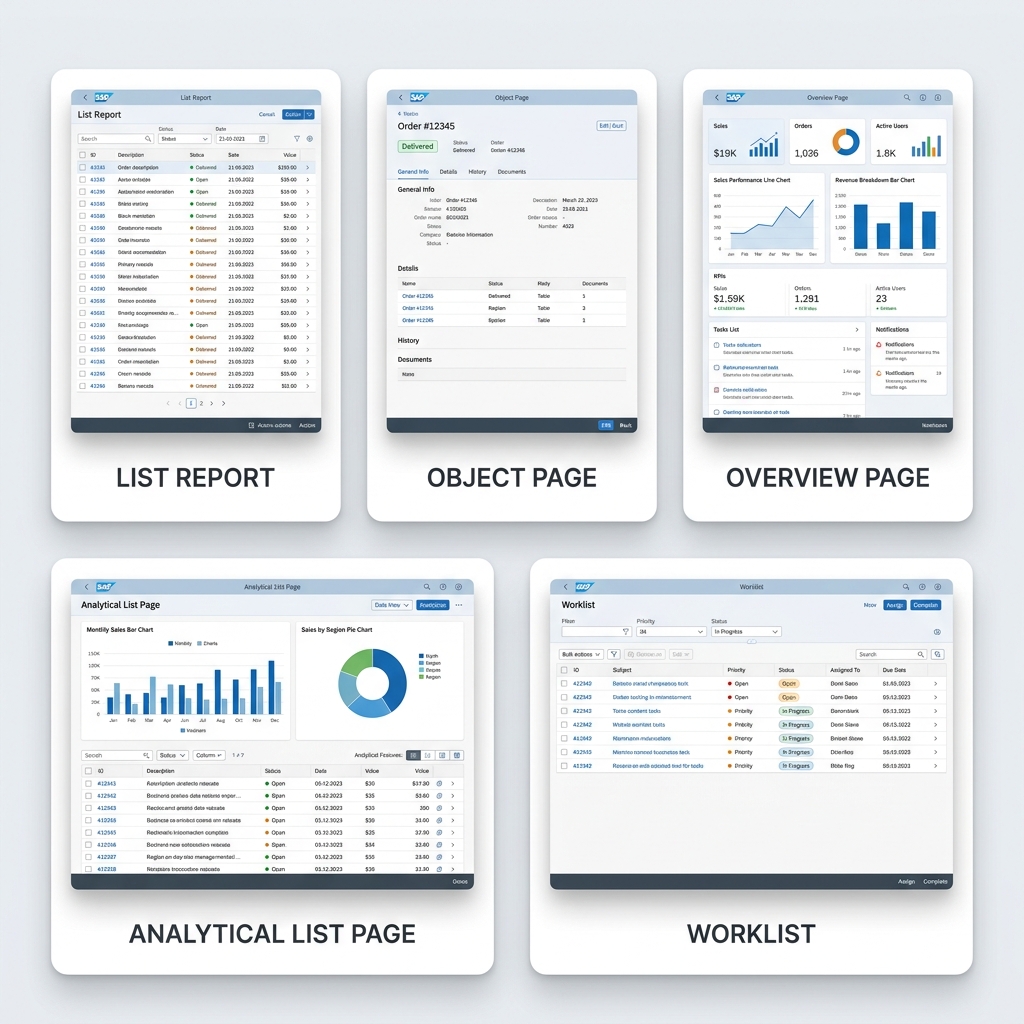
The standard Fiori Elements floorplans are:
- List Report: Used to search, filter, and view items in a table.
- Object Page: Displays comprehensive details about a single record.
- Overview Page (OVP): A dashboard layout showing data in card formats.
- Analytical List Page (ALP): Combines table lists with visual charts.
- Worklist: Used for processing a queue of work items immediately.
🙋♂️ **Q14. What is the manifest.json file?**
The manifest.json file is the application descriptor. It contains the configuration metadata of the app—such as the app ID, version, data sources (OData services), routing configurations, view targets, and library dependencies.
🙋♂️ **Q15. What is the Component.js file in SAPUI5?**
The Component.js file serves as the main entry point of an SAPUI5 application. It initializes the app, instantiates the OData models, sets up routing, and handles the lifecycle of the UI component.
Section 2: Intermediate Level Questions (Q16 – Q30)
🙋♂️ **Q16. What is the role of the Fiori Launchpad Designer?**
The Fiori Launchpad Designer is an administrative tool used to design catalogs and groups. Administrators use it to create tiles, define target mappings (which resolve to Fiori apps), and arrange tiles into logical homepage groups.
🙋♂️ **Q17. What is the difference between a Catalog and a Group in Fiori Launchpad?**
- Catalog: A collection of tiles and target mappings. It is the unit of authorization assigned to PFCG security roles. Users cannot see tiles unless they are authorized for the catalog.
- Group: A collection of tiles displayed together on the user’s home screen for visual organization. One catalog’s tiles can be assigned to multiple groups.
🙋♂️ **Q18. What is a Semantic Object in SAP Fiori?**
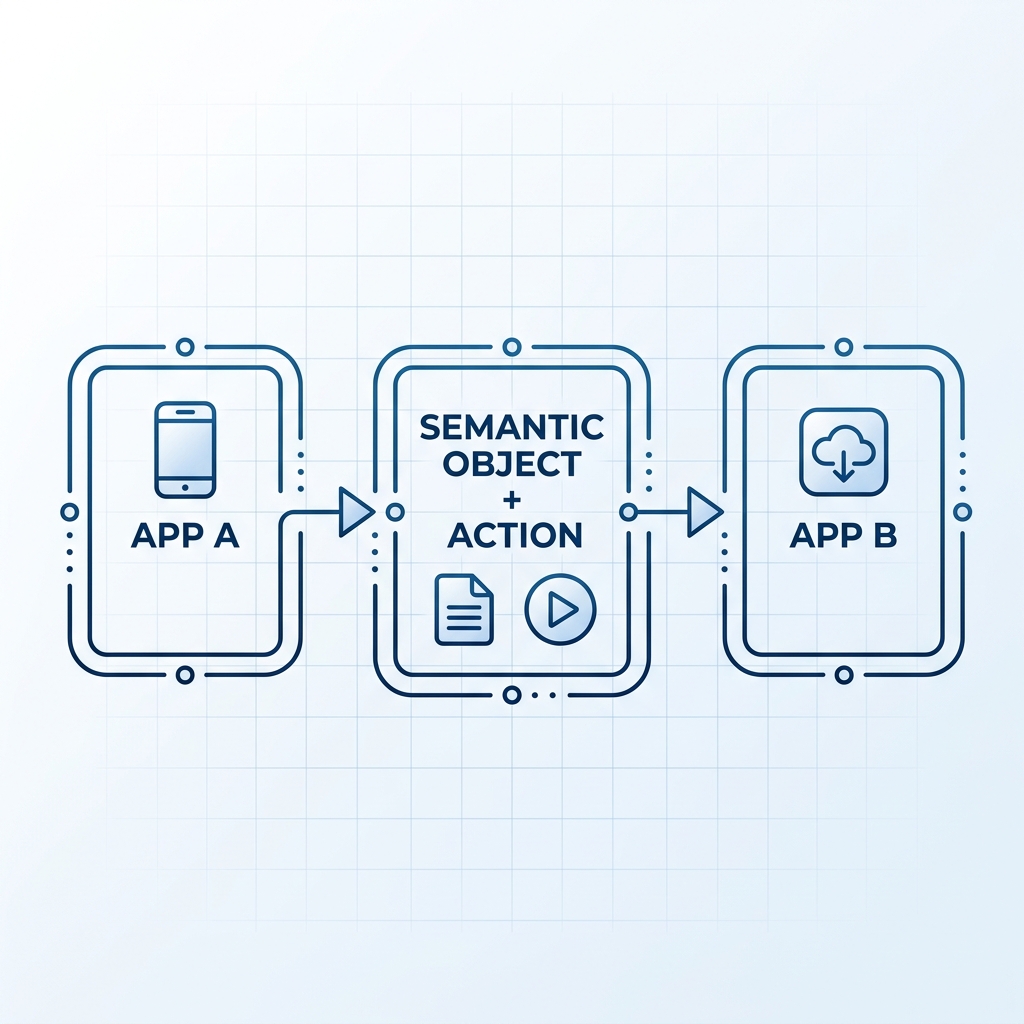
A Semantic Object represents a business entity (e.g., SalesOrder, Customer, Material). It acts as a logical identifier used in cross-app navigation to decouple the navigation link from the physical technical name of the target application.
🙋♂️ **Q19. Explain the concept of Intent-Based Navigation in Fiori.**
Intent-Based Navigation works by combining a Semantic Object and an Action (e.g., SalesOrder-display or Material-create). When a user clicks a tile, the Launchpad checks target mappings at runtime to resolve this intent into the actual application URL, making Fiori applications loosely coupled.
🙋♂️ **Q20. What is a Smart Control in SAPUI5?**
Smart Controls (such as SmartTable, SmartFilterBar, and SmartForm) are specialized UI controls that read annotations from the OData service metadata. They generate themselves automatically at runtime, binding columns and inputs without requiring the developer to write manual control structures.
🙋♂️ **Q21. What is an Annotation in Fiori Elements?**
Annotations are metadata properties added to the OData service. They describe how data should be presented visually on the UI (e.g., defining table column orders, default filters, chart types, or critical values) to drive the rendering of Fiori Elements apps.
🙋♂️ **Q22. What is the difference between CDS view annotations and Local annotations?**
- CDS View Annotations: Written directly in the ABAP backend source code of the CDS view. They are reusable across all services using that CDS view.
- Local Annotations: Written in the frontend project (within the
annotation.xmlfile) using SAP BAS. They are local to that specific application and useful when you cannot edit the backend CDS views.
🙋♂️ **Q23. What is Draft Handling in Fiori Elements apps?**
Draft Handling allows a user to save incomplete transactional data temporarily on the backend database without running validation checks. This prevents data loss if the connection drops, allowing users to resume editing later from any device.
🙋♂️ **Q24. What is a Fiori Launchpad Plugin?**
A Fiori Launchpad Plugin is an extension component that allows developers to run custom JavaScript code when the Launchpad loads. It is used to add custom header buttons, modify shell visuals, or run system-wide logging tasks.
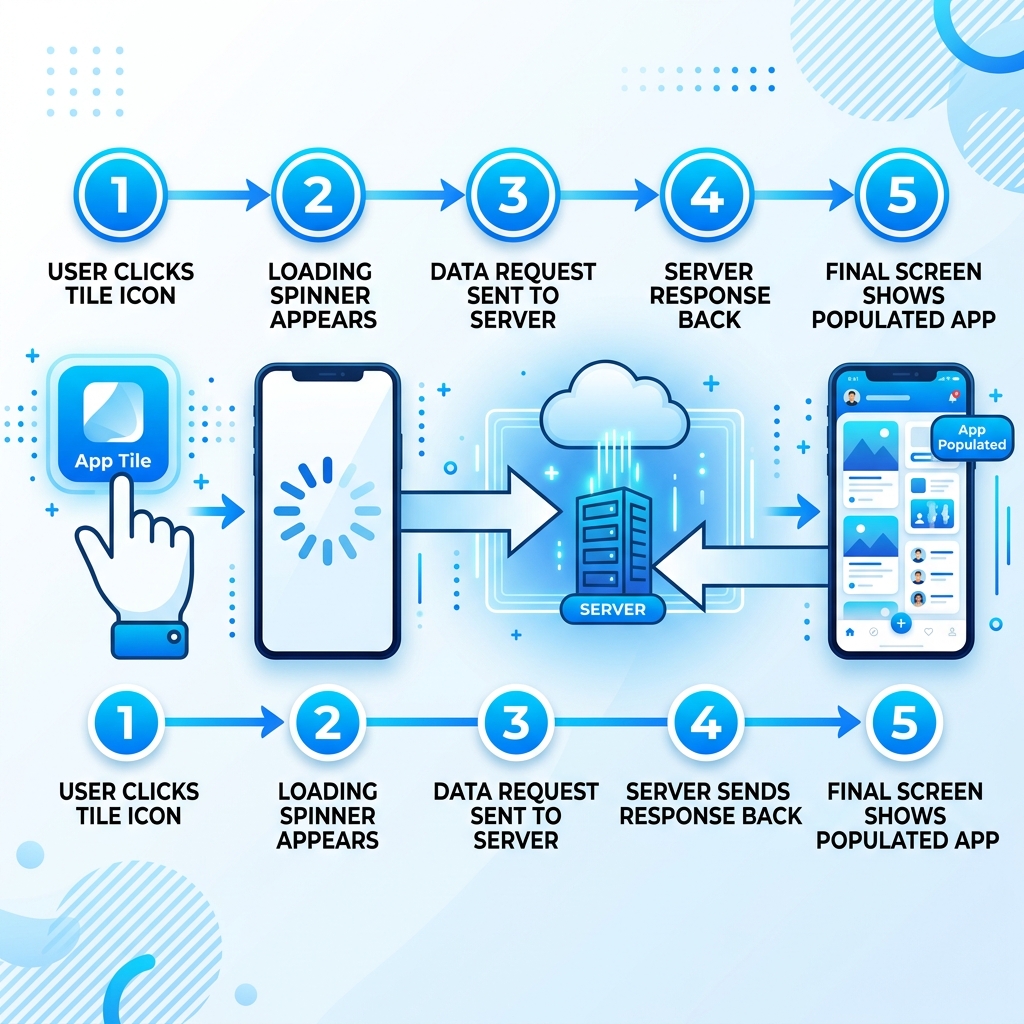
🙋♂️ **Q25. Explain the lifecycle of a Fiori app from request to response.**
- User Clicks Tile: Launchpad initiates the application component.
- App Instantiation: Read
manifest.json, load resource bundles, models, and dependencies. - Controller Execution: The active view’s controller issues an OData request to SAP Gateway.
- Gateway Conversion: Gateway routes the request to the ABAP backend system.
- Backend Processing: Data is queried from the database and returned to the UI client as OData JSON/XML.
🙋♂️ **Q26. What is the difference between SAP Fiori and SAP Web Dynpro?**
- SAP Web Dynpro: An older server-rendered UI technology. It is heavy, desktop-oriented, and relies on complex screen trees with rigid layouts.
- SAP Fiori: A modern client-side rendered UI framework. It is lightweight, mobile-first, responsive, and adheres to intuitive user experience guidelines.
🙋♂️ **Q27. What are Extension Points in Fiori Elements?**
Extension Points are hooks provided by Fiori Elements that allow developers to inject custom views (XML fragments) or controllers into standard templates. This allows adding custom fields or custom logic while maintaining upgrade-safety.
🙋♂️ **Q28. What is the difference between a Fragment and a View in SAPUI5?**
- View: A full UI screen with its own lifecycle methods, controller, and manifest routing definitions.
- Fragment: A lightweight, reusable UI piece. It does not have its own controller—it borrows the controller of the view containing it. Typically used for popups and dialog boxes.
🙋♂️ **Q29. What is Routing in SAPUI5?**
Routing manages navigation between different views inside a single-page application. It tracks changes in the URL hash, instantiates the corresponding target view, and places it into the main app container.
🙋♂️ **Q30. What is the difference between One-Way Binding and Two-Way Binding?**
- One-Way Binding: Data flows strictly from the model to the view. UI updates do not modify the model.
- Two-Way Binding: Changes made by the user on the UI (e.g., typing in an input field) automatically update the model, and model changes instantly update the UI.
Section 3: Advanced and Scenario Based Questions (Q31 – Q45)
🙋♂️ **Q31. How do you debug an SAPUI5 application?**
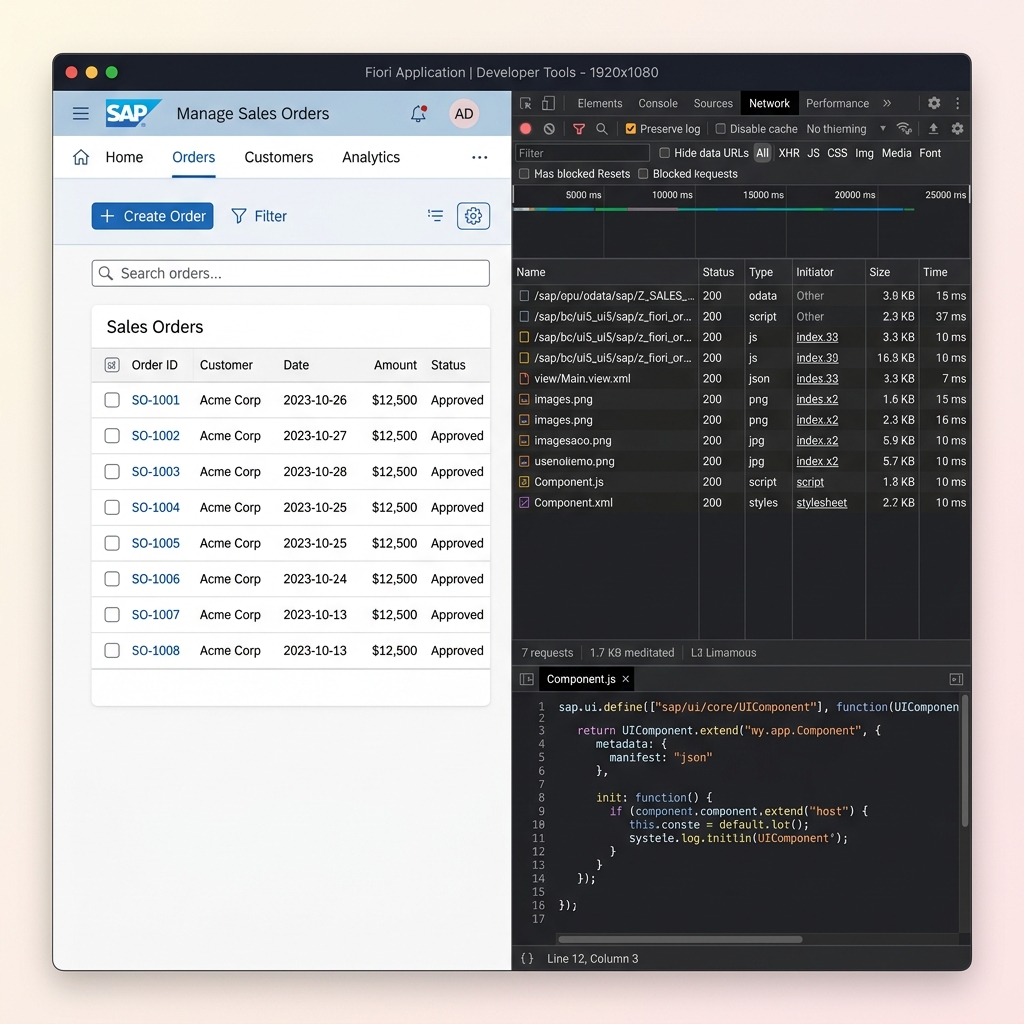
You debug using Chrome Developer Tools (Sources tab) to set breakpoints. also, you can activate the UI5 Diagnostics window (by pressing Ctrl+Alt+Shift+P in the browser) or the UI5 Inspector extension to analyze the control tree and model bindings.
🙋♂️ **Q32. How would you improve the performance of a Fiori application?**
Common performance tuning techniques include:
- Using asynchronous loading for all views and controllers.
- Activating Gzip compression on Gateway services.
- Using batch requests ($batch) to bundle multiple OData calls.
- Limiting data queries using filtering and pagination ($top/$skip).
- Compressing JS/CSS assets using build tools (UI5 Tooling).
🙋♂️ **Q33. What is the difference between synchronous and asynchronous loading in SAPUI5?**
- Synchronous: Blocks browser thread execution until the requested file is downloaded. This causes UI freeze lags.
- Asynchronous: Loads files in the background, allowing the UI to remain responsive. SAP UI5 strictly recommends async loading.
🙋♂️ **Q34. What is a Fiori App Variant?**
An App Variant is a customized variation of a standard Fiori application. Created using Adaptation Projects in SAP BAS, it allows key users to hide fields, rename labels, or rearrange UI cards without changing the underlying base app code.
🙋♂️ **Q35. What is SAP Business Application Studio (BAS)?**
SAP Business Application Studio (BAS) is SAP’s modern, cloud-based development environment. Succeeding SAP Web IDE, it provides preconfigured development spaces optimized for Fiori, CAP, and mobile developers.
🙋♂️ **Q36. How do you handle error messages in a Fiori Elements app?**
Fiori Elements handles error messages automatically. It listens to the standard OData error response headers returned by the backend and displays them in a system Message Popover or standard dialog box.
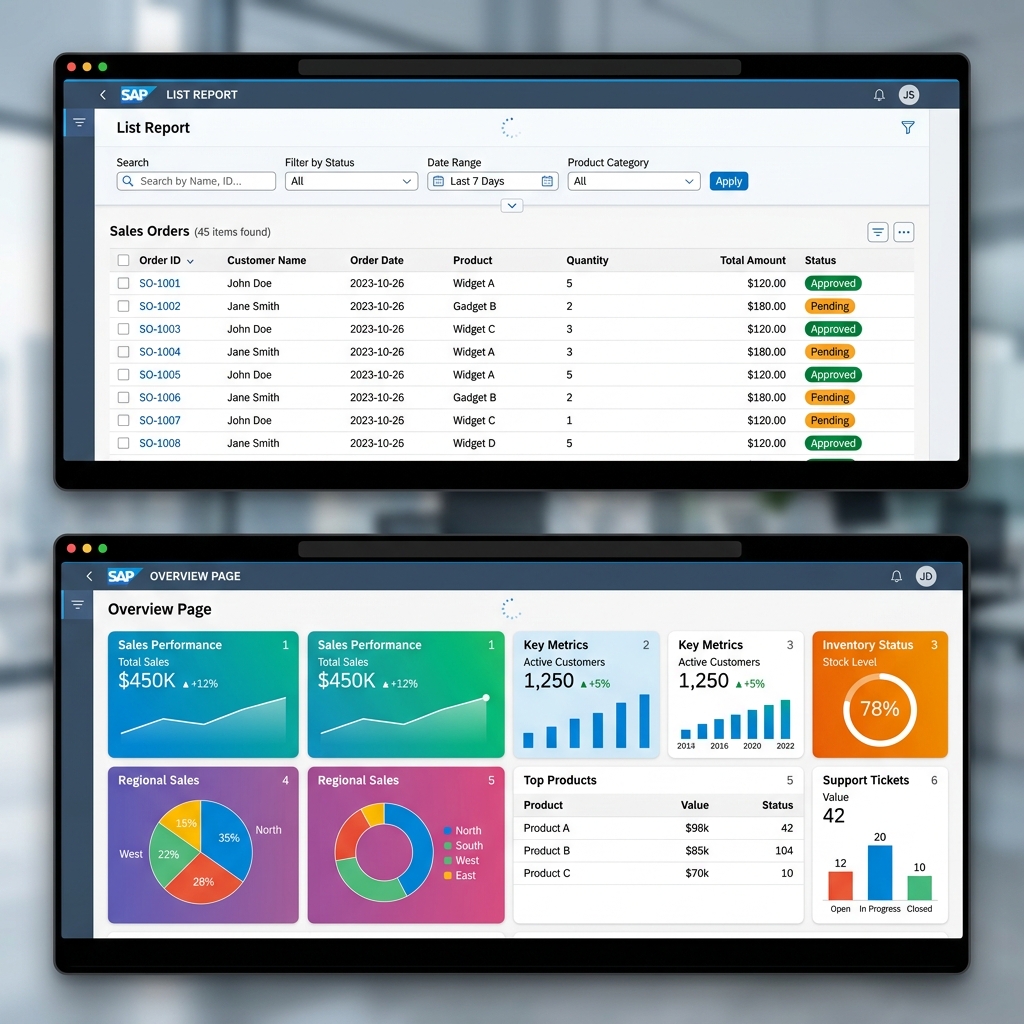
🙋♂️ **Q37. What is the difference between a List Report and an Overview Page?**
- List Report: Focuses on tabular data processing, providing search bars, filters, and standard tables.
- Overview Page: A dashboard page consisting of KPI dashboards, charts, and data cards designed for quick assessment by managers.
🙋♂️ **Q38. What is a Side Effect in Fiori Elements?**
A Side Effect is a rule defining field dependencies. It specifies that when a user modifies a specific field, the application should automatically request fresh data from the server to refresh related values or fields (e.g., updating tax totals when line items change).
🙋♂️ **Q39. What is Value Help (F4 Help) and how is it configured in Fiori Elements?**
Value Help provides a modal list of valid options for an input. In Fiori Elements, it is configured using backend annotations (e.g., @ValueHelpDefinition) linked to database reference tables, eliminating frontend code.
🙋♂️ **Q40. What is the difference between SAP Fiori for S/4HANA and classic Fiori apps on ECC?**
- Fiori on S/4HANA: Tailored for the S/4HANA data model, using CDS views directly for high-performance real-time analysis.
- Fiori on ECC: Works with older data models, relying on classic RFC/BAPIs wrapped into OData services, often lacking advanced analytical features.
🙋♂️ **Q41. What is Embedded Analytics in SAP Fiori?**
Embedded Analytics integrates real-time analytical reports (charts, grids, KPIs) directly within transactional screens, allowing operational users to make data-driven decisions without changing apps.
🙋♂️ **Q42. How does authorization work in Fiori applications?**
Authorization works via catalog permissions. PFCG roles assign Launchpad catalogs to users to make tiles visible. However, actual data restrictions and action permissions are still enforced by backend authorization objects in the Gateway/ERP systems.
🙋♂️ **Q43. What is the SAP Cloud Connector used for?**
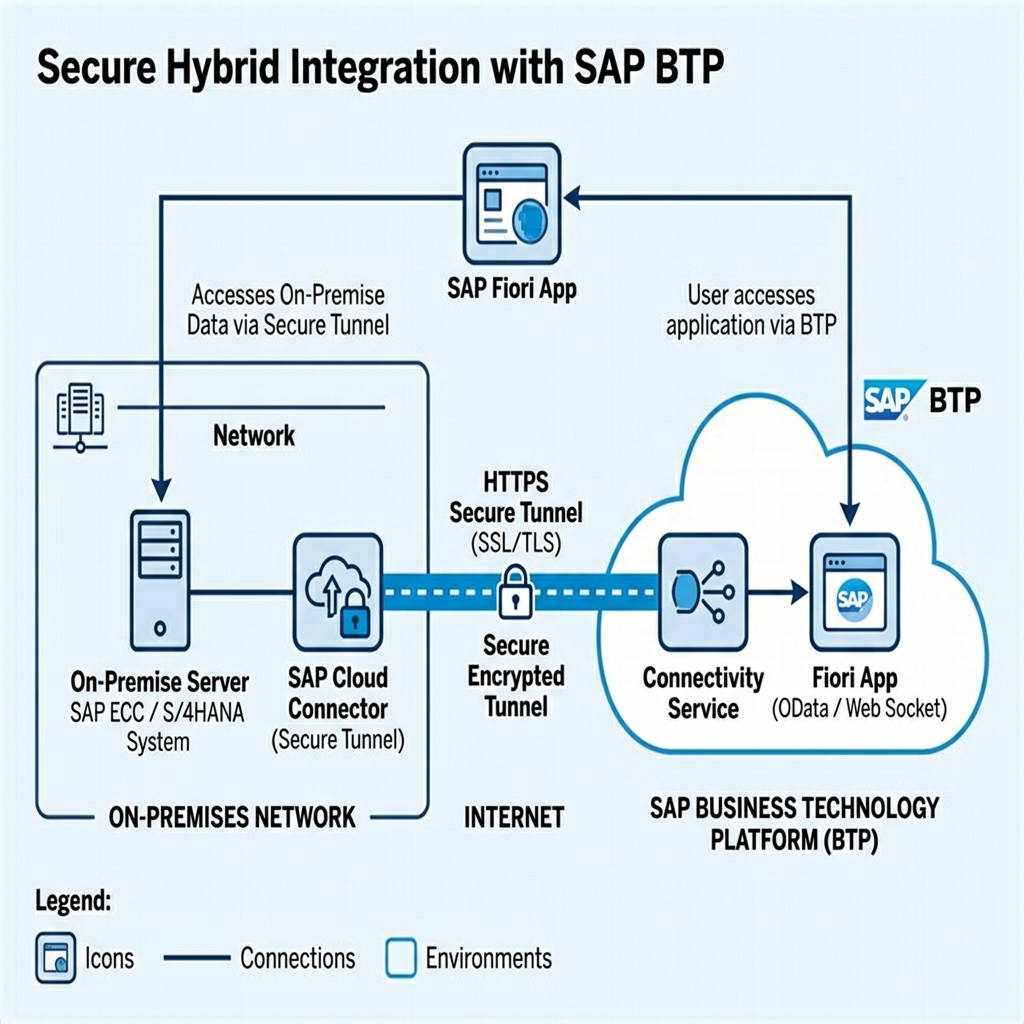
The Cloud Connector is an agent installed locally on-premise. It establishes a secure SSL/TLS tunnel connecting the cloud platform (SAP BTP) to the on-premise backend database without opening ports on the corporate firewall.
🙋♂️ **Q44. What is the difference between Smart Templates and Fiori Elements?**
There is no difference in concept. “Smart Templates” was the early name of the framework, which SAP later enhanced and renamed to “Fiori Elements”.
🙋♂️ **Q45. How do you handle custom business logic that Fiori Elements cannot generate automatically?**
You handle this by implementing controller extensions or embedding custom XML fragments. For backend logic, you define custom OData actions or function imports.
Section 4: HR / Behavioral Type Questions Related to Fiori Projects (Q46 – Q50)
🙋♂️ **Q46. Tell me about a Fiori project you have worked on.**
Explain your experience in a structured way:
- The Goal: What business process were you trying to solve (e.g., approving invoices)?
- The Stack: Standard Fiori Elements or custom SAPUI5? S/4HANA or ECC?
- Your Contribution: OData development, Launchpad configuration, or custom UI coding?
- The Result: Mention performance gains, reduced clicks, or positive user feedback.
🙋♂️ **Q47. What challenges did you face while developing Fiori apps and how did you resolve them?**
Provide a specific problem-solving scenario:
- Example challenge: High initial page load times due to massive metadata sizes.
- Resolution: Implemented lazy loading of non-critical views, grouped OData requests into batch actions, and configured browser metadata caching in the gateway.
🙋♂️ **Q48. How do you stay updated with new Fiori features?**
I follow the official SAP Community blogs, attend openSAP courses, read release notes on SAP Help Portal, and practice building prototypes in my BTP developer sandbox.

🙋♂️ **Q49. Why did you choose Fiori/UI5 as a career path?**
I enjoy connecting clean frontend UI design with powerful ERP enterprise logic. Fiori is also the core user experience for S/4HANA and cloud applications, making UI5 developers highly valuable in modern SAP transformations.
🙋♂️ **Q50. Where do you see yourself after mastering Fiori development?**
My goal is to grow into an SAP Full-Stack Developer. I want to build on my ABAP and Fiori knowledge to master cloud-native development on SAP BTP using the Cloud Application Programming (CAP) model.
Closing Notes
That’s the complete list of 50 SAP Fiori interview questions covering basic concepts to advanced scenario-based discussions. I tried my best to explain each answer in simple language so it stays useful for freshers as well as people with some experience already.
If you are preparing for an interview, don’t just memorize these answers. Try to actually build a small Fiori app on a trial system, understand annotations practically, and play with List Report and Object Page layouts. That practical exposure will help you answer follow-up questions confidently during the interview.

I keep sharing such practical SAP ABAP and Fiori content regularly on this blog, so keep visiting for more real interview experience-based posts.
All the best for your interview preparation!
Written by Daksh – SAP ABAP Developer in training

Written by Daksh Dedha
SAP Technical ConsultantDaksh is an SAP Technical Consultant specializing in ABAP programming, SAP S/4HANA migrations, Fiori development, and BTP cloud architecture. He authors free, hands-on tutorials to make enterprise SAP education accessible to all developers.
Test Your Knowledge
Loading question...
Quiz Completed
Related Tutorials
SAP Fiori End to End Implementation — From Backend to Launchpad in Plain Steps
Complete SAP Fiori end to end implementation guide. Covers backend activation, OData service setup, Fiori Launchpad configuration, role assignment, and testing.
SAP FioriSAP Fiori Launchpad Configuration — Complete Setup and Customization Guide
Step by step guide to SAP Fiori Launchpad configuration. Learn how to set up catalogs, groups, spaces, pages, custom tiles, and role-based access in FLP.
SAP FioriTop 30 SAP SD Interview Questions & Answers – Complete Guide
Master your next SAP Sales and Distribution (SD) functional interview. Study core concepts, the OTC cycle, Pricing Procedures, and logistics configuration.
Found this tutorial useful? Share it with your SAP development team.