
Top 30 SAP SD Interview Questions & Answers – Complete Guide
Table of Contents
Top 30 SAP SD (Sales and Distribution) Interview Questions and Answers – Complete Guide

If you are preparing for an SAP SD (Sales and Distribution) functional consultant interview, you are in the right place. Whether you are a fresher entering the SAP ecosystem or an experienced consultant gearing up for S/4HANA transitions, this full guide covers the actual questions asked in real technical rounds.
Based on my learning journey and discussions with senior SAP architects, I have compiled 30 core questions, dividing them into logical business areas: Organizational Structure, Master Data, the Order-to-Cash (OTC) lifecycle, Pricing Procedures, and logistics.
Let’s get started!
What is SAP SD? (Basic Understanding)
SAP Sales and Distribution (SD) is one of the core ERP modules that manages all transactions related to customer inquiries, quotations, sales orders, shipping, billing, and payments. It acts as the backbone of customer-facing sales operations and integrates deeply with Material Management (MM), Production Planning (PP), and Financial Accounting (FI).
Let’s jump into the technical questions.
Section 1: Organizational Structure & Master Data
This section covers the fundamental building blocks of the Sales and Distribution enterprise model and customer/material integration.
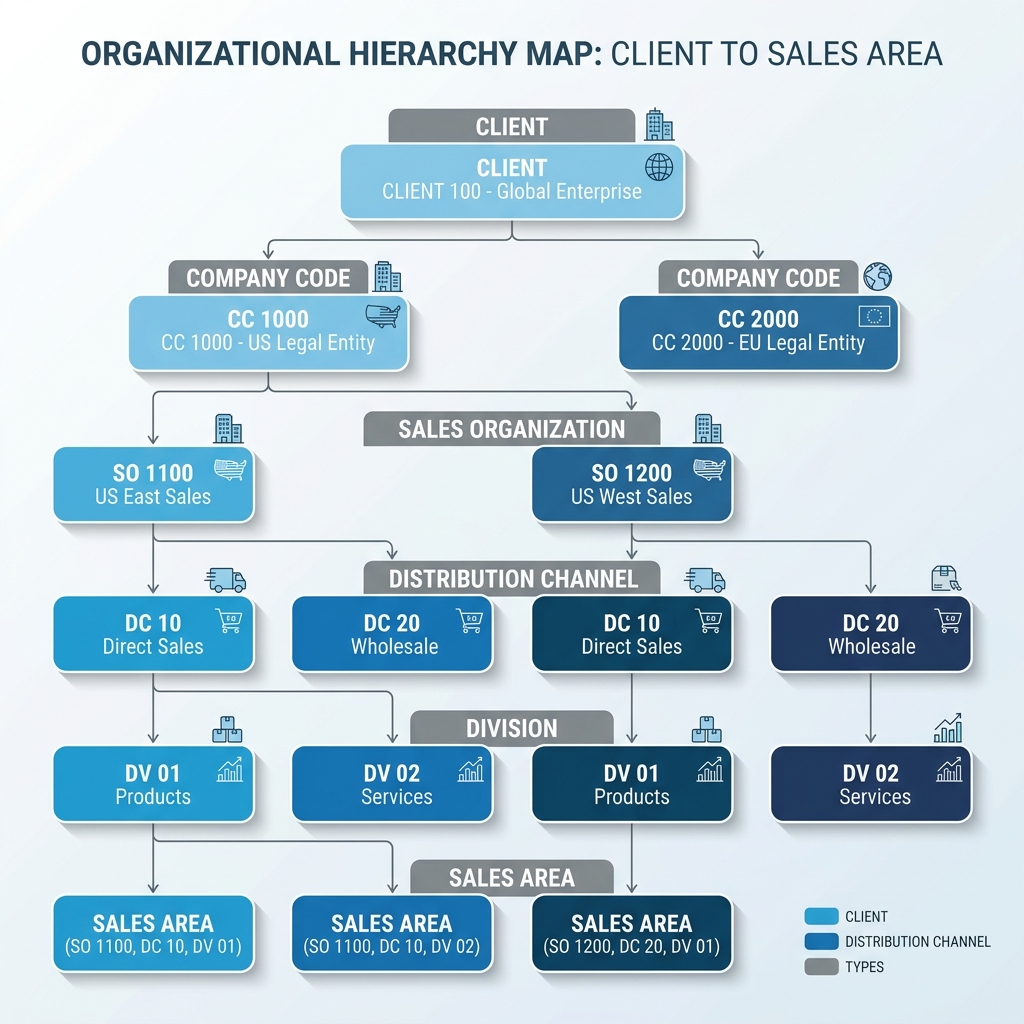
🙋♂️ **Q1. What is a Sales Area in SAP SD?**
A Sales Area is a key organizational unit in SAP SD. It is a unique combination of three specific organizational elements:
- Sales Organization: The legal entity responsible for sales, distribution, and product liabilities.
- Distribution Channel: The channel or medium through which products or services reach the customer (e.g., Wholesale, Retail, Direct Sales, Online).
- Division: A product group or line of business (e.g., Electronics, Services, Spare Parts).
Why is it important?
Every sales document (Inquiry, Quotation, Sales Order) must be assigned to a single Sales Area. also, pricing, master data validation, and sales statistics are always determined at the Sales Area level.
🙋♂️ **Q2. Explain the relationship between a Sales Organization, a Distribution Channel, and a Division.**
The relationship is configured in the Enterprise Structure mapping:
- Sales Organization to Company Code: A Sales Organization is assigned to exactly one Company Code. This ensures that sales revenues are directly posted to the correct legal accounting books.
- Distribution Channel to Sales Organization: A Distribution Channel is assigned to one or more Sales Organizations.
- Division to Sales Organization: A Division is assigned to one or more Sales Organizations.
Together, these assignments define the valid Sales Areas. A single sales office can operate in multiple distribution channels and divisions under the same sales organization.
🙋♂️ **Q3. Can a Sales Organization be assigned to more than one Company Code?**
No. A Sales Organization can be assigned to exactly one Company Code.
This is a strict 1-to-many relationship mapping in SAP. While a Company Code can have multiple Sales Organizations assigned to it (e.g., one for domestic sales, one for export sales), a single Sales Organization cannot cross corporate legal boundaries. If you need to sell products for different legal entities, you must define separate Sales Organizations.
🙋♂️ **Q4. What is a Customer-Material Info Record (CMIR) and what is its transaction code?**
A Customer-Material Info Record (CMIR) stores customer-specific data for a particular material. It acts as an override layer.
- T-codes: VD51 (Create), VD52 (Change), VD53 (Display).
- Key Use Cases:
- Mapping the customer’s internal material number to your company’s material number.
- Setting a customer-specific shipping point or delivery tolerance.
- Specifying whether partial deliveries are allowed for this specific customer/material combination.
During sales order entry, the system searches for a CMIR first. If it exists, it overrides the general data in the Material Master or Customer Master.
🙋♂️ **Q5. Explain the differences between the four primary Partner Functions: Sold-To, Ship-To, Bill-To, and Payer.**
Partner Functions define the roles that business partners play in a transaction:
- Sold-To Party (SP): The primary customer who places the order. They control the terms of the contract. The Sold-To party cannot be changed during sales order processing.
- Ship-To Party (SH): The physical address where the goods are delivered. Determines the tax jurisdiction and shipping route.
- Bill-To Party (BP): The partner to whom the invoice is sent. Controls the physical delivery of billing documentation.
- Payer (PY): The person or corporate entity responsible for paying the invoice. Controls credit limits and receives G/L accounting entries.
🙋♂️ **Q6. What are Common Distribution Channels and Common Divisions? How do they help?**
In a large enterprise, maintaining master data (customer master, pricing conditions) for every single distribution channel and division can create massive database administration overhead.
- Common Distribution Channel (T-code VOR1): Allows you to share customer and pricing conditions from one main channel (e.g., Wholesale) with secondary channels (e.g., Retail or Online).
- Common Division (T-code VOR2): Allows you to share master data across multiple divisions.
Benefit: If you define a customer in the Wholesale channel, you do not need to re-create their master record for Retail or Online if those channels are mapped to a Common Distribution Channel.
🙋♂️ **Q7. How does Partner Determination work in SAP SD?**
Partner Determination is the configuration mechanism that automatically assigns valid business partners to sales documents, deliveries, or billing items based on the Sold-To party.
- Configuration Steps:
- Define Partner Roles (e.g., Sold-To, Ship-To).
- Create a Partner Determination Procedure (PDP).
- Assign Partner Functions to the PDP, specifying which are mandatory (e.g., Sold-To and Payer must exist).
- Assign the PDP to the target object (e.g., Sales Document Type like OR, or Customer Account Group like 0001).
🙋♂️ **Q8. What are the key database tables that store Customer and Material Master data?**
Master data is split across general, organizational, and transactional tables:
- Customer Master tables:
- KNA1: General Customer Data (Address, Name, Country).
- KNB1: Customer Company Code Data (Reconciliation account, payment terms).
- KNVV: Customer Sales Area Data (Pricing group, shipping conditions, sales office).
- KNVP: Customer Partner Functions.
- Material Master tables:
- MARA: General Material Data (Weight, unit of measure).
- MARC: Plant Data for Material (ATP check group, profit center).
- MVKE: Sales Data for Material (Tax classification, delivering plant).
Section 2: Order-to-Cash (OTC) Cycle
This section covers the standard logistics cycle and the technical rules that control sales document flow.
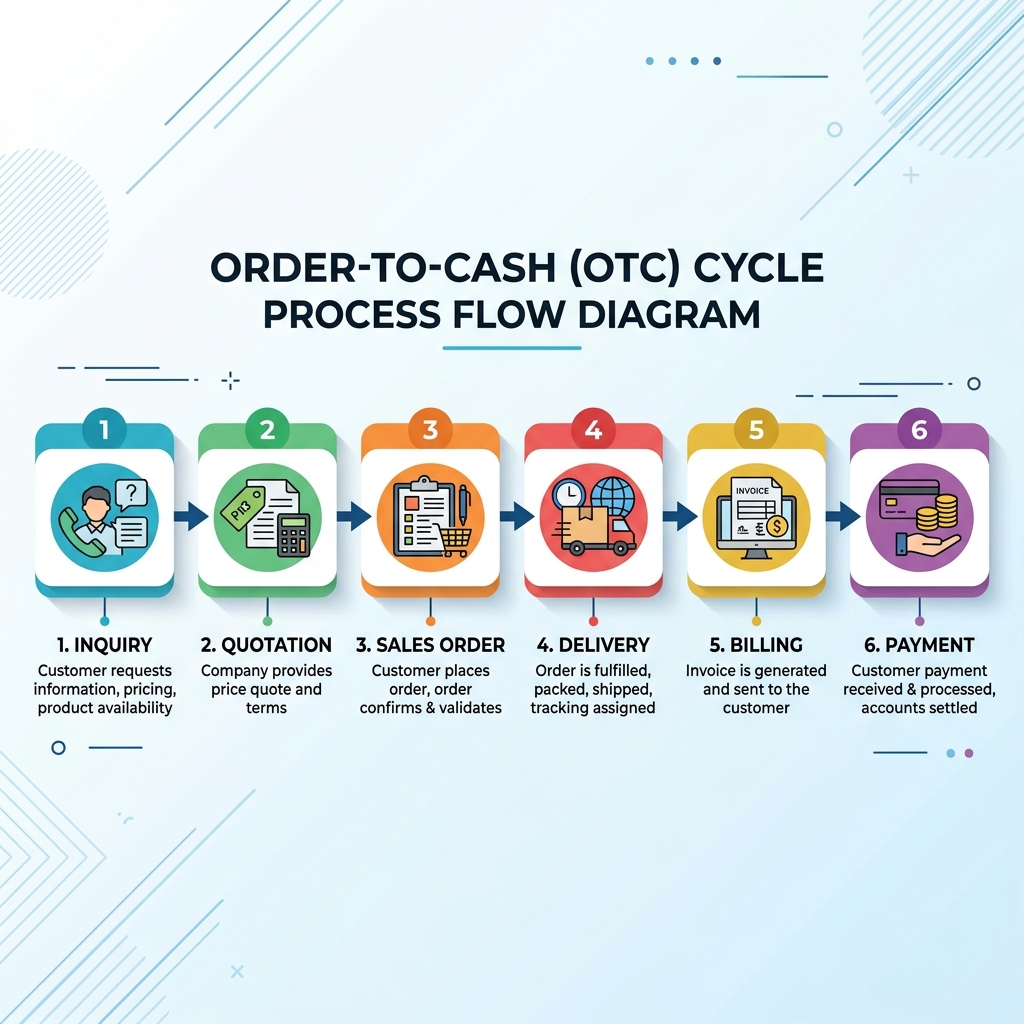
🙋♂️ **Q9. Describe the step-by-step document flow of the Order-to-Cash (OTC) cycle.**
The standard OTC cycle consists of the following logical steps:
- Inquiry (T-code VA11): Pre-sales document recording customer interest.
- Quotation (T-code VA21): Legal binding offer sent to the customer containing pricing and availability terms.
- Sales Order (T-code VA01): The contractual sales agreement.
- Outbound Delivery (T-code VL01N): Logistics staging. Includes:
- Picking: Selecting stock from warehouse shelves (optional integration with WM/EWM).
- Packing: Preparing boxes or pallets.
- Post Goods Issue (PGI): Deducting stock from inventory and transferring ownership.
- Billing (T-code VF01): Creating the customer invoice.
- Payment (T-code F-28): Recording payment from the customer (FI integration).
🙋♂️ **Q10. How does the system determine the Shipping Point in a Sales Order?**
The Shipping Point is determined automatically at the sales order item level using a search rule based on three key parameters: $$\text{Shipping Point} = f(\text{Shipping Conditions} + \text{Loading Group} + \text{Delivering Plant})$$
- Shipping Conditions: Derived from the Customer Master (Sales Area -> Shipping tab) or overridden by the Sales Document Type.
- Loading Group: Derived from the Material Master (Sales: General/Plant Data).
- Delivering Plant: Derived from the Customer-Material Info Record, Customer Master, or Material Master.
T-code configuration path: SPRO -> Enterprise Structure -> Assignment -> Logistics Execution -> Assign shipping points.
🙋♂️ **Q11. What is the difference between a Cash Sales and a Rush Order?**
Both are expedited order processing scenarios, but they differ in billing and document scheduling:
- Cash Sales (Order Type BV/CS):
- Used when the customer pays cash immediately and picks up the goods.
- Creating the order automatically creates a delivery in the background.
- An invoice document is printed immediately as a cash receipt.
- Billing is order-related.
- Rush Order (Order Type RO):
- Used when the customer needs delivery immediately but payment is processed later on credit terms.
- Creating the order automatically creates a delivery, but no invoice is generated immediately.
- Billing is delivery-related and done later via collective billing runs.
🙋♂️ **Q12. What is the Incompleteness Procedure and how is it configured?**
The Incompleteness Procedure checks if mandatory fields are missing during document processing (e.g., missing shipping point, payment terms, or pricing).
- Configuration Steps:
- Identify the target fields (e.g., table
VBKD, fieldZTERMfor payment terms). - Create an Incompleteness Schema and assign these fields to it, specifying a status group (e.g., blocks delivery, blocks billing).
- Assign the schema to the target object (e.g., Sales Document Header, Item Category, or Schedule Line).
- If a user tries to save a document with blank values for these fields, the system shows a warning and blocks downstream document processing.
- Identify the target fields (e.g., table
🙋♂️ **Q13. How does the system determine the Delivering Plant in a Sales Order?**
The system searches for the delivering plant in a hierarchical sequence:
- Customer-Material Info Record (CMIR): Checks if a plant is defined for this specific customer/material combo.
- Customer Master (Sales Area -> Shipping tab): If not found in CMIR, checks the customer’s defaults.
- Material Master (Sales: Org 1 tab): If not found in either, defaults to the plant defined on the material card.
🙋♂️ **Q14. Explain the difference between an Item Category and a Schedule Line Category.**
- Item Category (e.g., TAN): Controls behavior at the line-item level. It determines whether pricing is calculated, whether it is a text item, whether billing is allowed, and if a delivery can be created.
- Schedule Line Category (e.g., CP): Controls physical logistics. It determines whether stock is checked (Availability check/ATP), whether requirements are transferred to production/purchasing (TOR), and if a delivery block should be default.
🙋♂️ **Q15. How is the Item Category determined in a Sales Order?**
The Item Category is determined at runtime based on four parameters: $$\text{Item Category} = f(\text{Sales Document Type} + \text{Item Category Group} + \text{Usage} + \text{Higher-level Item Category})$$
- Sales Document Type: (e.g., OR, QT, IN).
- Item Category Group: Derived from the Material Master (e.g., NORM for standard items, BANC for third-party).
- Usage: Internal program indicators (e.g., FREE, text).
- Higher-level Item Category: Used in BOMs (Bill of Materials) or sub-items.
T-code configuration: VOV4.
🙋♂️ **Q16. How is the Schedule Line Category determined in a Sales Order?**
The Schedule Line Category is determined based on two parameters: $$\text{Schedule Line Category} = f(\text{Item Category} + \text{MRP Type / Account Assignment Group})$$
- Item Category: (e.g., TAN).
- MRP Type: Derived from the Material Master MRP 1 tab (e.g., PD for planned, ND for no planning).
T-code configuration: VOV5.
Section 3: Pricing Procedure & Condition Technique
This section covers the pricing engine, calculation logic, and condition techniques.
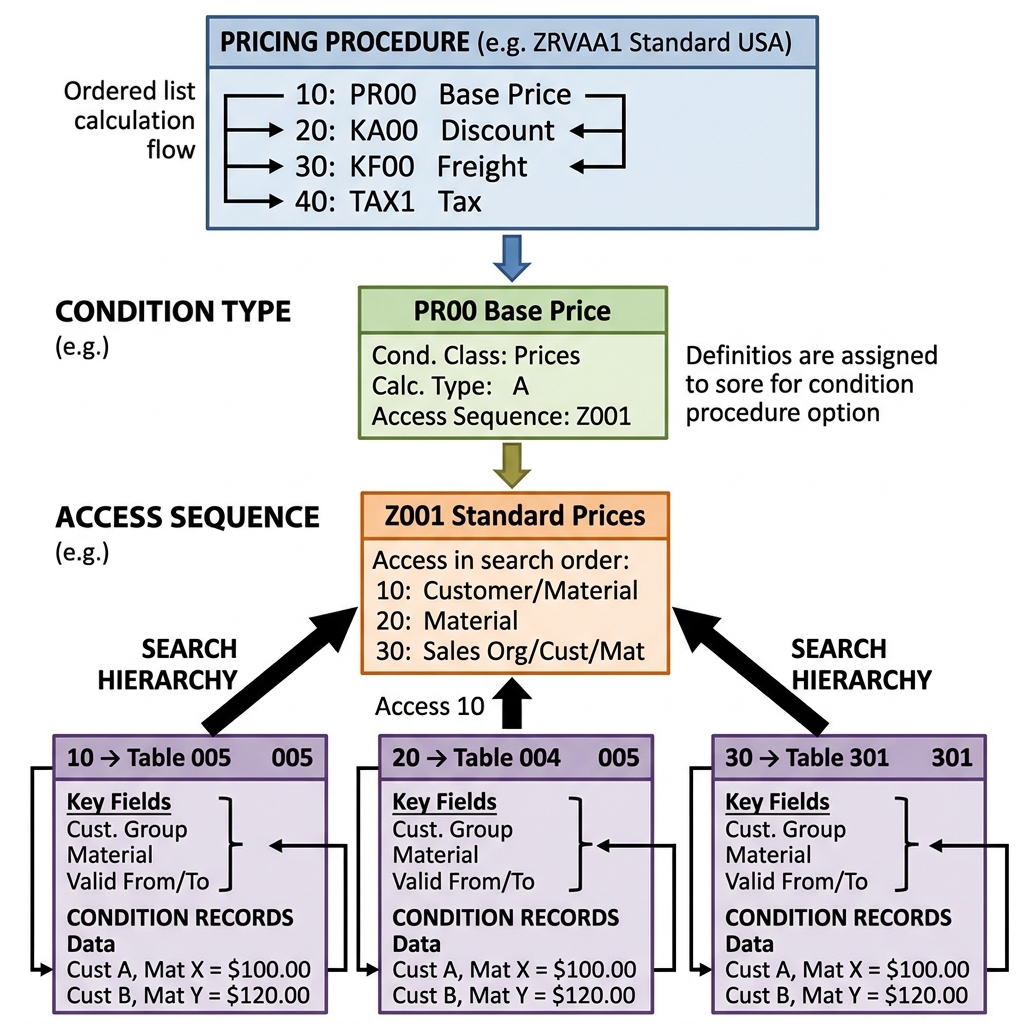
🙋♂️ **Q17. What is the Condition Technique in SAP SD?**
The Condition Technique is a search framework used to find valid pricing, tax, output, or account determination records. It searches from specific records to general records.
- Key Elements:
- Condition Table: Stores database key fields (e.g., Sales Org/Customer/Material).
- Access Sequence: A search strategy containing condition tables ordered from specific to general.
- Condition Type: Represents a pricing factor (e.g., Base Price PR00, Customer Discount K007, tax MWST).
- Pricing Procedure: A list of Condition Types sequenced to calculate net values.
🙋♂️ **Q18. How is the Pricing Procedure determined in a Sales Order?**
The Pricing Procedure is determined automatically at the sales order header level using five parameters: $$\text{Pricing Procedure} = f(\text{Sales Org} + \text{Dist. Channel} + \text{Division} + \text{Customer Pricing Procedure} + \text{Document Pricing Procedure})$$
- Sales Area: (Sales Org, Dist. Channel, Division).
- Customer Pricing Procedure (CPP): Defined in the Customer Master (Sales Area -> Billing tab).
- Document Pricing Procedure (DPP): Defined in the Sales Document Type configuration (e.g., ‘A’ for standard order OR).
T-code configuration: OVKK.
🙋♂️ **Q19. What is the purpose of the "Requirement" field in the Pricing Procedure?**
In a Pricing Procedure, the Requirement column contains an ABAP rule number (configured via transaction VOFM).
- Purpose: It specifies a condition that must be met before a Condition Type is executed or displayed.
- Example: Requirement
2(Item with pricing) ensures that the PR00 condition is skipped for text-only items. Requirement24(Only in billing document) ensures that a rebate discount is only calculated during invoicing, not during sales order entry.
🙋♂️ **Q20. What is an Access Sequence? Can a Condition Type exist without one?**
An Access Sequence is a search strategy that defines the order in which the system searches for condition records across different Condition Tables.
- Can a Condition Type exist without one?
- Yes. Header-only conditions (like manual freight charges or overall customer discounts) do not require an Access Sequence because they are entered manually during sales order processing and do not require database lookup.
🙋♂️ **Q21. Explain the differences between "Statistical" and "Manual" flags in the Pricing Procedure.**
- Manual Flag: If checked, the Condition Type cannot be determined automatically by the system. The user must add it manually to the sales order item conditions.
- Statistical Flag: If checked, the condition value is calculated and displayed on the screen for informational purposes, but it is not added to the net value of the invoice. Used for cost calculations (VPRS) or internal rebate accumulations.
🙋♂️ **Q22. What is the transaction code to maintain condition records, and what are the main database tables?**
- T-codes:
- VK11: Create Condition Record.
- VK12: Change Condition Record.
- VK13: Display Condition Record.
- Database Tables:
- KONH: Condition Header.
- KONP: Condition Item (storing pricing rate and calculation rules).
- KONV: Document-level condition cluster (S/4HANA replaced this with the
PRCD_ELEMENTStable for performance optimization).
🙋♂️ **Q23. What is the difference between Header Conditions and Item Conditions?**
- Item Conditions: Applied specifically to a single line item (e.g., material-specific discount). They rely on access sequences.
- Header Conditions: Applied to the entire document.
- Examples: Overall discount value (RC00) or overall discount percentage (RA01).
- They do not have access sequences and must be entered manually.
- The system distributes header conditions across items using the active item values (weight, volume, or net price).
🙋♂️ **Q24. How does the system determine the tax (e.g., MWST) in a Sales Order?**
Tax determination is executed using the condition technique (usually via condition type MWST): $$\text{Tax Rate} = f(\text{Country of Delivering Plant} + \text{Tax Classification of Customer} + \text{Tax Classification of Material})$$
- Tax Classification of Customer: Derived from the Customer Master (Billing tab). It defines whether the customer is tax-exempt or liable (0 or 1).
- Tax Classification of Material: Derived from the Material Master (Sales Org 1 tab). Defines if the material is tax-liable (0 or 1).
Section 4: Shipping, Delivery & Billing
This section covers physical inventory changes, delivery status, credit checks, and revenue accounting integration.

🙋♂️ **Q25. Explain the outbound delivery sequence: Picking, Packing, and Post Goods Issue (PGI).**
Outbound delivery maps the physical logistics sequence:
- Picking: Staging the materials. Materials are moved from storage bins to shipping zones. Can be updated manually or via a Transfer Order (TO) in Warehouse Management (WM).
- Packing (Optional): Grouping picked items into shipping containers (Handling Units).
- Post Goods Issue (PGI): The final step of the delivery document. It updates the inventory status.
🙋♂️ **Q26. What technical and accounting changes occur when Post Goods Issue (PGI) is saved?**
Executing PGI triggers critical updates across multiple ERP modules:
- Logistics updates:
- Inventory levels are reduced in the MM module.
- Delivery document status is updated to “Complete”.
- Requirements (ATP) are cleared.
- Accounting updates (FI/CO):
- An accounting document is posted.
- Debit: Cost of Goods Sold (COGS) account.
- Credit: Inventory asset account (valuated at material standard price).
🙋♂️ **Q27. What is the difference between Delivery-Related Billing and Order-Related Billing?**
- Delivery-Related Billing (e.g., Invoice F2): Used when the invoice represents physical goods shipped to a customer (e.g., standard sales order). The billing document cannot be created until Post Goods Issue (PGI) is completed.
- Order-Related Billing (e.g., Invoice F5): Used for service items, third-party sales, or credit/debit memo requests. There is no physical delivery. The invoice is generated directly from the sales order details.
🙋♂️ **Q28. What is Credit Management in SAP SD and how does a credit block work?**
Credit Management minimizes company financial risk. It monitors customer credit limits.
- Simple Credit Check: Compares the customer’s total value of open orders + open deliveries + open invoices against a static credit limit defined in transaction FD32.
- Automatic Credit Check: Allows dynamic checks (e.g., assessing payment history, past-due invoices, and critical fields).
- Credit Block: If a limit is exceeded, the system blocks delivery creation. The block must be reviewed and released by a credit manager using transaction VKM3 or VKM5.
🙋♂️ **Q29. How does automatic G/L Account Determination work (SD to FI integration)?**
Account Determination automatically finds the correct revenue and sales deduction G/L accounts during billing.
- Search Rule (T-code VKOA):
- Application: ‘V’ (Sales).
- Condition Type: ‘KOFI’ (Standard Account Determination) or ‘KOFK’ (with CO assignment).
- Chart of Accounts: Defined at the company code level.
- Sales Org: (e.g., 1000).
- Account Assignment Group of Customer: Derived from Customer Master (Billing tab).
- Account Assignment Group of Material: Derived from Material Master (Sales Org 2 tab).
- Account Key: Defined in the Pricing Procedure (e.g., ERL for revenue, ERS for deductions).
🙋♂️ **Q30. What is a Proforma Invoice and how is it different from a standard invoice?**
- Proforma Invoice (e.g., F5/F8):
- A temporary draft document used solely for customs clearance or export documentation.
- Does not post accounting entries to FI G/L accounts.
- Can be created multiple times for the same order or delivery.
- Standard Invoice (e.g., F2):
- A legally binding invoice document.
- Creates G/L postings immediately, updating accounts receivable.
- Can only be created once per transaction.
Putting It All Together
That is the complete list of 30 SAP SD interview questions. Understanding these core configuration logic items—especially pricing determination, partner determination, and delivery accounting steps—is essential to succeeding in your functional consultant interview rounds.

Keep studying, practice configuring these paths in your sandbox system, and check out my other SAP training guides!
All the best for your interview preparation!
Written by Daksh – SAP ABAP & Functional Developer in training

Written by Daksh Dedha
SAP Technical ConsultantDaksh is an SAP Technical Consultant specializing in ABAP programming, SAP S/4HANA migrations, Fiori development, and BTP cloud architecture. He authors free, hands-on tutorials to make enterprise SAP education accessible to all developers.
Test Your Knowledge
Loading question...
Quiz Completed
Related Tutorials
SAP Fiori End to End Implementation — From Backend to Launchpad in Plain Steps
Complete SAP Fiori end to end implementation guide. Covers backend activation, OData service setup, Fiori Launchpad configuration, role assignment, and testing.
SAP FioriSAP Fiori Launchpad Configuration — Complete Setup and Customization Guide
Step by step guide to SAP Fiori Launchpad configuration. Learn how to set up catalogs, groups, spaces, pages, custom tiles, and role-based access in FLP.
SAP FioriTop 50 SAP Fiori Interview Questions (With Answers) – Complete Guide
Master your next SAP Fiori job interview with this complete guide of 50 questions covering basic principles, architecture, Fiori Elements, OData, and
Found this tutorial useful? Share it with your SAP development team.