
Why SAP Fiori Matters More Than You Think: Benefits Nobody Talks About Enough
Table of Contents
- • What Problem Did SAP Fiori Solve?
- • Benefit 1: Role-Based User Experience
- • Benefit 2: Mobile Responsiveness by Design
- • Benefit 3: Embedded Real-Time Analytics
- • Benefit 4: Extensibility Without Core Modifications
- • Benefit 5: Real-Time Notifications and Approvals
- • Benefit 6: Consistent Multi-Solution Visual Language
- • Benefit 7: Foundation for Intelligent Enterprise Features
- • Conclusion: Prioritizing Your Fiori Transition
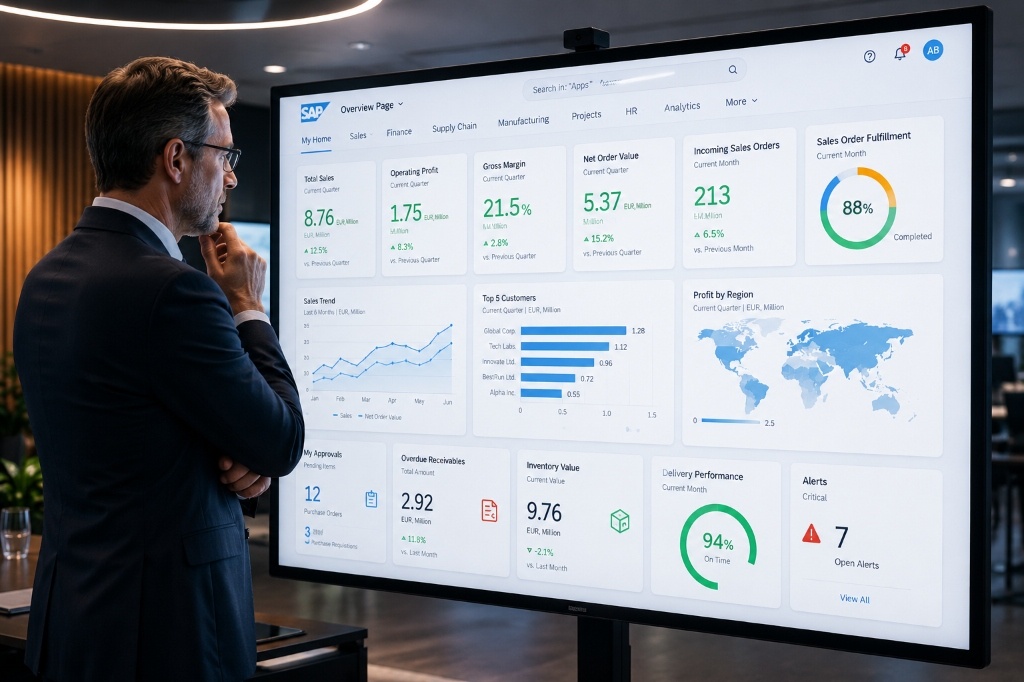 Figure 1: SAP Fiori analytical dashboards and overview pages provide direct visual insight for real-time decision-making.
Let me tell you about a real-world SAP project I heard about from a senior consultant. A manufacturing company based in Pune had been running SAP ECC for over 12 years. Their shop floor supervisors were tasked with approving production orders every single day.
To complete this simple action, a supervisor had to walk all the way back to their desk, open the desktop SAP GUI, log in, navigate through five different transaction screens, and finally hit approve. Doing this on a mobile device or quickly from the factory floor was virtually impossible.
After the company migrated to SAP S/4HANA and enabled SAP Fiori, that exact same approval process was reduced to two simple taps on a smartphone. The supervisor could perform approvals standing right next to the production line in under 10 seconds. This single visual workflow change saved each supervisor an average of 45 minutes every single day.
That is what SAP Fiori is truly about. It is not just a cosmetic upgrade, a theme change, or a modern skin. It is a fundamental shift in how people interact with enterprise software, and a demonstration of what becomes possible when system friction is completely removed.
In this post, we will cover the core benefits of SAP Fiori in modern SAP systems—not the glossy marketing pitch, but the actual benefits that consultants and end-users experience on live production projects.
What Problem Did SAP Fiori Solve?
To appreciate what SAP Fiori brings to modern enterprises, you first need to understand the limitations of what existed before it. Traditional SAP GUI (Graphical User Interface) was built for desktop computers in the 1990s. While it was incredibly stable and functional, it came with serious usability challenges:
- Transaction-Code Overload: Every system action required a specific 4-character transaction code. For instance, users had to memorize
ME21Nfor Create Purchase Order,MIGOfor Goods Receipt, andVA01for Create Sales Order. Beginners spent weeks memorizing these codes to become productive. - Cluttered, Dense Screens: A typical SAP Materials Management (MM) screen could display 40 or more input fields at once. Most users only ever needed three or four of these fields, meaning the rest of the interface was distracting and intimidating clutter.
- Zero Mobile Support: SAP GUI was designed strictly for desktop PCs. It simply did not scale down to mobile viewports, which was a massive gap as businesses moved toward mobile workflows.
- No Role-Based Simplification: A warehouse clerk saw the exact same complex transaction screens as a configuration consultant, even though their actual daily job required only a fraction of that functionality.
SAP Fiori was developed as SAP’s answer to these exact paint points. The benefits it delivers go far deeper than aesthetic improvements.
Benefit 1: Role-Based User Experience
The core design philosophy behind SAP Fiori is to change how users interact with the ERP. Instead of forcing every employee to navigate a massive, standardized system, SAP Fiori builds the experience around specific roles and tasks.
Instead of typing transaction codes, users access a personalized Fiori Launchpad. This is an intuitive, tile-based homepage showing only the applications relevant to that user’s specific job role.
- Purchase Managers see tiles for Purchase Order approvals, vendor evaluations, and spend analytics.
- Warehouse Operators see tiles for Goods Receipts, transfer order confirmations, and stock overviews.
- Financial Controllers see tiles for payment approvals, journal entry postings, and cash flow forecasts.
The underlying SAP database remains identical, but the presentation layer on top is tailored precisely to what each individual needs to complete their tasks.
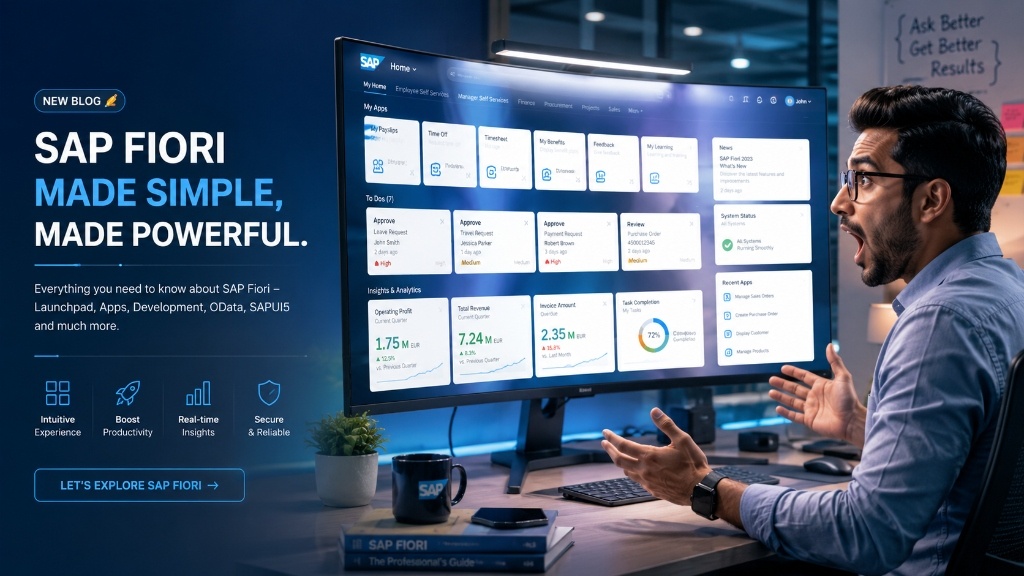 Figure 2: The personalized SAP Fiori Launchpad presents clean, role-based tiles instead of complex transaction codes.
[!TIP] Reduced Training Overhead: Companies implementing role-based Fiori Launchpads report massive reductions in training times. New hires who previously needed three to four weeks to learn SAP GUI navigation are often functional in Fiori within a few days because they only see what is relevant to their job.
Benefit 2: Mobile Responsiveness by Design
Unlike legacy mobile solutions that squeezed desktop layouts onto tiny screens, SAP Fiori was built mobile-first from its inception. The apps use a responsive layout that adapts dynamically to desktops, laptops, tablets, and smartphones.
For industries where work happens away from a desk—such as manufacturing, logistics, field service, retail, and healthcare—this responsiveness makes a massive difference:
- A field technician can confirm service order completion and log spare parts directly from the customer site.
- A logistics driver can post a goods receipt at the loading dock.
- A sales representative can check customer credit limits during a client meeting.
- A plant manager can review and approve emergency maintenance orders on the go.
| Feature | Traditional SAP GUI | Modern SAP Fiori |
|---|---|---|
| User Interface | Desktop-based, dense screens with up to 40+ fields. | Web-based, role-oriented, clean layout with only relevant fields. |
| Navigation | Transaction-code-driven (e.g., ME21N, VA01) requiring heavy training. | Intuitive tile-based Launchpad with instant search and search filters. |
| Device Support | Restricted to desktop environments (PCs). | Fully responsive grid supporting desktops, tablets, and mobile phones. |
| Real-time Context | Separated reports; users must navigate out of workflows. | Embedded real-time analytics, charts, and KPI metrics on same screen. |
| Customizations | Program modification (core modifications) which can break updates. | Upgrade-safe key user adaptations and developer extensions. |
| Action approach | Pull-based (check inbox manually). | Push-based with real-time browser & mobile alerts. |
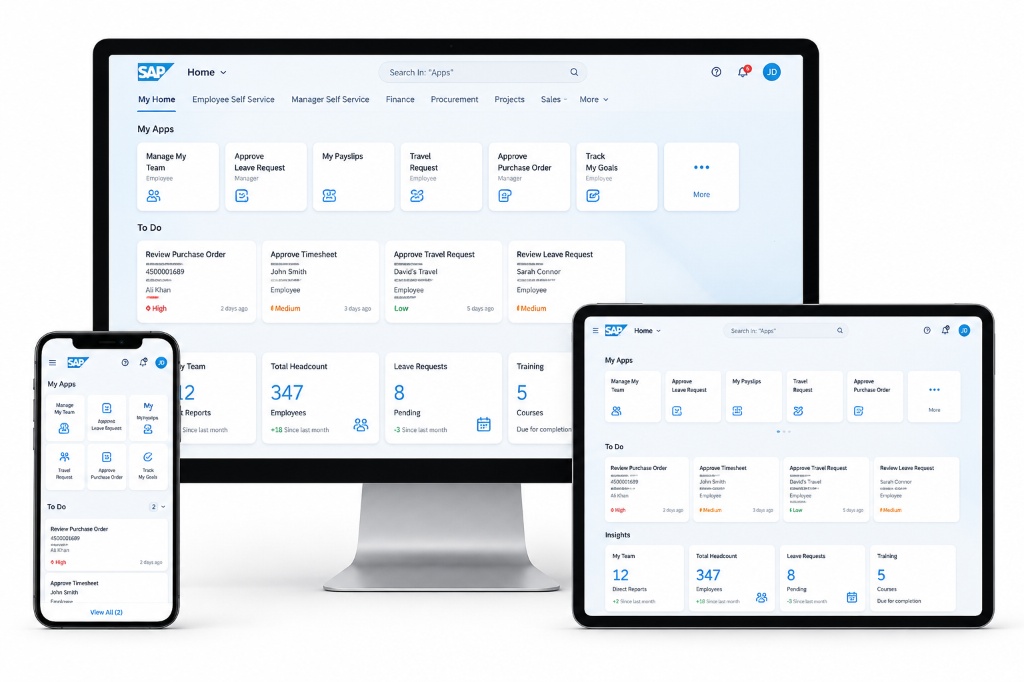 Figure 3: SAP Fiori applications dynamically scale layout templates across desktops, tablets, and mobile screens.
By capturing data at the point of activity rather than waiting for batch entries at the end of the day, organizations significantly reduce data-entry errors and capture operational metrics in real time.
Benefit 3: Embedded Real-Time Analytics
In legacy systems, reporting was isolated. A user had to exit their operational screen, open a separate reporting transaction or BI tool, export data, and return. SAP Fiori breaks down this barrier by embedding real-time analytics directly into daily workflows.
Using Analytical List Pages and Overview Pages, users can see live operational metrics alongside transactional buttons. For example, a procurement specialist reviewing purchase requisitions can view spend trend charts, vendor performance records, and budget consumption graphs on the very same page.
To power these analytics on the backend, developers write high-performance CDS (Core Data Services) Views in the ABAP layer. Here is a simple example of a CDS view configured to deliver real-time data to a Fiori card:
@AbapCatalog.sqlViewName: 'ZDEMO_CDS_PO'
@AbapCatalog.compiler.compareFilter: true
@AccessControl.authorizationCheck: #NOT_REQUIRED
@EndUserText.label: 'Purchase Order Analytics for Fiori'
define view ZDemo_PO_Analytics as select from ekko as Header
  association [1..*] to ekpo as _Items on Header.ebeln = _Items.ebeln
{
  key Header.ebeln as PurchaseOrder,
  Header.lifnr as Supplier,
  Header.waers as Currency,
  Header.wkurs as ExchangeRate,
  @Semantics.amount.currencyCode: 'Currency'
  sum(_Items.netpr) as TotalAmount
} group by Header.ebeln, Header.lifnr, Header.waers, Header.wkurs
Because these views run directly on the SAP HANA in-memory database, calculations occur at the database level (code pushdown) rather than loading entire tables into the application server, allowing complex reports to run in milliseconds.
Benefit 4: Extensibility Without Core Modifications
One of the greatest technical advantages of SAP Fiori for ABAP developers and consultants is its clean extensibility model. Historically, customizing SAP GUI screens required changing standard SAP code, which created high maintenance costs and complex upgrade paths.
Fiori provides multiple layers of personalization that protect the core system:
- Key User Adaptation: Authorized business users can drag and drop fields, rename labels, and hide sections directly inside the browser using visual tools—no coding required.
- Fiori Elements Extensions: Developers can extend standard SAP Fiori templates (like List Reports or Object Pages) by adding custom columns, action buttons, or sections using clean annotation overrides.
- Custom SAPUI5 Apps: When unique requirements arise, developers can build custom frontend applications using the SAPUI5 framework and bind them to custom OData APIs, leaving the standard core software untouched.
This upgrade-safe architecture ensures that future system upgrades do not break custom layouts, lowering the overall cost of ownership.
Benefit 5: Real-Time Notifications and Approvals
The Fiori Launchpad features a built-in notification center that pushes real-time alerts to users. Instead of constantly monitoring system tables or waiting for automated emails, users receive instant updates when their attention is required:
- A purchasing manager is notified when a high-value purchase order requires review.
- An HR specialist is alerted when a leave request is submitted.
- A warehouse manager receives an alert if an inventory level falls below a safety threshold.
Users can click directly on a notification, review the context, and approve or reject the request in a single click, keeping key business processes moving smoothly.
Benefit 6: Consistent Multi-Solution Visual Language
Before SAP Fiori, a company running multiple SAP acquisitions (like SuccessFactors, Ariba, Concur, or Fieldglass) faced a disjointed user experience. Employees had to relearn navigation, button styles, and visual flows as they switched between solutions.
SAP Fiori provides a unified design system across the entire SAP cloud portfolio. Whether an employee is submitting expenses in Concur, requesting resources in Fieldglass, or tracking sales in S/4HANA, the interface uses the same typography, icon library, and interaction patterns. This consistency reduces cognitive load and accelerates employee onboarding across different departments.
Benefit 7: Foundation for Intelligent Enterprise Features
SAP is aggressively embedding machine learning, predictive analytics, and natural language interfaces into its core products. The front door for these intelligent features is SAP Fiori.
From the Fiori Launchpad, users can interact with SAP Joule (SAP’s generative AI copilot), receive automated payment matching suggestions, view system anomaly warnings, and use predictive stock level indicators. By adopting SAP Fiori today, organizations lay the essential user-interface foundation required to run tomorrow’s AI-assisted enterprise processes.
Conclusion: Prioritizing Your Fiori Transition
If your organization has migrated to SAP S/4HANA but is still relying on classic SAP GUI screens, you are leaving a significant portion of your software investment on the table. SAP Fiori is not an optional aesthetic addition; it is the core engine that unlocks S/4HANA’s speed, mobility, and embedded intelligence.
For developers and consultants, Fiori skills are no longer just a nice-to-have addition. System integrators and enterprise clients are actively seeking professionals who understand:
- Modern frontend development with the SAPUI5 framework.
- Frontend templating via Fiori Elements.
- Backend API modeling using OData Services and Gateway tools.
- Core data modeling using CDS views and the RAP (RESTful ABAP Programming) model.
To prepare your career for the future of enterprise software, start exploring the official SAP Fiori guidelines, practice building applications in the SAP BTP trial environment, and master the modern web technologies powering Fiori.
Keep learning, keep building!
— Daksh
learnsapfree.com

Written by Daksh Dedha
SAP Technical ConsultantDaksh is an SAP Technical Consultant specializing in ABAP programming, SAP S/4HANA migrations, Fiori development, and BTP cloud architecture. He authors free, hands-on tutorials to make enterprise SAP education accessible to all developers.
Test Your Knowledge
Loading question...
Quiz Completed
Related Tutorials
SAP Fiori End to End Implementation — From Backend to Launchpad in Plain Steps
Complete SAP Fiori end to end implementation guide. Covers backend activation, OData service setup, Fiori Launchpad configuration, role assignment, and testing.
SAP FioriSAP Fiori Launchpad Configuration — Complete Setup and Customization Guide
Step by step guide to SAP Fiori Launchpad configuration. Learn how to set up catalogs, groups, spaces, pages, custom tiles, and role-based access in FLP.
SAP FioriTop 30 SAP SD Interview Questions & Answers – Complete Guide
Master your next SAP Sales and Distribution (SD) functional interview. Study core concepts, the OTC cycle, Pricing Procedures, and logistics configuration.
Found this tutorial useful? Share it with your SAP development team.