
SAPUI5 Introduction and Architecture Explained — Everything a Beginner Needs to Know
Table of Contents
- • What Is SAPUI5? — The Real Explanation
- • OpenUI5 vs SAPUI5 — What’s the Difference?
- • Why Did SAP Build SAPUI5 Instead of Using Existing Frameworks?
- • SAPUI5 Architecture — Layer by Layer
- ↳ Interactive Architecture Explorer
- ↳ Layer 1 — Core Framework (Foundation Layer)
- ↳ Layer 2 — Control Library (Building Blocks Layer)
- ↳ Layer 3 — MVC Architecture (Application Structure Layer)
- ↳ Layer 4 — Routing and Navigation
- ↳ Layer 5 — OData Integration Layer
- • How All Five Layers Work Together — Complete Picture
- • Why Learning SAPUI5 Architecture First Actually Matters
- • Where to Practice SAPUI5 Architecture Right Now
- • Moving Forward
- • Self-Assessment Checkpoint
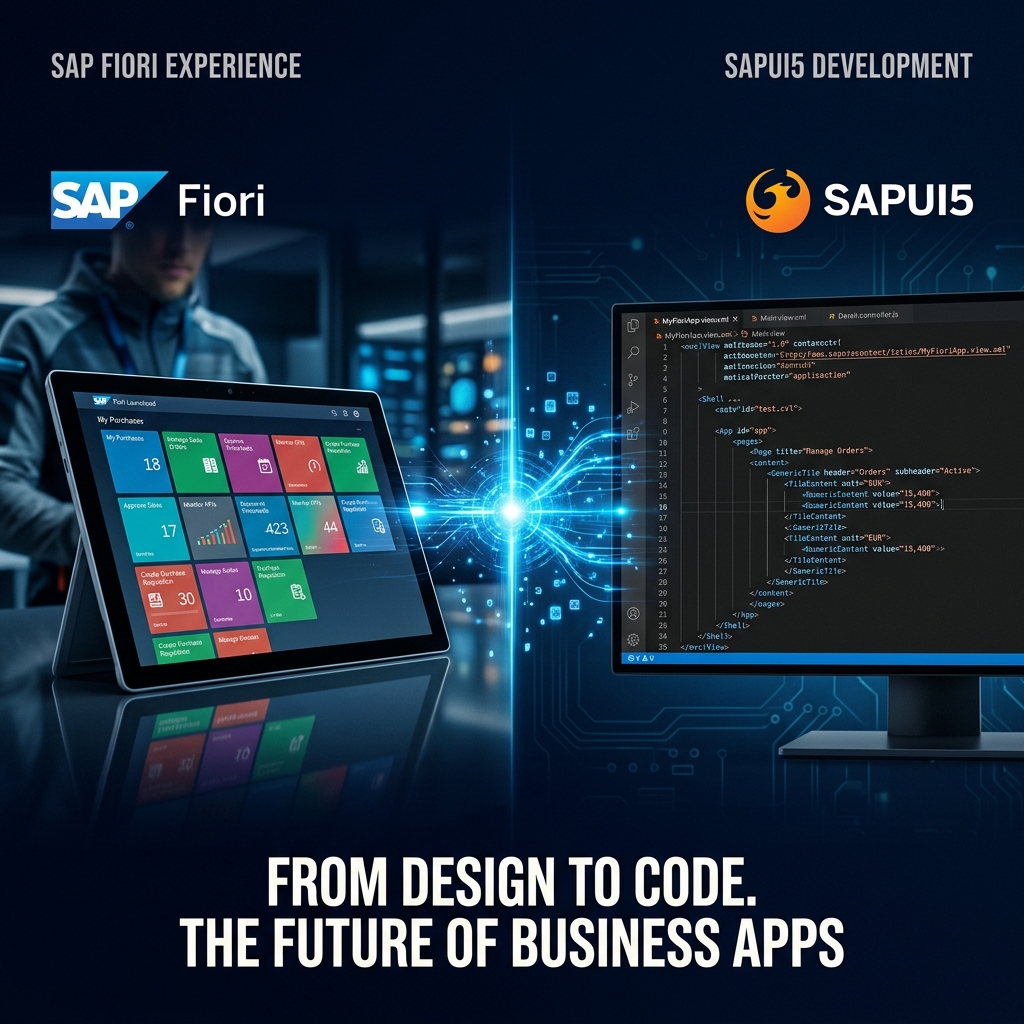 Figure 1: SAPUI5 combines Fiori design patterns and responsive web technologies to power modern SAP enterprise interfaces.
Let me be completely honest about how I felt the first time I heard “SAPUI5.”
Confused. Genuinely confused.
UI5 sounded like some internal SAP code name. I had no idea if it was a language, a framework, a tool, or something entirely different. Nobody around me explained it clearly. Every article I found either went too deep too fast or stayed so surface-level it was useless.
So if you’re sitting there right now thinking “what even is SAPUI5 and why does everyone in SAP development keep talking about it” — this post was written for exactly that feeling.
By the time you finish reading this, you’ll understand what SAPUI5 is, why it exists, how its architecture works from the ground up, and why learning it is one of the best technical investments you can make in the SAP space right now.
No jargon overload. No skipping the basics. Let’s build this understanding properly.
What Is SAPUI5? — The Real Explanation
SAPUI5 stands for SAP User Interface for HTML5.
At its core, SAPUI5 is a JavaScript-based UI framework built by SAP for developing enterprise web applications. It’s the technology that powers every single SAP Fiori application you see — whether that’s a purchase order approval app, a leave request form, an inventory dashboard, or a financial report.
When a user opens a Fiori app on their phone or browser and sees those clean tiles, responsive layouts, charts, tables, and forms — all of that is rendered by SAPUI5 running in the browser.
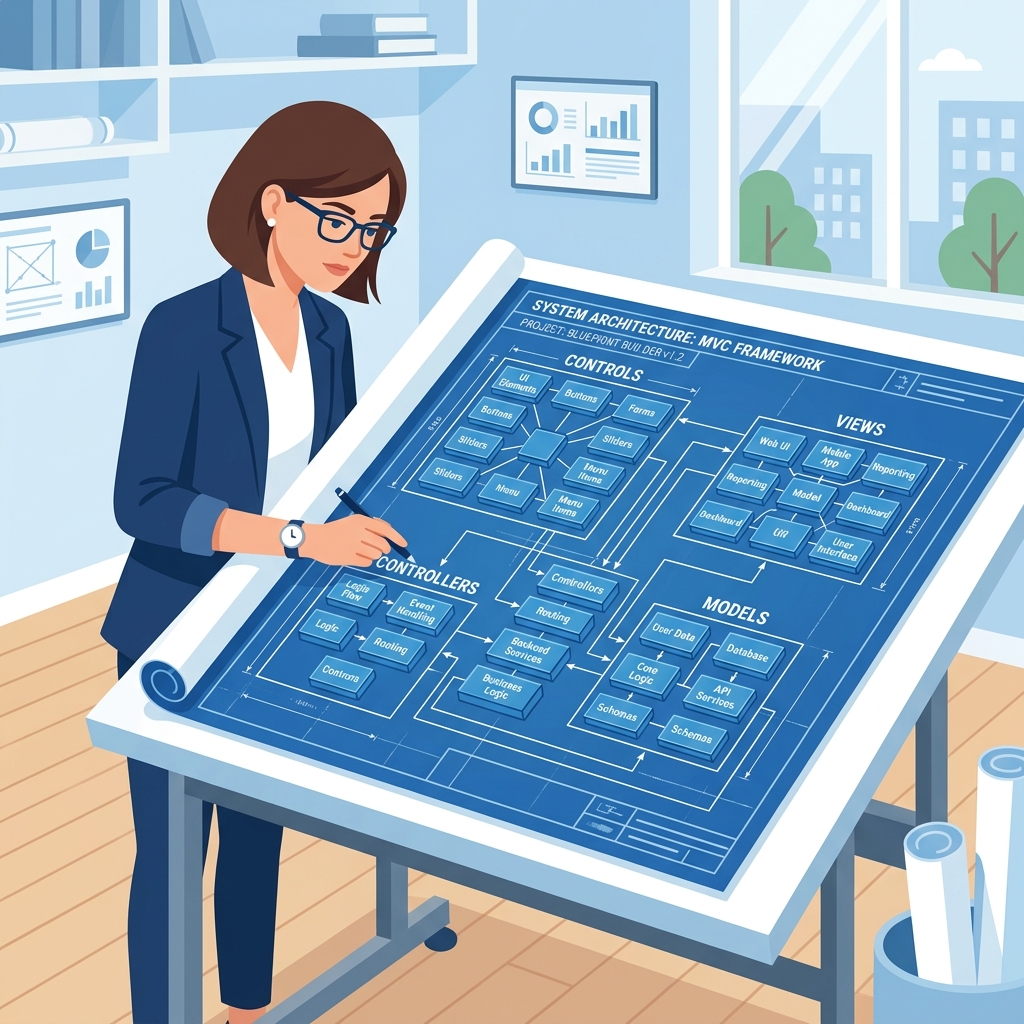 Figure 2: SAPUI5 provides structured components and controls as architectural building blocks.
Here’s an analogy that makes it click:
Think of SAPUI5 the same way you’d think of React or Angular in the web development world. Just like React gives web developers pre-built components, state management, and routing to build web apps faster — SAPUI5 gives SAP developers pre-built enterprise UI components, data binding, and navigation to build SAP-grade business applications faster.
The difference is that SAPUI5 is specifically designed for enterprise requirements — complex data tables, form validations, approval workflows, SAP backend connectivity — things generic web frameworks don’t handle out of the box.
OpenUI5 vs SAPUI5 — What’s the Difference?
This question comes up every time someone starts learning, so let’s clear it immediately.
OpenUI5 is the open-source version of SAPUI5. SAP released it to the community under Apache 2.0 license. It contains the core framework — MVC architecture, data binding, routing, and a solid set of UI controls.
SAPUI5 is the enterprise version — everything in OpenUI5 plus additional SAP-specific libraries, Fiori-specific controls, charts library (VizFrame), smart controls that auto-generate UI from OData metadata, and full SAP support.
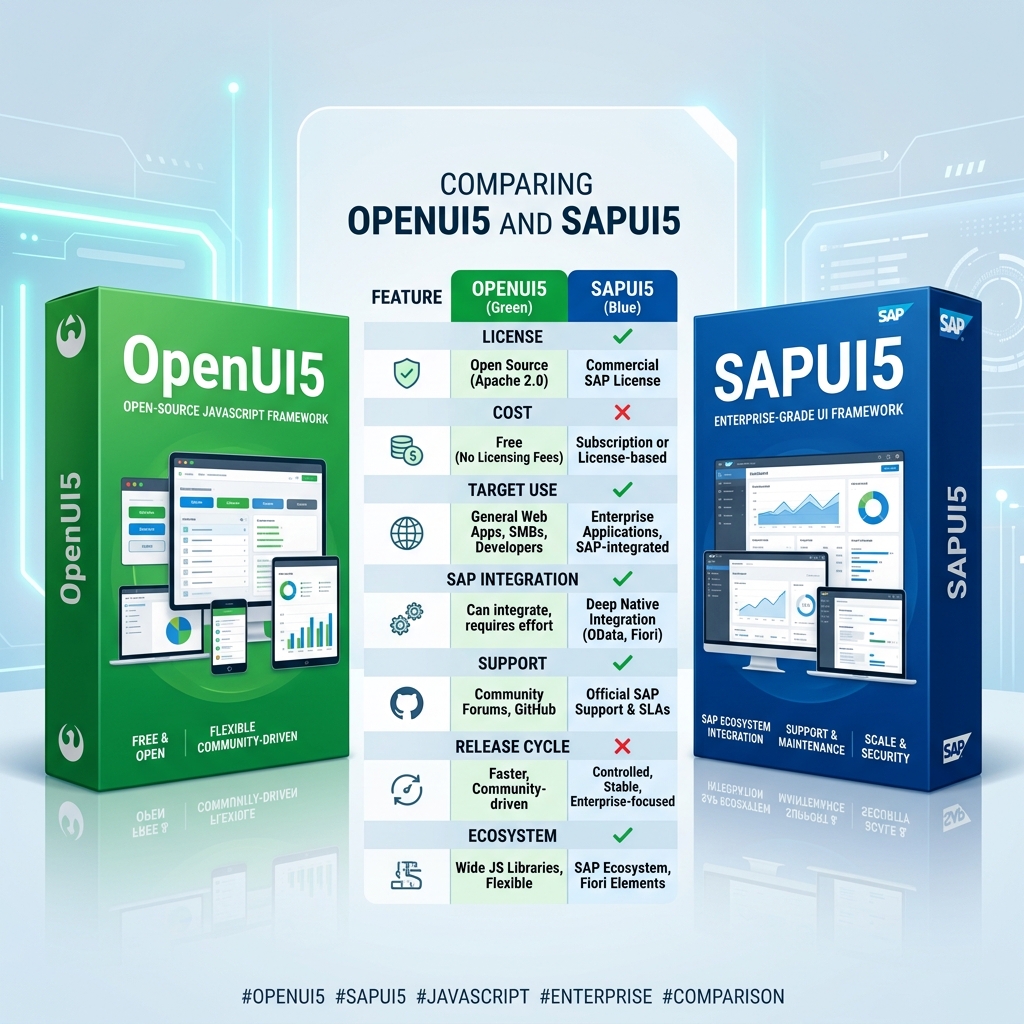 Figure 3: OpenUI5 and SAPUI5 comparison of licenses, features, support, and ecosystem details.
For learning purposes — everything you learn in OpenUI5 applies directly to SAPUI5. Most tutorials and practice projects use OpenUI5 because it’s freely accessible. When you work on actual SAP projects, you use SAPUI5.
Think of OpenUI5 as the community edition and SAPUI5 as the enterprise edition — same foundation, different feature set on top.
Why Did SAP Build SAPUI5 Instead of Using Existing Frameworks?
Legitimate question. React, Angular, Vue — these already existed. Why did SAP build their own?
Four reasons:
- Enterprise-Grade Controls Out of the Box: Generic web frameworks don’t come with complex data tables that handle 100,000 rows efficiently, smart form controls that auto-populate from SAP metadata, or approval workflow components. Building these from scratch on React would take enormous effort on every project. SAPUI5 ships with them ready to use.
- SAP Backend Connectivity: SAPUI5 has native, deeply integrated support for OData protocol — the standard way SAP backends expose data to Fiori apps. Connecting a SAPUI5 app to an SAP ABAP OData service is built into the framework, not a third-party add-on.
- Fiori Design Language Enforcement: SAP needed all enterprise apps — whether built by SAP, partners, or customers — to look and behave consistently. SAPUI5’s theming engine and control library enforce Fiori design guidelines automatically. Developers using SAPUI5 produce Fiori-consistent apps without being UX experts.
- Accessibility and Globalization: Enterprise software must support right-to-left languages (Arabic, Hebrew), multiple date formats, currency displays, and accessibility standards (WCAG). SAPUI5 handles all of this at framework level — saving developers from implementing it application by application.
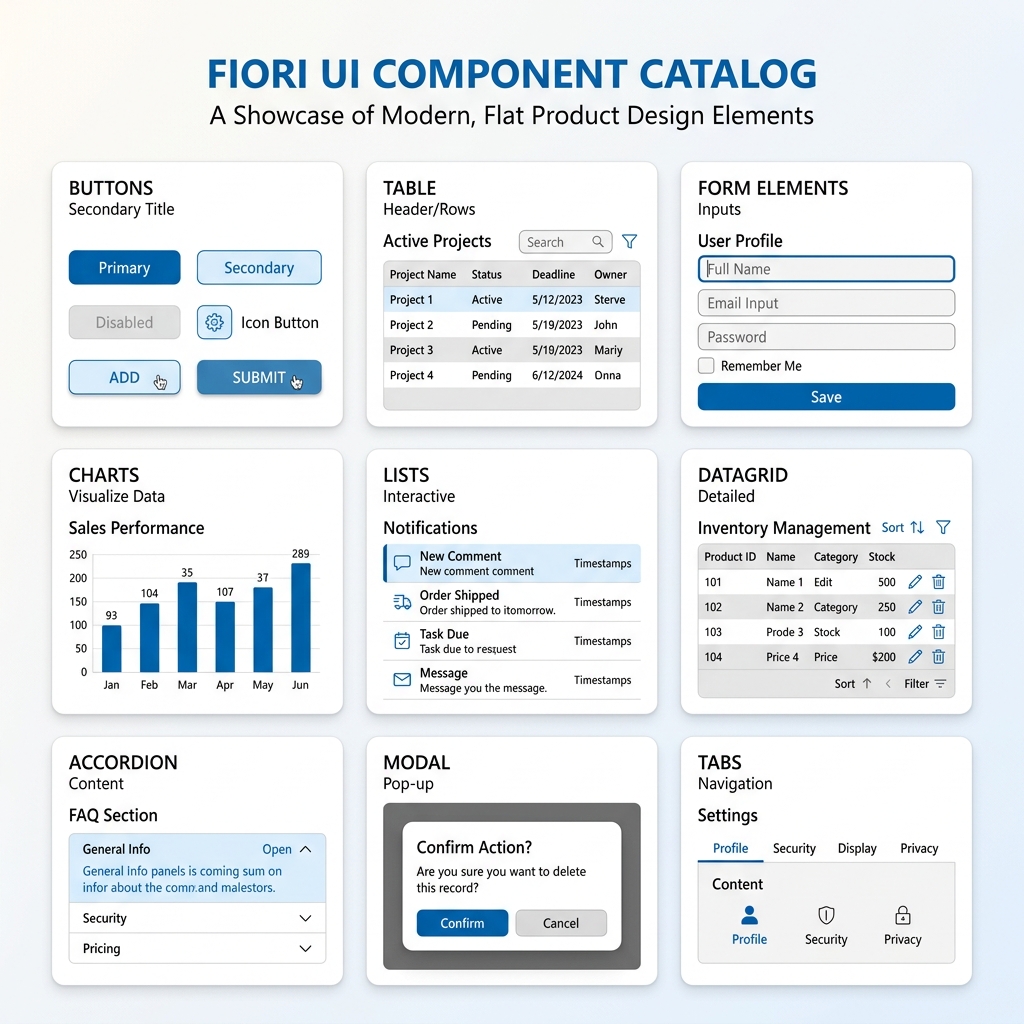 Figure 4: A subset of standard Fiori enterprise-ready UI components in the SAPUI5 Control Library.
SAPUI5 Architecture — Layer by Layer
Now let’s get into the architecture properly. This is where most explanations either get too vague or too technical. I’ll walk through each layer in a way that actually makes sense.
SAPUI5 architecture has five distinct layers. Understanding each one tells you exactly what role it plays and how they connect.
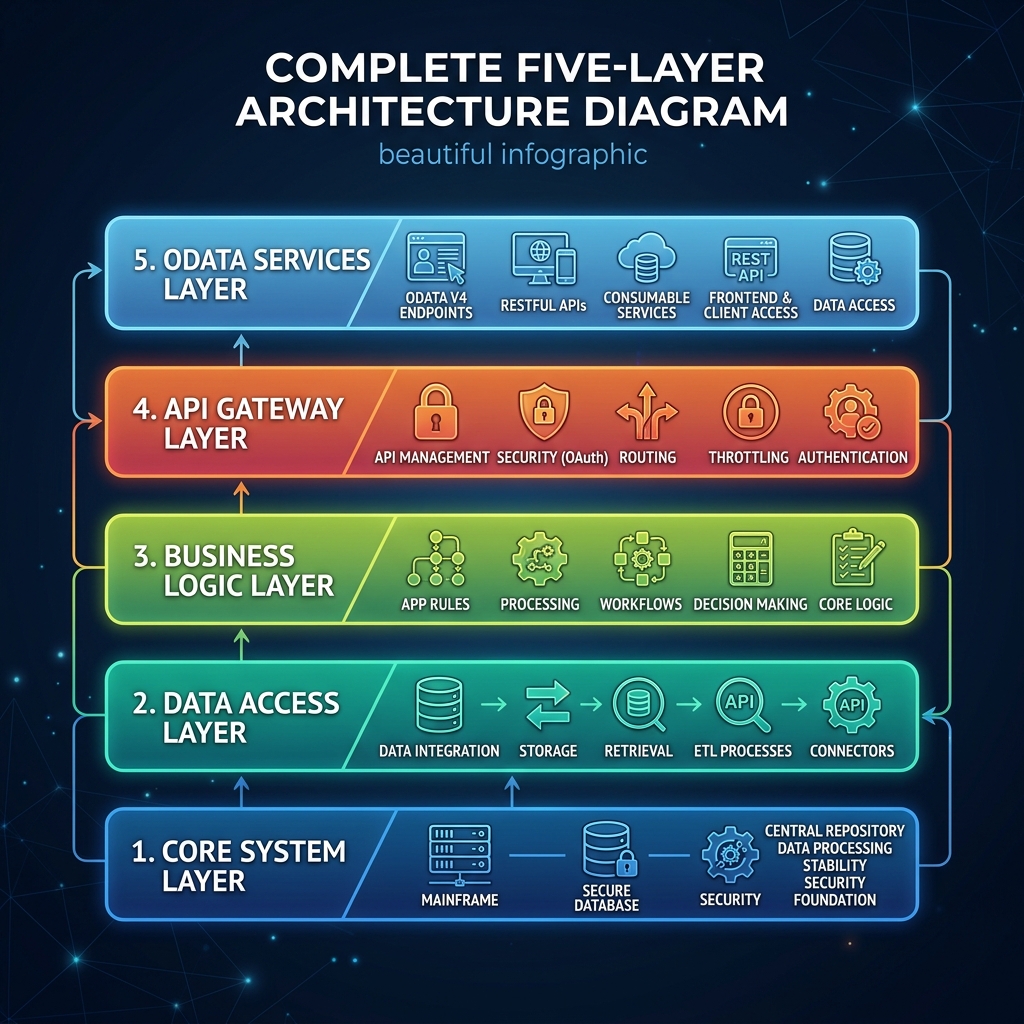 Figure 5: SAPUI5 five-layer stack showing the logical flows from database systems up to frontend visual libraries.
Interactive Architecture Explorer
Below, you can interactively select any of the five layers to read its details, see code/config snippets, and understand how they fit together:
Layer 5 — OData Integration Layer
This layer connects the SAPUI5 frontend to the SAP S/4HANA or ABAP backend. Instead of writing custom AJAX/fetch requests, SAPUI5's OData Model natively binds UI controls to backend service entities, automating HTTP requests and JSON parsing.
Layer 1 — Core Framework (Foundation Layer)
At absolute bottom sits the SAPUI5 Core — sap.ui.core library.
This is the engine room. Everything else runs on top of it. Core provides:
- Component lifecycle management — how SAPUI5 apps start, initialize, and shut down
- Event system — how user interactions (clicks, inputs, navigation) are captured and handled
- Module loading system — how SAPUI5 loads JavaScript files on demand rather than all at once (AMD — Asynchronous Module Definition)
- Theming engine — how visual styling applies across all controls consistently
- Localization and internationalization — date formats, number formats, text translations based on user locale
- Accessibility framework — screen reader support, keyboard navigation, ARIA attributes
You rarely interact with Core directly as a developer. But every component you use relies on it functioning correctly underneath.
Layer 2 — Control Library (Building Blocks Layer)
On top of Core sits SAPUI5’s extensive Control Library — pre-built UI components ready to use in your applications.
This is where SAPUI5 really shines for enterprise development. Controls include:
- Basic Controls: Button, Input, Text, Label, Icon, CheckBox, RadioButton, Select dropdown, DatePicker, TimePicker, RatingIndicator.
- Container Controls: Page, Panel, Form, ScrollContainer, HBox, VBox (horizontal and vertical layouts), Dialog, Popover, MessageBox.
- Complex Controls: Table (sorting, filtering, pagination), List (mobile/desktop lists), Tree (hierarchical data), Carousel (content slider), Wizard (workflows).
Smart Controls (SAPUI5 specific — not in OpenUI5)
Smart Controls are one of SAPUI5’s most powerful features for SAP development.
- SmartTable: reads OData metadata and automatically generates a complete table with correct columns, types, and filters — without manually configuring each column in code.
- SmartForm: auto-generates a form based on OData entity metadata.
- SmartFilterBar: creates filter controls automatically from OData annotations.
Smart Controls are why experienced SAPUI5 developers can build functional data-driven apps faster than you’d expect — the framework does heavy lifting based on backend metadata.
Layer 3 — MVC Architecture (Application Structure Layer)
This is the most important architectural concept to understand in SAPUI5 — and getting it right early saves enormous confusion later.
SAPUI5 follows MVC — Model View Controller pattern. Every SAPUI5 application is structured around these three components working together.
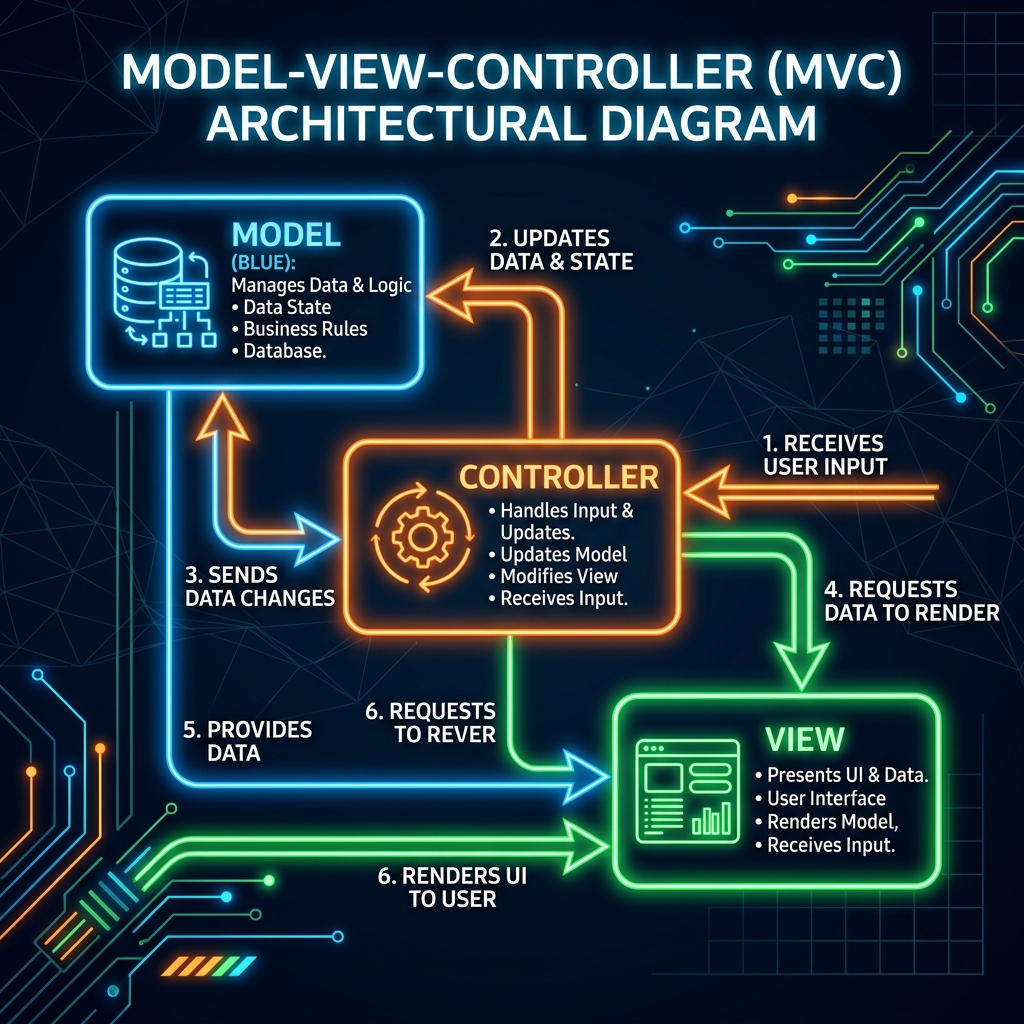 Figure 6: MVC data binding and interaction flow inside SAPUI5.
Model — The Data
Model holds the data your application works with. It has no knowledge of how data is displayed. In SAPUI5 there are different model types:
- JSON Model: stores data as JavaScript JSON objects. Great for local app data, static lists, and UI state management.
- OData Model: connects directly to an SAP OData service. Reads and writes data to SAP backend automatically. This is what most real Fiori apps use.
- Resource Model: stores text translations for internationalization (i18n files).
- XML Model: for XML data sources.
// Creating a simple JSON Model
var oModel = new sap.ui.model.json.JSONModel({
    products: [
        { id: "P001", name: "Laptop", price: 75000 },
        { id: "P002", name: "Mouse", price: 850 },
        { id: "P003", name: "Keyboard", price: 1200 }
    ]
});
this.getView().setModel(oModel);
View — The UI
View defines what the user sees — the visual layout, controls, and structure. SAPUI5 supports multiple view formats:
- XML Views: most commonly used and SAP recommended. UI structure defined in XML, clean separation from logic.
- JavaScript Views: UI built programmatically in JS code (older approach, less preferred now).
- JSON Views: UI defined in JSON (rarely used).
- HTML Views: legacy approach, not recommended for new development.
XML View example:
<mvc:View xmlns:mvc="sap.ui.core.mvc"
          xmlns="sap.m"
          controllerName="myapp.controller.ProductList">
    <Page title="Product List">
        <List items="{/products}">
            <StandardListItem
                title="{name}"
                description="{id}"
                info="{price}"/>
        </List>
    </Page>
</mvc:View>
Notice {name}, {id}, {price} — those curly braces are data binding expressions. They tell SAPUI5 to pull values from the Model automatically and display them in the View. When Model data changes, View updates instantly — no manual DOM manipulation needed.
Controller — The Logic
Controller contains the application logic — what happens when user clicks a button, submits a form, navigates to another screen, or triggers any action.
sap.ui.define([
    "sap/ui/core/mvc/Controller",
    "sap/m/MessageToast"
], function(Controller, MessageToast) {
    "use strict";

    return Controller.extend("myapp.controller.ProductList", {

        onInit: function() {
            // Called when view initializes
            // Load data, set models here
        },

        onProductPress: function(oEvent) {
            // Handle product tap/click
            var oItem = oEvent.getSource();
            var sProductId = oItem.getBindingContext()
                                  .getProperty("id");
            MessageToast.show("Selected: " + sProductId);
        },

        onSearch: function(oEvent) {
            // Handle search input
            var sQuery = oEvent.getParameter("query");
            // Filter logic here
        }
    });
});
How MVC Works Together
User interacts with View → Controller captures the event → Controller reads or updates Model → Model change automatically reflects back in View through data binding.
This clean separation means:
- View can be redesigned without touching business logic in Controller.
- Controller logic can be tested independently without UI.
- Model can switch data sources without changing View or Controller.
Every professional SAPUI5 developer internalizes MVC instinctively. It’s not just a pattern — it’s how every Fiori app is structured.
Layer 4 — Routing and Navigation
Real applications have multiple screens. Routing is how SAPUI5 manages navigation between them.
SAPUI5’s Router uses URL hash-based navigation — each screen in a Fiori app gets its own URL pattern.
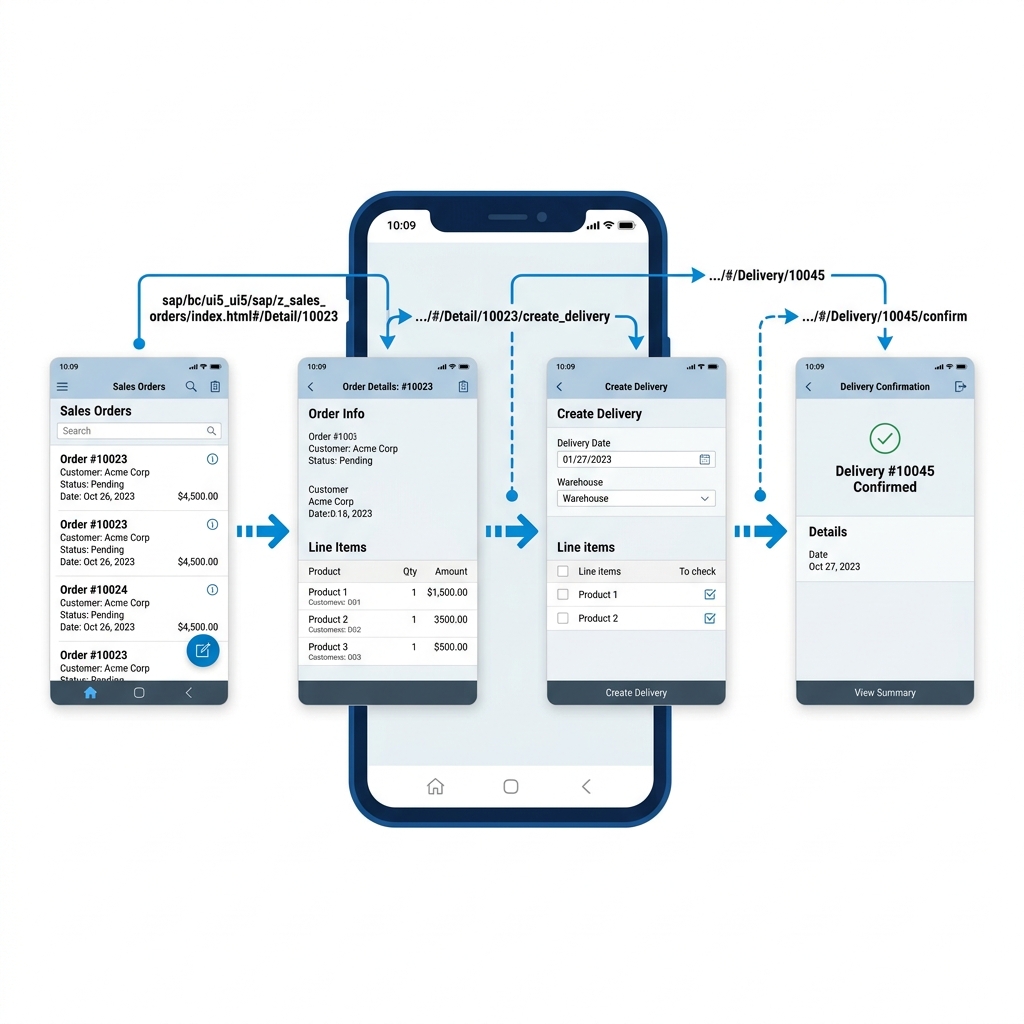 Figure 7: URL hash-based navigation paths and detail screen parameters in SAPUI5.
This enables:
- Browser back/forward button support.
- Deep linking — sharing a URL that opens directly to a specific screen.
- Navigation history management.
Routing configuration lives in manifest.json — the application descriptor file that defines app metadata, routing patterns, and target views.
"routing": {
    "routes": [
        {
            "name": "productList",
            "pattern": "",
            "target": "productList"
        },
        {
            "name": "productDetail",
            "pattern": "product/{productId}",
            "target": "productDetail"
        }
    ]
}
When a user taps a product in the list, the Router navigates to the product detail URL pattern, passing the product ID as a parameter. The detail Controller reads that parameter and loads the correct data.
Layer 5 — OData Integration Layer
This is what connects the SAPUI5 frontend to the SAP backend — and it’s what makes SAPUI5 specifically powerful for SAP development rather than generic web development.
OData (Open Data Protocol) is a REST-based protocol that SAP uses to expose backend data and operations as web services. SAPUI5’s OData Model speaks this protocol natively.
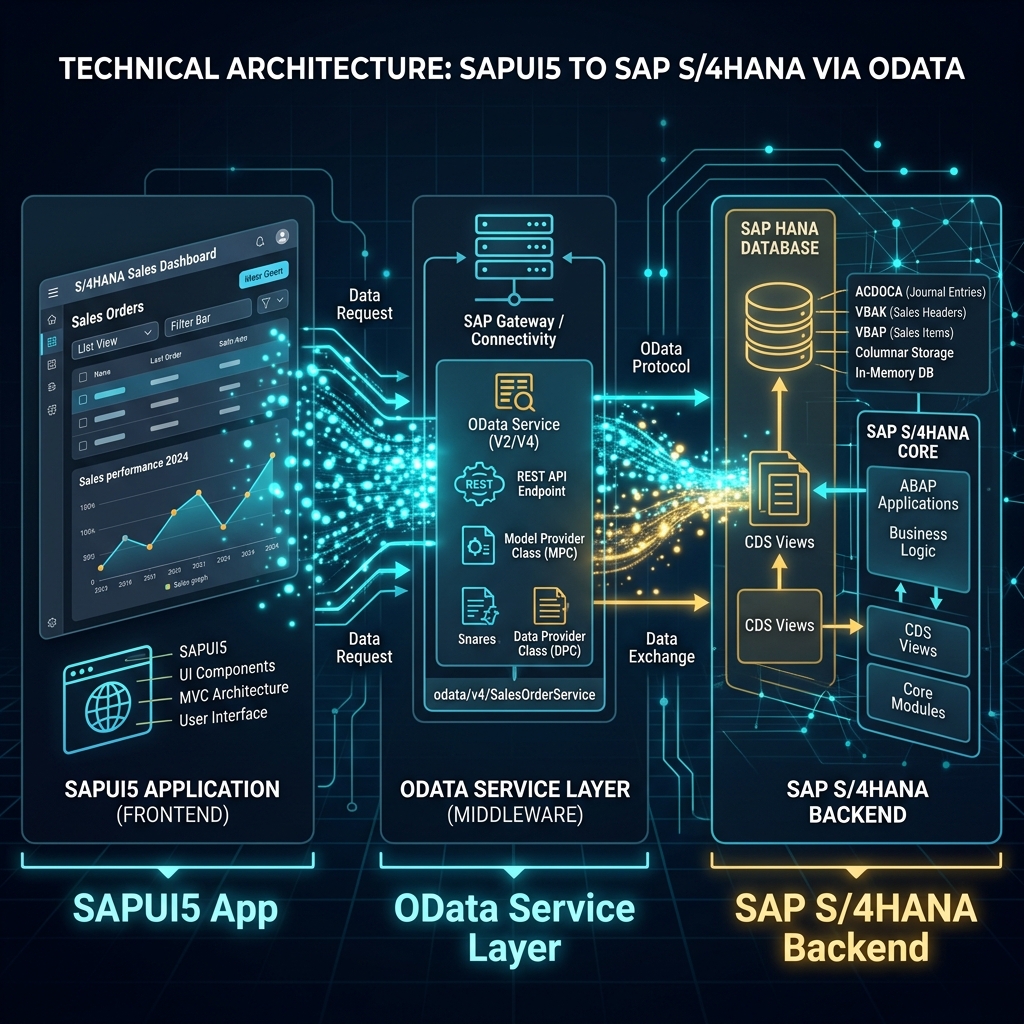 Figure 8: OData model communication and data exchange between SAPUI5 frontend and SAP Gateway backend.
When a SAPUI5 app needs to display purchase orders, it doesn’t write custom API calls. It creates an OData Model pointing to a Purchase Order OData service URL, binds a Table control to the relevant entity set, and SAPUI5 handles the HTTP request, JSON parsing, and data display automatically.
// OData Model connecting to SAP backend service
var oODataModel = new sap.ui.model.odata.v2.ODataModel(
    "/sap/opu/odata/sap/PURCHASE_ORDER_SRV/"
);
this.getView().setModel(oODataModel);
With that single model setup — every control bound to this model automatically reads and writes Purchase Order data from the SAP backend through the OData service.
This is the link between the SAPUI5 frontend and the ABAP RAP or Gateway backend. You need to understand this for full-stack SAP development.
How All Five Layers Work Together — Complete Picture
Here’s how a complete Fiori app flows through all architectural layers:
- User opens Fiori app in browser → Core Framework initializes, loads modules, applies theme.
- App manifest.json loads → Routing initializes, default route activates, target View loads.
- View renders controls from Control Library → XML View parsed, SAPUI5 controls instantiated on screen.
- Controller initializes → OData Model created, bound to View. Data binding expressions in View activate, OData requests fire to SAP backend.
- SAP backend responds with JSON data → OData Model updates with received data. Data binding automatically updates all bound controls in View.
- User interacts (e.g. taps a button) → Controller event handler fires. Logic executes (validation, navigation, data update). Model updates if needed → View reflects changes instantly.
Every SAP Fiori app you’ve ever seen works through exactly this flow. Understanding it gives you a mental model that makes every tutorial, every code sample, and every project challenge dramatically easier to work through.
Why Learning SAPUI5 Architecture First Actually Matters
Most beginners want to skip straight to writing code. I understand that impulse completely.
But SAPUI5 beginners who understand architecture before coding make significantly faster progress than those who don’t. Here’s why:
When something breaks — and it will break — you know which layer to investigate. Controller logic wrong? Look at Controller JS. Data not displaying? Check Model binding. Navigation not working? Check Router config. Controls looking wrong? Check View XML.
Without architectural understanding, debugging becomes random guessing. With it, debugging becomes systematic elimination.
Architecture knowledge also makes reading official SAP documentation dramatically easier. SAP docs assume you know what “bind a model to a view” means. Once you understand MVC properly, that language clicks immediately.
Where to Practice SAPUI5 Architecture Right Now
Two completely free options:
- SAP BTP Free Tier with Business Application Studio: browser-based development environment where you can build complete SAPUI5 apps without installing anything. Go to account.hanatrial.ondemand.com and create a free account.
- ui5.sap.com Walkthrough Tutorial: SAP’s official step-by-step SAPUI5 tutorial that builds a complete app from Hello World to OData-connected application. Covers every architectural concept covered in this post with hands-on code.
 Figure 9: Setting up a custom SAPUI5 app workspace in SAP Business Application Studio.
Start with the walkthrough. Build alongside it. Every concept from this post will solidify as you see it working in actual code.
Moving Forward
SAPUI5 is not just another JavaScript framework to add to a list. For anyone serious about SAP Fiori development — it’s the skill that turns you from someone who configures SAP into someone who builds for SAP.
Understanding its architecture — Core, Controls, MVC, Routing, OData integration — gives you a foundation that makes everything else learnable. From this base, Fiori Elements, Smart Controls, RAP integration, and advanced SAPUI5 patterns all become extensions of concepts you already understand.
Start simple. Build the walkthrough app. Break it intentionally. Fix it. Add a new view. Connect it to mock OData data. Each iteration builds the intuition that no amount of reading alone can give you.
Keep building. Keep learning.
 Figure 10: Building custom Fiori applications marks the shift from standard configuration to full-scale enterprise creation.
— Daksh
Self-Assessment Checkpoint
💡 **What is the difference between OpenUI5 and SAPUI5?**
OpenUI5 is open-source (Apache 2.0 license) containing core MVC framework and basic controls. SAPUI5 is the commercial enterprise edition containing OpenUI5 plus smart controls, VizFrame charts, additional Fiori libraries, and full official SAP support.
💡 **Why is MVC pattern beneficial in SAPUI5 development?**
It separates data model, presentation UI views, and controller logic. This ensures code reusability, simplifies testing, and allows developers to change UI layout or database APIs independently.
💡 **What role does OData play in a typical Fiori app?**
OData acts as the REST-based communication protocol. It exposes SAP backend database tables and business logic as consumable web services that SAPUI5 can automatically read, query, and write to using data binding.

Written by Daksh Dedha
SAP Technical ConsultantDaksh is an SAP Technical Consultant specializing in ABAP programming, SAP S/4HANA migrations, Fiori development, and BTP cloud architecture. He authors free, hands-on tutorials to make enterprise SAP education accessible to all developers.
Test Your Knowledge
Loading question...
Quiz Completed
Related Tutorials
SAP Fiori End to End Implementation — From Backend to Launchpad in Plain Steps
Complete SAP Fiori end to end implementation guide. Covers backend activation, OData service setup, Fiori Launchpad configuration, role assignment, and testing.
SAP FioriSAP Fiori Launchpad Configuration — Complete Setup and Customization Guide
Step by step guide to SAP Fiori Launchpad configuration. Learn how to set up catalogs, groups, spaces, pages, custom tiles, and role-based access in FLP.
SAP FioriTop 30 SAP SD Interview Questions & Answers – Complete Guide
Master your next SAP Sales and Distribution (SD) functional interview. Study core concepts, the OTC cycle, Pricing Procedures, and logistics configuration.
Found this tutorial useful? Share it with your SAP development team.