
What is SAP? The Ultimate Enterprise Guide to SAP ERP, Architecture & Modules
Table of Contents
- • 1. What Does SAP Stand For? (Full Form & Origin)
- ↳ The Origin Story
- • 2. The Core Problem SAP Solves: Data Silos vs. Centralized ERP
- ↳ The Decentralized Nightmare (Without SAP)
- ↳ The Centralized Solution (With SAP ERP)
- • 3. The Architectural Evolution of SAP: From Mainframe to Cloud
- ↳ The Classical 3-Tier Architecture (SAP R/3 & ECC)
- ↳ The Paradigm Shift: SAP S/4HANA & In-Memory Computing
- • 4. Complete Breakdown of Core SAP Modules
- ↳ Key Functional Modules
- ↳ Key Technical Modules & Frameworks
- • 5. End-to-End Business Flow: How SAP Connects a Real Business
- • 6. SAP vs. The Competition: How Does SAP Compare?
- • 7. The Modern Era: Clean Core, RISE with SAP, and Joule AI
- ↳ 1. The “Clean Core” Strategy
- ↳ 2. RISE with SAP
- ↳ 3. SAP Joule (Enterprise AI Copilot)
- • 8. Career Opportunities in the SAP Ecosystem
- ↳ 1. Functional Consultant (e.g., SAP FICO, MM, or SD Consultant)
- ↳ 2. Technical Consultant (e.g., ABAP / BTP / Fiori Developer)
- ↳ 3. SAP BASIS / Cloud Infrastructure Engineer
- • 9. Frequently Asked Questions (FAQ)
- ↳ Is SAP difficult to learn for beginners?
- ↳ What is the difference between SAP and ERP?
- ↳ What language is SAP written in?
- ↳ How much does SAP software cost?
- • Summary & Next Steps
- ↳ Key Takeaways Checklist
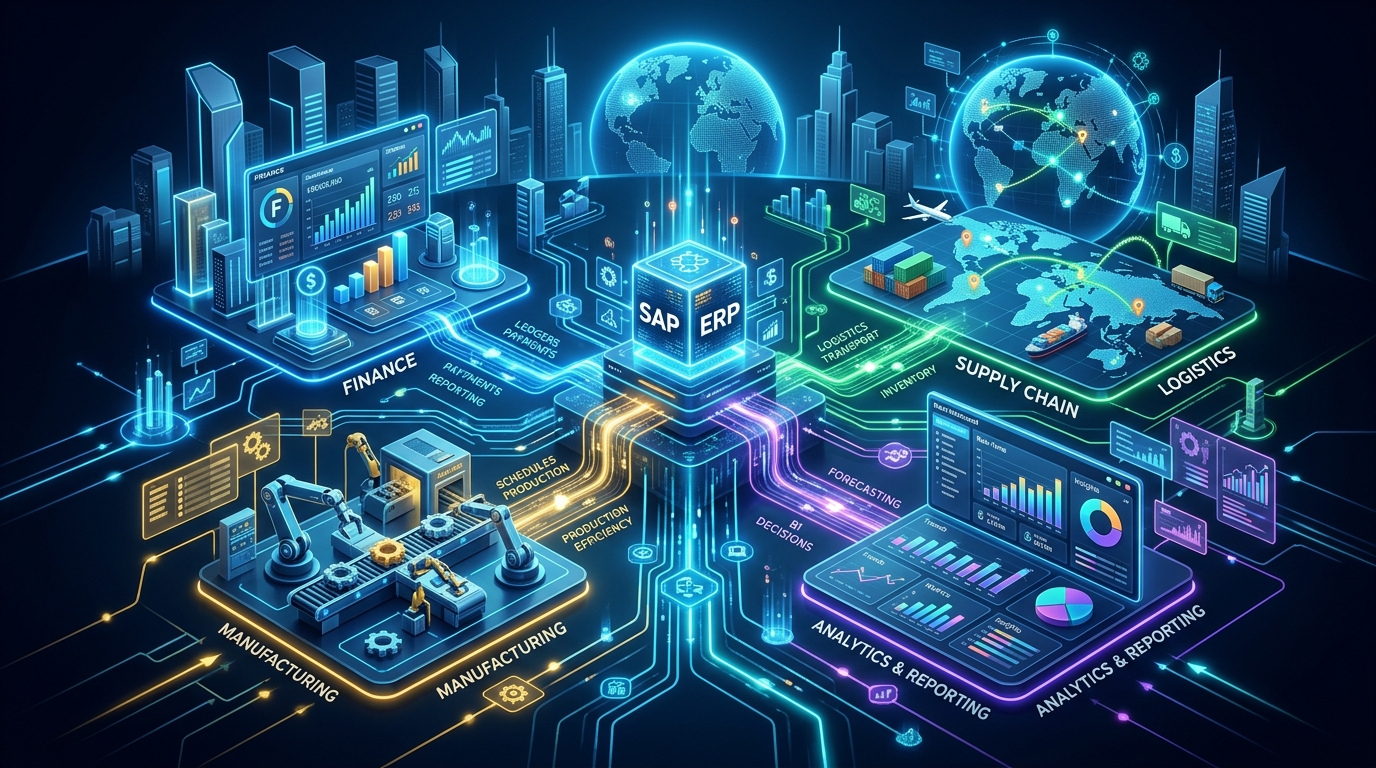 Figure 1: SAP connects finance, supply chain, procurement, sales, and manufacturing into a single real-time enterprise database.
Every time you book a flight ticket, pick up a prescription from a pharmacy, buy a new car, or order goods online, there is a 99% probability that SAP software processed that transaction.
According to global enterprise statistics, over 87% of all global commerce touches an SAP system, representing more than $46 trillion in worldwide economic transactions. Yet, outside the corporate IT ecosystem, the term “SAP” remains mysterious to students, career switchers, and non-technical business leaders.
Is SAP an operating system? A database? An accounting software? Or a programming language?
The direct answer: SAP is the world’s leading Enterprise Resource Planning (ERP) software company. Its platform serves as the central nervous system for Fortune 500 multinationals, government organizations, and mid-market enterprises worldwide.
In this definitive guide, we break down what SAP actually is, how it works beneath the hood, its architectural evolution from 1972 to the in-memory SAP S/4HANA era, the core functional and technical modules, real-world end-to-end business workflows, and how you can build a high-paying career in the SAP ecosystem.
Before diving deep, feel free to explore our main learning hub, look up transaction codes in our T-Code Lookup Tool, or learn more about our team.
1. What Does SAP Stand For? (Full Form & Origin)
SAP stands for:
- German: Systeme, Anwendungen und Produkte in der Datenverarbeitung
- English: Systems, Applications, and Products in Data Processing
(Pronunciation Note: In enterprise environments, SAP is always pronounced as individual letters: S-A-P (/ˌɛs.eɪˈpiː/), never as the single word “sap”.)
┌─────────────────────────────────────────────────────────────┐
│                           S · A · P                         │
│  Systems (Systeme) · Applications (Anwendungen) · Products  │
│                   in Data Processing                        │
└─────────────────────────────────────────────────────────────┘
The Origin Story
In 1972, five former IBM engineers (Dietmar Hopp, Klaus Tschira, Hans-Werner Hector, Hasso Plattner, and Claus Wellenreuther) founded SAP in Mannheim, Germany.
Their groundbreaking vision was radical for the era: standardized software that processes business transactions in real time rather than overnight batch processing on punch cards.
Instead of forcing every enterprise to build custom accounting software from scratch on mainframe computers, SAP created pre-configured enterprise business logic that any corporation could implement and tailor to its industry.
2. The Core Problem SAP Solves: Data Silos vs. Centralized ERP
To understand why global enterprises invest millions of dollars into SAP, you must first understand the operational failure of decentralized business systems.
The Decentralized Nightmare (Without SAP)
In a company without an integrated ERP system, every department operates in an isolated silo with its own disconnected software and database:
[ Sales Team ] ──(Spreadsheet Email)──> [ Inventory Warehouse ]
     │                                            │
(Paper Invoice)                              (Stock Count Delay)
     │                                            │
     ▼                                            ▼
[ Finance & Accounting ] <──(Manual Rec.)── [ Manufacturing Plant ]- Sales Department uses standalone CRM software to log customer purchase orders.
- Warehouse & Logistics uses a separate desktop tool to track inventory levels.
- Production Floor relies on spreadsheets to schedule raw material manufacturing.
- Finance & Accounting uses third-party bookkeeping software to invoice customers.
What goes wrong in this setup?
- Data Duplication & Inconsistency: The sales team sells 500 units of a product believing stock is available, only to discover the warehouse ran out two hours earlier.
- Latency & High Friction: Month-end financial close takes 15 to 20 days because accountants must manually cross-reference hundreds of thousands of ledger entries across spreadsheets.
- Zero Executive Visibility: Corporate leadership cannot get a real-time snapshot of daily global revenue or inventory valuation without waiting weeks for consolidated manual reports.
The Centralized Solution (With SAP ERP)
SAP replaces disconnected departmental software with a single centralized database and unified enterprise business logic.
                   ┌──────────────────────────────┐
                   │    Unified SAP Database      │
                   │  (SAP S/4HANA Single Truth)  │
                   └──────────────┬───────────────┘
                                  │
      ┌──────────────┬────────────┼────────────┬──────────────┐
      │              │            │            │              │
      ▼              ▼            ▼            ▼              ▼
 [ Sales & ]   [ Materials &] [Production] [Finance &]   [ Human ]
 [ Delivery]   [ Warehouse  ] [ Planning ] [Ledgers  ]   [Capital]
   (SD)            (MM)          (PP)        (FI/CO)      (HCM)
When a sales representative enters a customer purchase order in SAP:
- Inventory is instantly checked and reserved in the Materials Management (MM) module.
- Production schedules are automatically triggered in the Production Planning (PP) module if stock falls below safety levels.
- Revenue and Accounts Receivable are booked immediately in the Financial Accounting (FI) module without duplicate manual entries.
- Logistics is dispatched with automated shipping labels and packing lists generated in Sales & Distribution (SD).
Every department operates on the exact same data in real time, eliminating reconciliation discrepancies, delays, and inventory bottlenecks.
3. The Architectural Evolution of SAP: From Mainframe to Cloud
SAP has transitioned through five major architectural generations over the past 50+ years. Grasping this evolution is essential for working with modern platforms like SAP S/4HANA and SAP BTP.
1972: SAP R/1 (Single-tier Mainframe)
  │
1979: SAP R/2 (Mainframe Multi-currency & Multi-language)
  │
1992: SAP R/3 (Client-Server 3-Tier Architecture)
  │
2004: SAP ECC 6.0 (ERP Central Component & NetWeaver)
  │
2015+: SAP S/4HANA (In-Memory Computing & Columnar Storage)
  │
2026+: SAP Clean Core & BTP Cloud Native Architecture
The Classical 3-Tier Architecture (SAP R/3 & ECC)
The “R” in SAP R/3 stands for Real-time, and the “3” represents the Three-Tier Client-Server Architecture:
┌───────────────────────────────────────────────────────────┐
│ 1. Presentation Tier (SAP GUI / Web Browser / Fiori UI)   │
│    User inputs data, interacts with forms and reports     │
└─────────────────────────────┬─────────────────────────────┘
                              │ Network (RFC / HTTPS)
┌─────────────────────────────▼─────────────────────────────┐
│ 2. Application Tier (SAP NetWeaver Application Server)    │
│    Executes ABAP business logic, work processes, locks    │
└─────────────────────────────┬─────────────────────────────┘
                              │ SQL Queries
┌─────────────────────────────▼─────────────────────────────┐
│ 3. Database Tier (Oracle / DB2 / SQL Server / SAP HANA)  │
│    Stores transaction tables, master data, configuration  │
└───────────────────────────────────────────────────────────┘- Presentation Layer: The user interface where business users perform day-to-day operations (traditionally the desktop SAP GUI, and today modern HTML5 SAP Fiori apps).
- Application Layer: Application servers executing custom business logic written in SAP ABAP. It processes transactions, enforces security authorizations, and manages database locking mechanisms.
- Database Layer: The relational database management system (RDBMS) that stores company codes, customer records, master data, and journal entries.
The Paradigm Shift: SAP S/4HANA & In-Memory Computing
In legacy systems (SAP ECC running on Oracle or Microsoft SQL Server), databases stored records on slow physical hard disks using row-based tables. Complex reporting required aggregating millions of rows into pre-calculated summary tables (like GLT0, BSIS, BSAS), causing data bloat and synchronization lag.
In 2015, SAP launched SAP S/4HANA (Suite 4 on High-performance ANalytic Appliance):
- In-Memory Computing: The entire relational database resides directly in volatile RAM instead of reading from spinning disks, accelerating query performance by up to 1,000x to 10,000x.
- Columnar Data Storage: Data is organized in columns rather than rows, enabling high compression ratios (typically 5x to 10x smaller footprint) and ultra-fast aggregate calculations (
SUM,AVG,COUNT) on the fly. - The Universal Journal (
ACDOCA): S/4HANA eliminated over 30 separate legacy financial index tables, consolidating general ledger, asset accounting, controlling, and inventory entries into a single universal table with hundreds of dimensions. - OLTP + OLAP Convergence: Operational transactions (OLTP) and real-time analytical reporting (OLAP) execute on the exact same database without needing complex overnight ETL (Extract, Transform, Load) pipelines to external data warehouses.
4. Complete Breakdown of Core SAP Modules
SAP ERP is modular. Companies license and configure specific functional modules tailored to their industry and operational structure. These modules are broadly divided into Functional (business processes) and Technical (underlying technology and infrastructure).
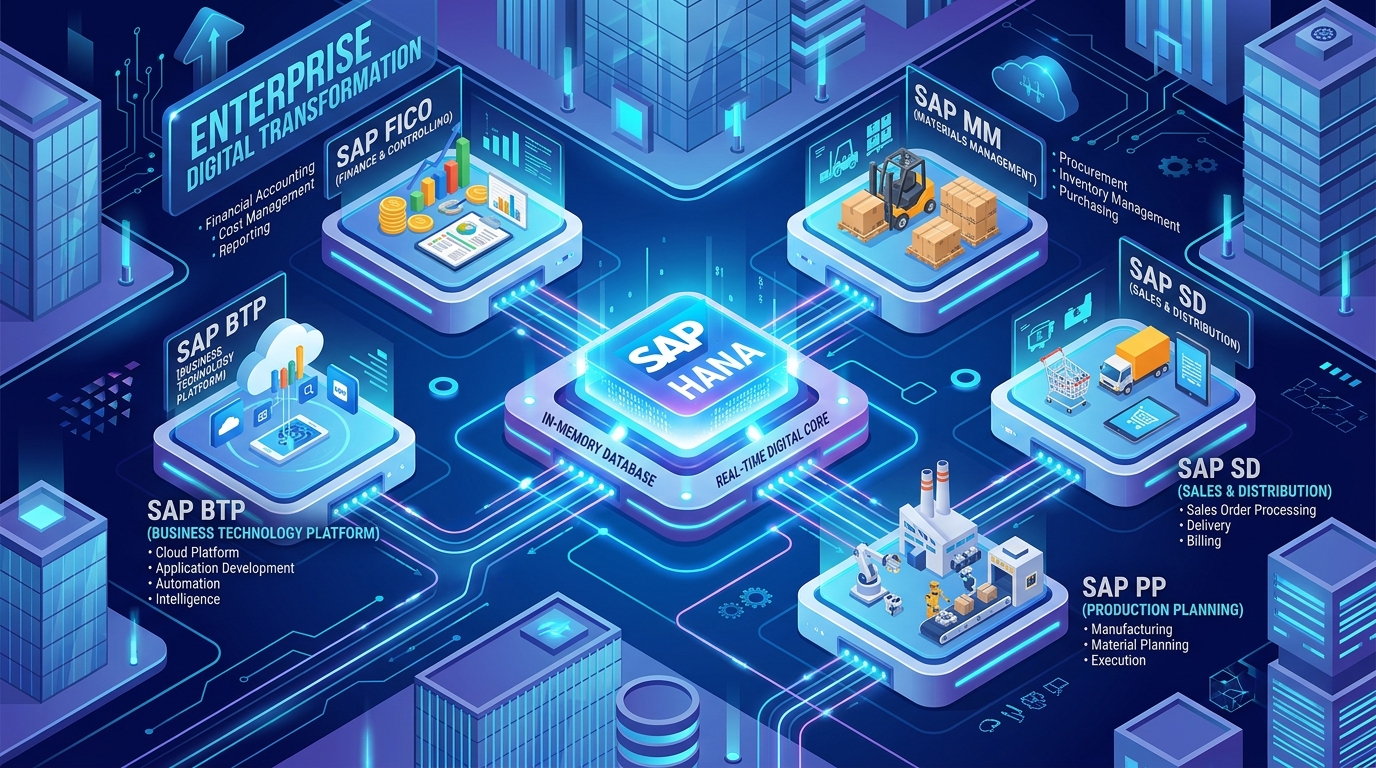 Figure 2: Comprehensive breakdown of core SAP functional modules (FICO, MM, SD, PP) and technical platforms (BTP, HANA, ABAP).
                            SAP ENTERPRISE SUITE
     ┌────────────────────────────────┬────────────────────────────────┐
     │      Functional Modules        │       Technical Modules        │
     ├────────────────────────────────┼────────────────────────────────┤
     │ • SAP FI (Financial Accounting)│ • SAP ABAP (Programming)       │
     │ • SAP CO (Controlling / Mgmt)  │ • SAP BASIS (Admin & Infra)    │
     │ • SAP MM (Materials Management)│ • SAP HANA (In-Memory DB)      │
     │ • SAP SD (Sales & Distribution)│ • SAP BTP (Cloud Platform)     │
     │ • SAP PP (Production Planning) │ • SAP Fiori / UI5 (Frontend)   │
     │ • SAP QM (Quality Management)  │ • SAP Security & GRC           │
     │ • SAP PM (Plant Maintenance)   │ • SAP Joule (AI Copilot)       │
     │ • SAP HCM / SuccessFactors     │ • SAP Cloud ALM                │
     └────────────────────────────────┴────────────────────────────────┘
Key Functional Modules
1. SAP FI (Financial Accounting)
The backbone of external statutory reporting. It records all financial transactions for legal compliance, tax authorities, banks, and external shareholders.
- General Ledger (FI-GL): Chart of accounts, multi-ledger accounting, journal vouchers.
- Accounts Payable (FI-AP): Vendor invoices, automated payment runs, purchase matching.
- Accounts Receivable (FI-AR): Customer invoicing, credit limits, dunning notices.
- Asset Accounting (FI-AA): Fixed asset depreciation, asset acquisition, retirement.
- Bank Ledger (FI-BL): Automated bank statement reconciliation (CAMT.053, MT940).
- Learn more in our complete SAP FICO Module Overview.
2. SAP CO (Controlling / Management Accounting)
Unlike FI (which is external-facing), CO is designed for internal management decision-making. It answers questions like: Which manufacturing plant is most profitable? What does it cost to produce one unit of SKU-99?
- Cost Center Accounting (CO-CCA): Tracking overhead expenses per department.
- Profit Center Accounting (CO-PCA): Measuring profitability across business divisions.
- Product Costing (CO-PC): Calculating standard manufacturing costs (BOM + Routing).
- Profitability Analysis (CO-PA): Multidimensional margin analysis by product line, region, and customer group.
3. SAP MM (Materials Management)
Controls the entire Procure-to-Pay (P2P) supply chain lifecycle.
- Purchasing: Purchase Requisitions (PR), Purchase Orders (PO), Requests for Quotation (RFQ).
- Inventory Management: Goods Receipt (via transaction
MIGO), Goods Issue, Physical Inventory, Stock Transfers. - Invoice Verification: Three-way matching (PO vs. Goods Receipt vs. Vendor Invoice) via transaction
MIRO. - Material Master Data: Master records defining valuation, storage dimensions, reorder points.
- Check out our dedicated SAP MM Guide.
4. SAP SD (Sales & Distribution)
Handles the entire Order-to-Cash (O2C) commercial lifecycle.
- Pre-Sales Activities: Inquiries, formal customer quotations.
- Sales Order Processing: Order capture, pricing condition techniques (taxes, discounts, freight), availability checks (ATP).
- Shipping & Transportation: Outbound delivery creation, picking, packing, Goods Issue dispatch.
- Billing: Customer invoices, credit/debit memos, revenue account determination.
- Prepare for job interviews with our SAP SD Interview Questions & Answers.
5. SAP PP (Production Planning)
Manages the transformation of raw materials into finished goods in discrete and process manufacturing.
- Bill of Materials (BOM): The recipe/ingredient list of parts required to build a product.
- Work Centers & Routings: Step-by-step machine and labor steps required on the assembly floor.
- Material Requirements Planning (MRP): Automated calculations determining what raw materials must be purchased or manufactured based on sales forecasts.
Key Technical Modules & Frameworks
1. SAP ABAP (Advanced Business Application Programming)
The high-level, 4th-generation programming language created by SAP. ABAP developers build custom business reports, user exits, BAPIs, OData APIs, and RESTful Application Programming (RAP) business objects.
- Start coding today with our First ABAP Program Beginner’s Guide.
2. SAP BASIS & Cloud ALM
The system administration and infrastructure layer. BASIS administrators manage database backups, user authorizations, transport management systems (TMS), kernel upgrades, server sizing, and performance monitoring.
3. SAP BTP (Business Technology Platform)
The modern multicloud platform-as-a-service (PaaS) where enterprise extensions, integrations, automated workflows, and custom SaaS applications are built without touching the core ERP codebase.
- Explore our full SAP BTP Architecture Guide.
4. SAP Fiori & SAPUI5
The modern, responsive web user interface design system based on HTML5 and JavaScript. Fiori replaces archaic desktop SAP GUI screens with role-based web and mobile applications.
- Learn how to build modern UI with our SAP Fiori Complete Guide.
5. End-to-End Business Flow: How SAP Connects a Real Business
To visualize how SAP operates in practice, let’s walk through the standard Order-to-Cash (O2C) business process for a corporate customer purchasing 100 laptops.
┌─────────────────┐       ┌─────────────────┐       ┌─────────────────┐
│ 1. Sales Order  │ ────> │ 2. Inventory    │ ────> │ 3. Outbound     │
│    Created      │       │    Check (ATP)  │       │    Delivery     │
│   (SAP SD)      │       │   (SAP MM/PP)   │       │   (SAP Logistics│
└─────────────────┘       └─────────────────┘       └────────┬────────┘
                                                             │
┌─────────────────┐       ┌─────────────────┐                │
│ 5. Cash Receipt │ <──── │ 4. Customer     │ <──────────────┘
│    & Clearing   │       │    Invoicing    │
│   (SAP FI-GL)   │       │   (SAP FI/SD)   │
└─────────────────┘ └─────────────────┘| Step | Business Action | SAP Module | What Happens in the Database? |
|---|---|---|---|
| 1. Order Creation | Customer sends Purchase Order for 100 laptops. Sales rep logs order. | SAP SD | System checks customer credit limit and calculates tax/discount pricing conditions. |
| 2. Stock Allocation | System performs Available-to-Promise (ATP) inventory check. | SAP MM / PP | 100 laptops are reserved in warehouse storage location. Stock status shifts from Unrestricted to Committed. |
| 3. Dispatch (PGI) | Warehouse staff picks, packs, and dispatches the delivery (Post Goods Issue). | SAP MM / SD | Inventory count decreases by 100. An accounting document is posted: Debit Cost of Goods Sold (COGS), Credit Inventory Asset. |
| 4. Invoicing | System generates legal invoice and emails PDF to customer. | SAP SD / FI | Open item created on customer account: Debit Accounts Receivable, Credit Sales Revenue. |
| 5. Payment Clearing | Customer pays via electronic wire transfer. | SAP FI-AP/AR | Bank statement clears invoice: Debit Bank Cash Account, Credit Accounts Receivable. Account balance returns to zero. |
The key advantage: No employee had to send manual emails, update an offline Excel spreadsheet, or transfer paperwork between sales, warehouse, and accounting. SAP orchestrated the entire transaction across departments automatically with 100% audit compliance.
6. SAP vs. The Competition: How Does SAP Compare?
Large enterprises frequently evaluate SAP alongside other enterprise platforms such as Oracle Cloud ERP, Microsoft Dynamics 365, Workday, and Salesforce.
| Feature / Dimension | SAP S/4HANA | Oracle ERP Cloud | Microsoft Dynamics 365 | Salesforce CRM |
|---|---|---|---|---|
| Primary Sweet Spot | Global enterprises, heavy manufacturing, deep supply chain, utilities, oil & gas | Large enterprise finance, public sector, cloud financials | Mid-market enterprises, retail, services, Microsoft 365 ecosystem | Customer relationship management, marketing cloud, sales pipeline |
| Manufacturing & Supply Chain Depth | Unmatched (Industry Standard) | Strong | Moderate to Strong | Requires 3rd-party ERP integration |
| Database Engine | Native SAP HANA In-Memory Columnar DB | Native Oracle Autonomous DB | Microsoft SQL Server / Azure Cloud DB | Proprietary Salesforce Multi-tenant DB |
| Customization Scalability | Massive (ABAP, BTP, Clean Core Extensions) | High (OIC / Java Cloud) | High (Power Platform / .NET) | High (Apex / Lightning Web Components) |
| Target Customer Size | Multi-billion global corporations & mid-sized market leaders | Large corporations & mid-market | Small to Upper Mid-Market companies | Small startups to Global Fortune 100 |
7. The Modern Era: Clean Core, RISE with SAP, and Joule AI
In past decades, many organizations made the mistake of heavily modifying their core SAP system with millions of lines of custom ABAP code (commonly called “Z-developments”). This created technical debt and made upgrading ERP versions a complex multi-year challenge.
Today, SAP has structured enterprise computing around three modern pillars:
                  ┌─────────────────────────────────┐
                  │          SAP JOULE AI           │
                  │   Generative Enterprise Copilot │
                  └────────────────┬────────────────┘
                                   │
      ┌────────────────────────────┴────────────────────────────┐
      ▼                                                         ▼
┌───────────────────────────────┐     ┌─────────────────────────────────┐
│     SAP S/4HANA CLOUD         │     │     SAP BTP (Side-by-Side)      │
│     "The Clean Core"          │ <──>│  Custom Apps, APIs, Events,     │
│ Standard ERP Logic Untouched  │     │  Machine Learning, Integrations │
└───────────────────────────────┘     └─────────────────────────────────┘
1. The “Clean Core” Strategy
Under the Clean Core paradigm, enterprises keep the standard SAP S/4HANA core completely unmodified. Any custom business logic, integrations, or unique industry workflows are built side-by-side on SAP BTP (Business Technology Platform) using standard public APIs and event meshes. This ensures companies can upgrade their ERP system continuously with zero downtime.
2. RISE with SAP
A comprehensive enterprise subscription model that bundles SAP S/4HANA Cloud software, cloud infrastructure hosting (on AWS, Microsoft Azure, or Google Cloud), technical managed services, and service level agreements (SLAs) into a single commercial contract.
3. SAP Joule (Enterprise AI Copilot)
SAP’s integrated generative AI copilot. Embedded across all SAP applications, Joule understands business context. An executive can simply prompt: “Joule, summarize our top 5 overdue vendor invoices in Germany and analyze the cash flow impact,” and Joule generates instant, mathematically verified enterprise answers.
- Read our in-depth analysis on SAP Joule AI Copilot.
8. Career Opportunities in the SAP Ecosystem
Because SAP powers the world’s largest enterprises, skilled SAP professionals command some of the highest consulting salaries in the IT industry.
                              SAP CAREER PATHS
                                      │
     ┌────────────────────────────────┼────────────────────────────────┐
     │                                │                                │
     ▼                                ▼                                ▼
[ Functional Consultant ]   [ Technical Consultant ]      [ Solutions Architect ]
FI/CO, MM, SD, PP, QM        ABAP, BTP, Fiori, BASIS       End-to-End Enterprise Design
Business analysis,           Coding, database tuning,     Cloud integration, security,
configuration, testing       API integrations, tooling    governance, landscape strategy
1. Functional Consultant (e.g., SAP FICO, MM, or SD Consultant)
- What they do: Bridge the gap between business stakeholders and technical software. They gather business requirements, configure company codes, setup pricing rules, conduct user acceptance testing, and train corporate teams.
- Ideal Background: Accounting, Supply Chain Management, Business Administration, Industrial Engineering.
2. Technical Consultant (e.g., ABAP / BTP / Fiori Developer)
- What they do: Write clean custom software, design OData APIs, build custom Fiori user interfaces, integrate third-party systems via REST/SOAP, and optimize database queries.
- Ideal Background: Computer Science, Software Engineering, Web Development.
3. SAP BASIS / Cloud Infrastructure Engineer
- What they do: Maintain system uptime, manage cloud migrations to AWS/Azure/GCP, handle disaster recovery, configure user security roles, and monitor performance.
- Ideal Background: Systems Administration, Cloud Engineering, Cybersecurity.
9. Frequently Asked Questions (FAQ)
Is SAP difficult to learn for beginners?
SAP has a learning curve because it models real-world enterprise business complexity. However, beginners who focus on understanding one specific business process (e.g., Procure-to-Pay in SAP MM or Financial Ledgers in SAP FICO) rather than trying to learn everything at once make rapid progress.
What is the difference between SAP and ERP?
ERP (Enterprise Resource Planning) is the category/concept of integrated business management software. SAP is the specific company and software brand that builds the market-leading ERP system. In other words, all SAP ERP products are ERPs, but not all ERPs are SAP.
What language is SAP written in?
The core business logic of SAP is written in ABAP (Advanced Business Application Programming). The modern user interface is built with SAPUI5 (JavaScript/HTML5), and the database kernel of SAP HANA is written in C++ and C.
How much does SAP software cost?
SAP implementations for mid-to-large enterprises typically range from hundreds of thousands of dollars to tens of millions of dollars, depending on user license count, cloud infrastructure tiers, module scope, and consulting implementation services.
Summary & Next Steps
SAP is the foundation of modern global enterprise commerce. By replacing disconnected software silos with a unified in-memory digital core, SAP enables organizations to operate with real-time intelligence, frictionless supply chains, and instant financial visibility.
- Want to learn SAP technical development? Explore our guide on Getting Started with SAP ABAP Programming.
- Interested in Finance? Read our comprehensive breakdown of SAP FICO Modules and Career Paths.
- Exploring Cloud Architecture? Check out our deep dive into SAP Business Technology Platform (BTP) Explained.
- Need quick command references? Check our interactive SAP T-Codes Directory.
Key Takeaways Checklist
- SAP stands for Systems, Applications, and Products in Data Processing.
- ERP Integration unifies sales, inventory, finance, and manufacturing into one single source of truth.
- SAP S/4HANA runs on in-memory columnar computing, eliminating data lag and redundant reconciliation tables.
- Core Functional Modules: FI, CO, MM, SD, PP, QM, PM, HCM.
- Core Technical Elements: ABAP, BASIS, HANA DB, Fiori UI, SAP BTP.
- Modern Strategy: Clean Core + RISE with SAP + Joule Generative AI.

Written by Daksh Dedha
SAP Technical ConsultantDaksh is an SAP Technical Consultant specializing in ABAP programming, SAP S/4HANA migrations, Fiori development, and BTP cloud architecture. He authors free, hands-on tutorials to make enterprise SAP education accessible to all developers.
Test Your Knowledge
Loading question...
Quiz Completed
Related Tutorials
SAP Accounting Software: The Ultimate Guide to SAP S/4HANA Finance & FICO
Discover how SAP accounting software powers global enterprise finance. Explore SAP FICO modules, Universal Journal (ACDOCA), S/4HANA Finance migration, and real-time ledger accounting.
Automotive CareHow to Get Tree Sap Off Your Windshield Safely: 7 Proven Methods That Work
Struggling with sticky tree sap on your car windshield? Discover 7 safe, effective methods to remove hardened pine sap fast without scratching your glass or damaging wiper blades.
ABAP ProgrammingSAP ABAP Enhancement Framework — User Exits, BADIs, and Enhancement Points
Master SAP ABAP enhancements. Learn User Exits, Customer Exits, BADIs, Enhancement Points, and Implicit/Explicit Enhancement Spots to modify standard SAP without modifying source code.
Found this tutorial useful? Share it with your SAP development team.